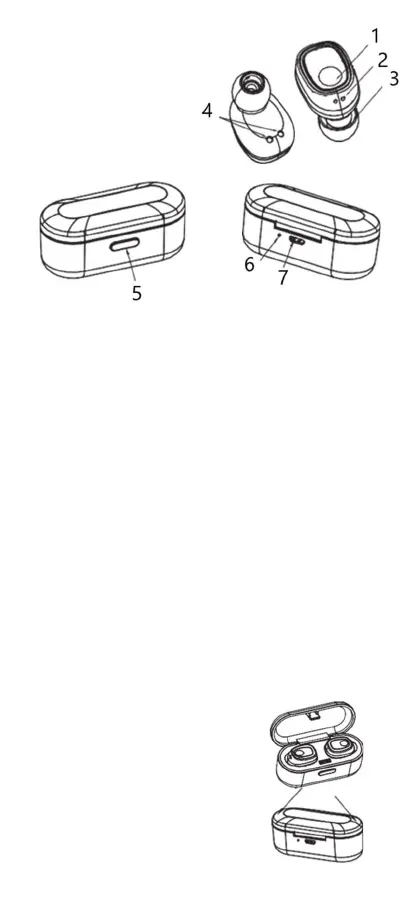
Device sketch
1 MFB (Multifunctionbutton)
2 Status-LED & Microfone
3 Speaker
4 Charging contact point
5 ON/OFF for charging-box
6 Charging indicator
7 Micro-USB charging port
Specifications
1 Pairing mode
The Status-LED of the right earbud blinks red and blue alternately,
when the headset is in pairing mode.
2 Standby-Mode after successful pairing
The Status-LED of the right earbud blinks blue every 5 seconds if the
headset is paired and not in use.
3 Call mode
The Status-LED of the right earbud blinks red every 5 seconds when
making a call.
4 Charging mode Headset
The charging indicator of the right earbud will glow red when the
device is beeing charged. When charging is complete it will turn off
automatically.
5 Charging mode charging-box
The charging indicator will glow red when the Charging-box is beeing
charged.When charging is complete it will turn off automatically.
6 Power ON
The Status-LED blinks blue 3 times after the headset is turned on.
7 Power OFF
After turning off the headset by putting it in the charging-box the
Status-LED blinks red 3 times. After turning off the headset by the
MFB it will blink red 4 times.
Charging the Headsets
Place the headset in the charging-box
and close it tightly.
The charging indicator of the charging-box
will glow red during charging. It will turn off
after the headset is fully charged.


 To Next Page
 Loading...