Page 56 Image Server 2000 Owner’s Manual
The Playlist view
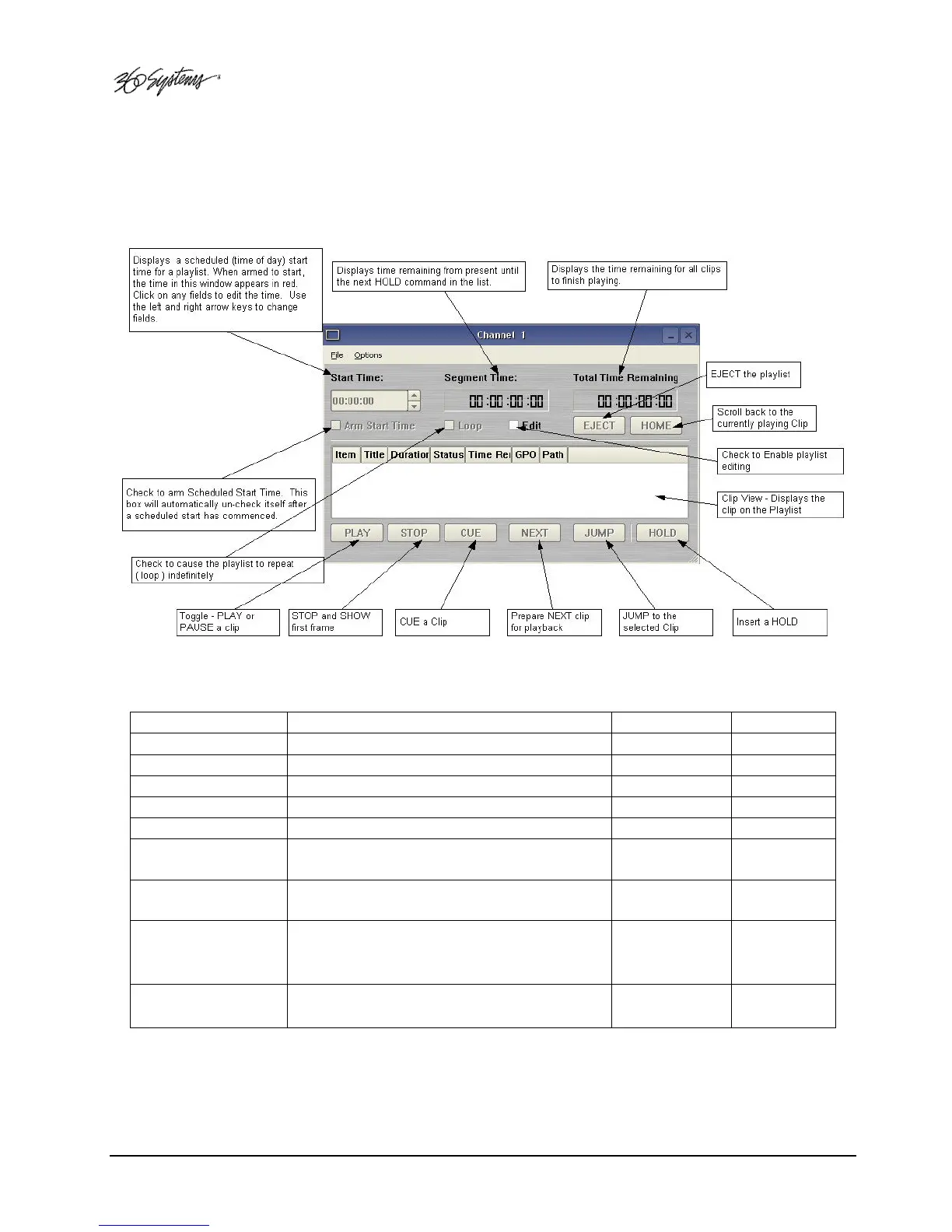
The Playlist View for channel 1 is shown in Figure 18. Its functions are briefly described here. Table
1 provides an overview of Playlist control functions and their associated hot-keys.
Figure 18 - Channel 1 Playlist View
FUNCTION DESCRIPTION / REFERENCE INVOKE HOT-KEY
PLAY/ PAUSE
Play / Pause a clip ( Page 41, 59 ) PLAY Button P or SPACE
STOP/ SHOW
Stop / Show First Frame ( Page 58 ) STOP Button S
CUE
Cue a clip ( Page 59 ) CUE Button C
NEXT
Prepare next clip for playback ( Page 59 ) NEXT Button N
JUMP
Jump to the selected clip ( Page 59 ) JUMP Button J
LOOP
Check to loop a Playlist ( Page 59 ) LOOP
Checkbox
L
EDIT
Check to enable editing ( Page 61 ) EDIT
Checkbox
E
ARM START TIME
Enable Scheduled Start Time ( Page 58 ) ARM START
TIME
Checkbox
T
HOME
Scroll to currently playing Clip ( Page 59 )
HOME
Button
H
Table 1 - Playlist Control Functions


 To Next Page
 Loading...