10
Specifications
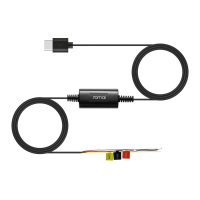
Product: 70mai Hardwire Kit
Model: Midrive UP03
Input: DC 12 ~ 30V
Output: DC 5V
=
2.4A
User guide
The user guide contains a detailed description of the product's
functions. Please read the user guide carefully before using
this product to prevent losses due to incorrect use.
Scan the QR code for the user guide.
Negative car power outlet: GND(-)
Positive car power outlet: VCC(+)
Car power: ACC
Low voltage protection: 11.8V
Packing list
1. 70mai Hardwire Kit × 1 2. User manual × 1
Troubleshooting
1. The hardwire kit is not powering the mian device.
•
Make sure the selected regular electric fuse has an output voltage of
12-30V.
•
Make sure that the hardwire kit cables are well connected with the
correct fuses.
•
If it still doesn't power the main device, try to identify other usable
fuses and connect them, referring to Step 2 in Installation chapter.
2. The main device is constantly rebooing.
Make sure that the black cable of the hardwire kit is securely bolted to a
good metal ground connection.
3. The main device couldn't enter parking surveillance mode.
•
Make sure the parking surveillance function is enabled in the main
device or the 70mai app (when the main device is connected to the


 To Next Page
 Loading...