Components and Instruction
Transmitter(TX)
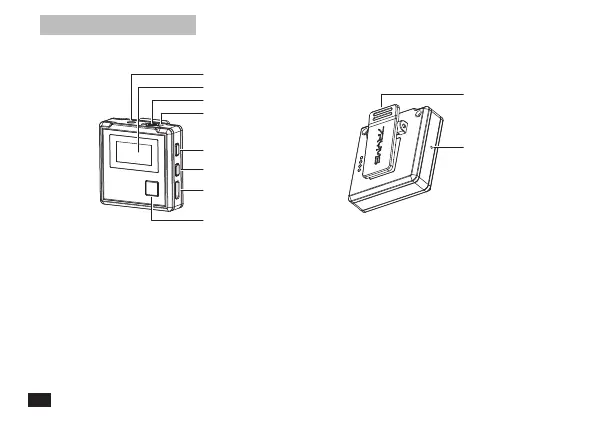
Components:
Function Introduction:
3.5mm TRS Port of External Mic
Belt Clip
Display Screen
Internal Mic
Locking Buckle of Wind Mu
Power Button
Muting Button
Pair Button
USB-C Charging Port
Reset Hole
1. 3.5mm TRS Port of External Mic: Insert the 3.5mm TRS Mic Audio Input Cable, and you can use the
external lavalier microphone for recording. At this time, the internal microphone of the device is turned
o automatically
2. Power Button: Long press for On/O
3. Muting Button: Long press to switch between normal recording and mute
4. Pair Button: Long press for pairing with the receiver
5. USB-C Charging Port: Connect the transmitter with the power through 3 in 1 charging/output cable to
charge
6. Reset Hole: If there is an abnormal phenomenon such as the device is crash or unable to turn on,
insert the reset pin into the reset hole to reset it
4


 To Next Page