EasyManua.ls Logo

80TAPE LIMBO III-COMPACT - User Manual

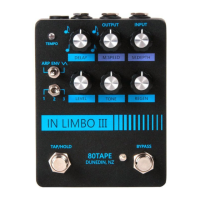
80TAPE LIMBO III-COMPACT
3 pages
Print Icon
To Next Page IconTo Next Page
Loading...
IN LIMBO III - COMPACT MANUAL
80TAPE FX
Dunedin, New Zealand
email: jonny@80tape.com
Congure for Ext. Tap OR Expression mode:
1) Power the unit o then congure the internal dip
switches as shown below for the appropriate settings. The
bottom case needs to be opened and with a small
screwdriver push the white knobs into position.
2) Now hold the tap tempo button, wait a couple of
settings then turn the M.Speed control to the appropriate
setting. Release the tap tempo button and the setting will
be saved.
Make sure both steps have been completed.
M.SPEED
Ext. tap
mode
Expression/
CV mode
ON DIP
1 2 3 4
For Expression/CV mode.
ON DIP
1 2 3 4
For Ext tap mode.
Setting the regen swell amount:
Hold the tap tempo and then turn the Regen control to the desired position (hint - play a note to see how it
currently sounds). Once at the desired position release the tap tempo and the setting will be saved.
To test, Dial the Regen control back a little and then hold the tap tempo button again. Automatically the Regen
control is transitioned to the saved setting, once the tap is released it will return to normal. The transistion takes
about 500ms to ramp up.
POWER SUPPLY NOTES:
Voltage: 9V DC (negative tip - standard Boss style 2.1mm connector)
Typical current draw: 120mA (recommended 200mA power supply)
CV Input range: 0 to +5V
EXT tap: Active LOW (Expects to be pulled to GND)
Where possible avoid daisy chaining this unit to avoid interfernce.
Changing subdivision:
Hold the tap tempo switch for one second then turn
the DELAY control a quarter turn in any direction.
Next, move the dial to the desired subdivision as
shown on the right release the tap tempo button
when in place to set. The setting will be saved and
recalled for next use.
DELAY
3
1
Question and Answer IconNeed help?

Do you have a question about the 80TAPE LIMBO III-COMPACT and is the answer not in the manual?

Overview

The IN LIMBO III - COMPACT MANUAL describes a device called the "80TAPE FX," a compact effects unit manufactured in Dunedin, New Zealand. The primary function of this device appears to be a delay effect with advanced modulation and pitch-shifting capabilities, including tap tempo, subdivision changes, expression pedal control, and an experimental "ARP Mode."

Technical Specifications

  • Voltage: 9V DC (negative tip, standard Boss style 2.1mm connector).
  • Current Draw: 120mA (recommended 200mA power supply).
  • CV Input Range: 0 to +5V.
  • EXT Tap: Active LOW (expects to be pulled to GND).
  • Power Supply Note: Users are advised to avoid daisy-chaining this unit to prevent interference.

Usage Features

The 80TAPE FX offers a range of customizable features:

Changing Subdivision

To change the delay subdivision:

  1. Hold the tap tempo switch for one second.
  2. Turn the DELAY control a quarter turn in any direction.
  3. Move the DELAY dial to the desired subdivision, as indicated by the diagram showing positions 1, 2, and 3 around the dial.
  4. Release the tap tempo button to set the subdivision. The setting will be saved and recalled for future use.

Configuring for External Tap or Expression Mode

The unit can be configured for either external tap tempo or expression pedal/CV control:

  1. Power off the unit.
  2. Open the bottom case and configure the internal DIP switches according to the diagrams provided. For Expression/CV mode, DIP switches 1, 2, 3, and 4 should all be in the "ON" position (up). For Ext tap mode, DIP switches 1, 2, 3, and 4 should all be in the "OFF" position (down). Use a small screwdriver to push the white knobs into position.
  3. Power on the unit.
  4. Hold the tap tempo button.
  5. Wait for a couple of settings to pass, then turn the M.SPEED control to the appropriate setting.
  6. Release the tap tempo button. The setting will be saved.
    • Important: Both steps (DIP switch configuration and M.SPEED setting) must be completed.

Setting the Regen Swell Amount

To adjust the amount of "regen swell":

  1. Hold the tap tempo button.
  2. Turn the REGEN control to the desired position. It's recommended to play a note to hear the effect in real-time.
  3. Release the tap tempo button to save the setting.

To test this setting:

  1. Dial the REGEN control back a little.
  2. Hold the tap tempo button again. The REGEN control will automatically transition to the saved setting.
  3. Release the tap tempo button to return to normal. The transition takes approximately 500ms to ramp up.

Setting the Expression Mode

To configure the expression pedal/CV mode:

  1. Hold the tap tempo switch for one second.
  2. Turn the M.DEPTH control a quarter turn in any direction.
  3. Move the M.DEPTH dial to the desired mode, as shown in the diagram (M.Depth, M.Speed, Delay Time, Regen, Direct Control Modulation).
  4. Release the tap tempo button to set the mode.
    • Hint: There are no guides, so selecting the correct mode might require a few attempts. Aim for the center solid line to ensure the correct setting is selected.

ARP Mode

In ARP mode, the M.DEPTH control, in conjunction with the mode number switch, selects the pitch shift setting. This mode is synced to the tempo, allowing either the tap tempo or manual delay time control to govern its frequency. The M.SPEED control acts as a tempo multiplier (4x, 3x, 2x, 1x tempo speed in clockwise quarter turns). Mode 3 is unique, triggering with the tap tempo button.

ARP Mode Explained: ARP mode is an experimental modulation mode where repeats are pitch-shifted by an LFO. The delay time automates to achieve the desired pitch shift. For example, if the delay time is set to 500ms and "octave up" mode is selected, the delay time will alternate between 500ms and 250ms. When the delay time shifts to 250ms, audio recorded at 500ms plays back twice as fast, resulting in an octave up. When the delay shifts back to 500ms, the audio will come out as an octave down. The modulation depth control selects the pitch shift, while the modulation speed adjusts the frequency of these shifts. This is all synced to the tap tempo, and the delay setting determines the base delay time.

Modulation Settings

The device offers various modulation types:

  • LFO (Low-Frequency Oscillator): Modulates between Sine Wave, Sawtooth, and Square Wave.
      1. SINE WAVE
      1. SAWTOOTH
      1. SQUARE WAVE
  • ENV (Envelope): Changes modulation based on an envelope. M.SPEED sets the attack response.
      1. HEAVY ENVELOPE
      1. NORMAL
      1. NORMAL INVERTED
  • ARP (Arpeggiator): Pitch shifts repeats.
      1. A: Octave down B: Octave up C: 5th up D: 5th down
      1. A: Special down B: Special up C: 2 Octaves down D: 2 Octaves up
      1. MODE1 but with manual trigger via tap tempo

Maintenance Features

Low Noise

All analog delays inherently exhibit noise at longer delay times. To reduce noise:

  • Tone Control: Avoid setting the tone control higher than 12 O'Clock. Lowering the tone control improves the signal-to-noise ratio (S/N).
  • Headroom: Utilize as much headroom as possible. Avoid sending signals less than unity gain, unless using very hot pickups.
  • Input Signals: Brighter input signals generally result in a better S/N. Users can always filter on the amplifier side if needed.

80TAPE LIMBO III-COMPACT Specifications

General IconGeneral
Brand80TAPE
ModelLIMBO III-COMPACT
CategoryRecording Equipment
LanguageEnglish