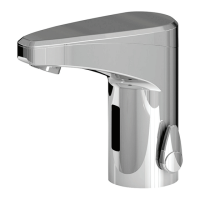
74.107.AC15 5
electronic functions - washbasin faucet with touch-function
signs and symbols
- touch function - hand/object within sensor area
- water fl ows - LED fl ashes GREEN
- waterfl ow stops - LED fl ashes RED
h - hours / min. - minutes / sec. - seconds
function procedure
feedback
signal
information default
setting
range
via iqua-
Touch
fi rst startup
after installation
-. -
1x min. 3 sec. till
remove hand/object from sensor area
wait
+ 2x/sec., keep out of sensor area
wait till
1x
confi rmation, ready for operation
temporary off
«cleaning mode»
activate
1x app. 2 sec. till
1x
extended function mode is active
2 min. -
2x a app. 0,5 sec.
pulsing during active function
temporary off
stop
1x app. 2 sec.
1x
manual stop
or automatic
1x
automatic after preset time
continous run
activate
1x app. 2 sec. till
1x
extended function mode is active
2 min.
0,5-20 min.
(in 0,5 min.
steps)
1x minimum 3 sec.
(max. 5 sec.)
water fl ows after releasing
continous run
stop
1x app. 2 sec.
manual stop
or automatic
automatic after preset time
follow up
time control
for normal
operation
set / programm
1x app. 2 sec. till
1x
extended function mode is active
1 sec.
0-10
sec.
1x app. 5 sec. till
1x
1x 0 - 10 sec.
keep touched
+
1x/sec., water fl ows during touching -
releasing defi nes duration
after releasing
1x
confi rmation, ready for operation
time of waterfl ow
for continous on
and
purge duration for
line purge feature
set / programm
1x app. 2 sec. till
1x
extended function mode is active
2 min.
0,5-20
min.
(in 0,5 min.
steps)
1x minimum 3 sec.
(max. 5 sec.)
+
touch max. 5 sec., water fl ows after releasing,
number of
(1x-40x) shows current setting
1x keep touched till
1x - 40x
1x =0,5 min. .... 40x = 20,0 min.
releasing defi nes duration
after releasing
+ 1x
check / confi rmation of setting by repeating
number of
(1x - 40x) according to setting
line purge feature
activate / deactivate
«automatic fl ush on
set intervall»
1x app. 2 sec. till
1x
extended function mode is active
off
off
12 h
24 h
48 h
1x app. 25 sec. till
1x - 4x
1x= off , 2x=12h, 3x= 24h, 4x= 48h
ignore fl ashes after 5 sec. and 10 sec. - keep
touched till
1x - 4x aftter app. 25 sec.,
releasing defi nes interval
wait till
1x
confi rmation, ready for operation
restart electronics
1x app. 2 sec. till
1x
extended function mode is active
--
2x a app. 0,5 sec.
pulsing during active function
1x app. 5 sec. till
4x 1x/sec.
release and wait till
+ 1x/sec., keep out of sensor area
wait till
1x
confi rmation, ready for operation
sensor range
set / programm
1x app. 2 sec. till
1x
extended function mode is active
6 1-8 steps
2x a app. 0,5 sec.
pulsing
1x app. 15 sec. till
1x - 8x
1x = min. ...... 8x = max.
ignore fl ashes 4x after 5 sec., keep touched
till
1x - 8x after app. 15 sec., releasing
defi nes sensor range step
release and wait till
+ 1x/sec., keep out of sensor area
wait till
1x
confi rmation, ready for operation
security off
permanent
when without movement only
--
empty battery
2x/sec. during dedecting hand / object
--
touch
XXX
XXX
XXX
XXX


 To Next Page
 Loading...