Chapter 5 Managing Your Test Results
5.1 Flagging Test Results
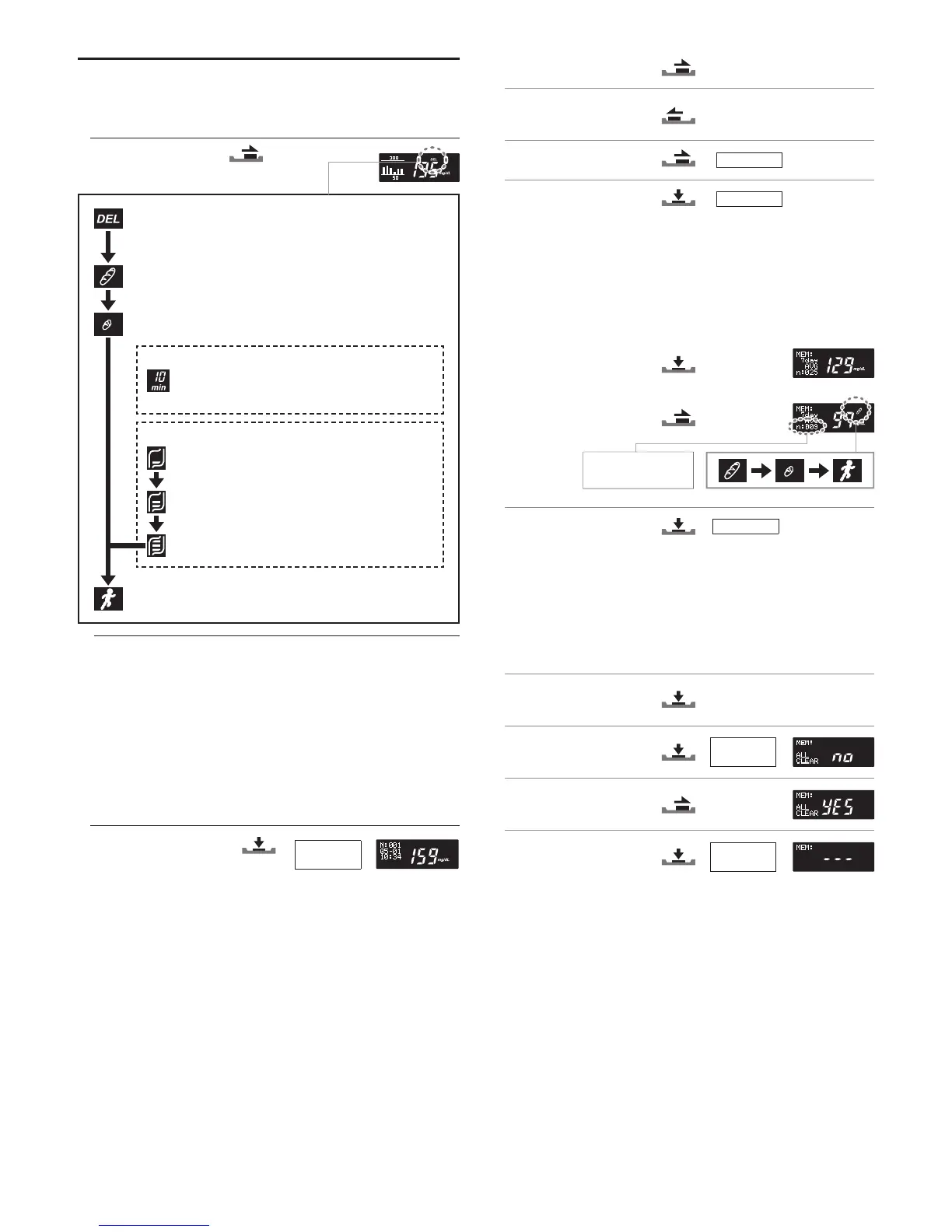
Flags help you categorize and identify results.
1. Leave the test strip in the meter after the test result appears on the screen.
2. Select the ag you want.
Delete ag
For inaccurate results. Not part of your result averages. The
delete ag can be attached only after testing.
Before-meal ag
For results obtained before eating
After-meal ag
For results obtained after eating
Clock counter
If the clock counter setting is on, the elapsed
time appears on the right of the after-meal
ag. See chapter 6.2.
Meal amount ag
When the meal amount setting is on, the meal
amount ag appears below the after-meal ag.
Select the amount of food you ate from the 3
levels shown on the left.
After-exercise ag
For results obtained after exercise
3. Slide the test strip disposal lever to eject the test strip. The meter turns itself
off.
5.2 Reviewing Past Results
You can review past results stored in the memory. Your meter stores up to 500
test results. New results beyond the 500th overwrite previously stored results in
the order of oldest rst.
1. Make sure the meter is off.
2. Turn on the meter.
The most recent test result
appears on the screen.
The 3-digit number following “M:” is the order in which test results are stored,
with the most recent result rst. The screen also shows the date and time
when the test was done.
50%
80%
Full
Hold for
2 seconds
3. View the test result you want.
To go to the next result:
To go back to the previous
result:
To scroll through results:
4. To turn off the meter:
5.3 Viewing Result Averages
You can view result averages for the set interval (7, 14, 30 or 90 days).
1. See steps 1 and 2 in chapter 5.2.
2. View the averages of your
glucose test results.
3. To view the averages with a
ag:
4. To turn off the meter:
Twice
5.4 Deleting All Test Results from the Memory
You can delete all test results from the memory. Remember that results cannot
be retrieved once deleted.
1. See steps 1 and 2 in chapter 5.2.
2. Go to the “AVG (average)”
screen.
3. Go to the “ALL CLEAR”
screen.
4. Select “YES”.
5. Delete the test results from the
memory.
The meter then turns itself off.
Hold
Twice
The number of tests
included in the calculation
of the result average.
Hold for
5 seconds
Hold for
2 seconds


 To Next Page
 Loading...