Home
A4 Tech.
Mouse
BT-630
Page 10
A4 Tech. BT-630 - Page 10
20 pages
Manual
Save Page as PDF
To Next Page
To Next Page
To Previous Page
To Previous Page
Loading...
—
9 —
Step
3
:
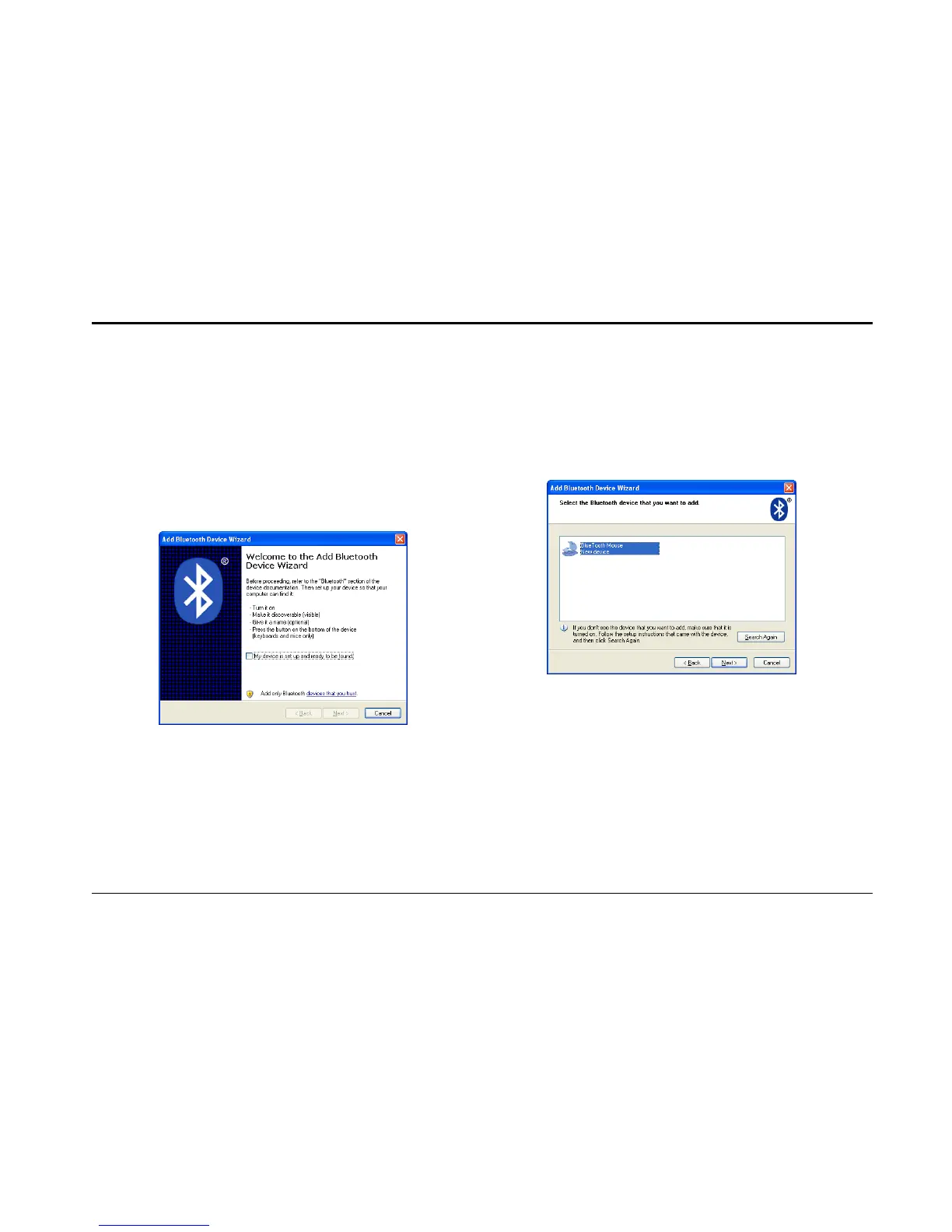
Turn
on
t
he
mouse
and
press
t
he
connection
button
at
the
bottom
of
mouse
until
the
LE
D
Indi
cator
i
n
t
he
middle
wheel
blinks
a
lternatel
y
in
Re
d
a
nd
Green.
In
the
Add
Bluetooth
De
vice
Wizard
,
select
the
My
de
vice
is
set
up
and
ready
to
be
found
check
box,
and
then
click
Next
.
Step 4
:
After th
e devic
e names appea
r,click
Bluetooth
Mouse
,
and then cli
ck
Next
.
9
11
Related product manuals
A4 Tech. X-710
14 pages
A4 Tech. G7-300
7 pages



 To Next Page