Chapter 2 - The A-Minima Control Panel
15
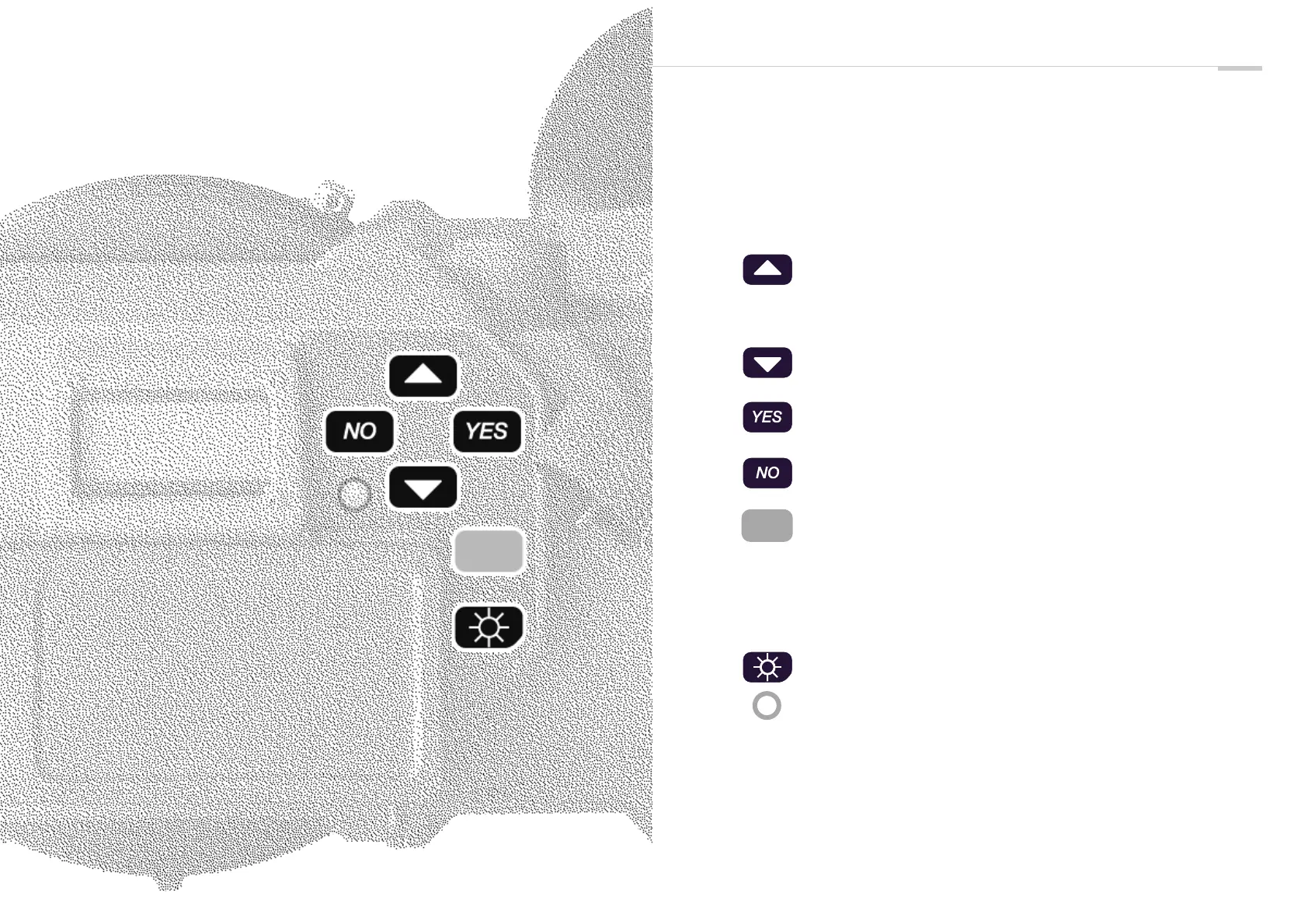
A-Minima control panel
The A-Minima control panel consist of an illuminated LCD display,
six buttons to access and adjust all operator functions, and a camera
status LED. Each buttons can have a different function, depending
on the mode you are in.
• Inches the camera by frame when you are in the camera
default display.
• Allows you to select or change the camera parameters within
a menu.
• Allows you to view, access and change the camera
parameters.
• Allows you to enter a selected menu, to change or validate a
parameter within a particular menu.
• Allows you to cancel a parameter or move a step backward
while setting a parameter.
• Wakes up the camera ( if left alone, the camera display will
automaticaly shut off after 5 minutes. Needless to say that
every settings are being kept in the camera internal memory)
• Shows battery voltage.
• Powers down the camera electronics.
• allows you to return to the camera default mode at any time
• exit the "TV SYNC" and INTERVALLOMETER" mode.
Press on it to view the theorical lens aperture.
This LED conveys camera status information.
• Yellow flashing: timecode has been initialized.
• Slow red flashing: low battery.
• Fast red blinking: camera not running at the selected speed
• Solid red: end of film warning


 To Next Page
 Loading...