Ordered default configurations are not locked. The user can use any of
the available default configurations for a particular product type as a
base to create an own configuration. The only requirement is that all
needed hardware and software options are available.
It is possible to give the inserted IED in the plant structure a user
defined name. Be sure to only user characters a-z, A-Z, 0-9 and _. Do
not use space character in IED names.
4.7.1 Setting IED IP address in the project
There are two alternatives to set IP address of the IED object in PCM600. The IED
object in PCM600 must have the same IP address and subnetwork mask as the front
or rear port on the physical IED to which the PC is connected. The IP address of the
physical IEDs front and rear port can not be set from PCM600 but only from LHMI.
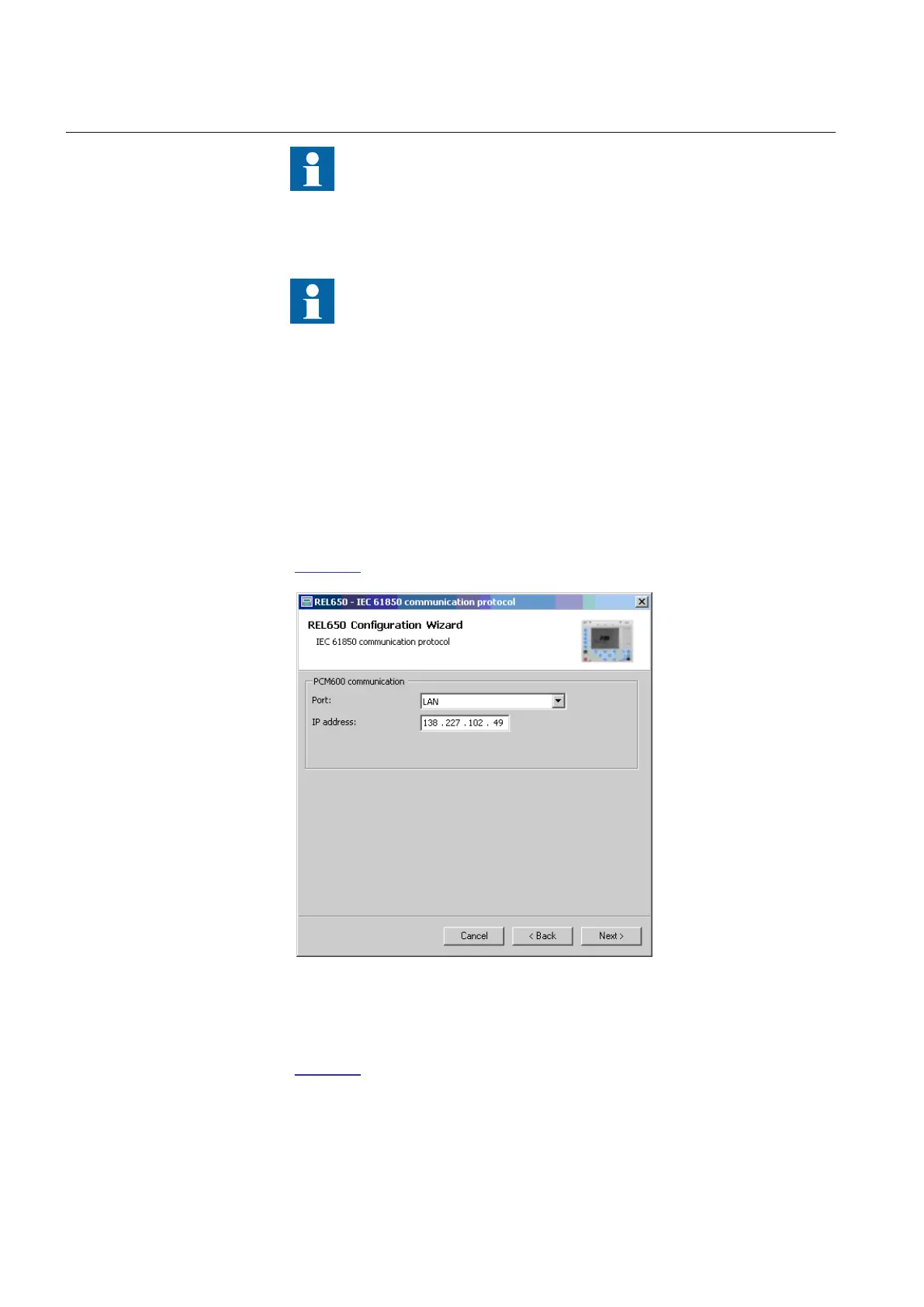
• Via the first window of the wizard when including a new IED in a project, see
Figure 30.
IEC09000662 V1 EN
Figure 30: Alternative 1: IP address via first Wizard window
• Via the IP address property of the IED in the Object Properties window, see
Figure 31.
Section 4 1MRK 511 284-UEN A
Setting up a project
46 650 series
Engineering manual


 To Next Page
 Loading...