
 Need help?
Do you have a question about the ABRRU EL014 and is the answer not in the manual?
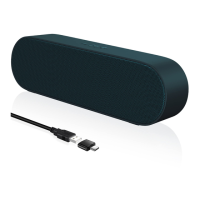
Connect the USB cable to your desktop/PC's USB port for power and audio source. If no sound, proceed to troubleshooting.
Connect the USB cable to the laptop's USB port. Use a USB-C adapter if your laptop has only Type-C ports.
Connect your pad, speaker, and USB-C together. Works with Type-C port devices. Some need OTG enabled.
Check USB interface, audio driver, mute status, and select 'Speaker(AudioUSB2.0)' as playback device.
If issues persist after checks, contact customer service for assistance and resolution.
Plug into USB port, click 'Speaker' icon, expand 'Select playback device', and choose 'USB2.0 Device'.
Contact support via email for damaged, unsatisfactory, or non-working products within 24 hours.
Offers a 60-day full refund and a 6-month warranty for replacement or repair.

 To Next Page
 General