19
Les captures d’écran et les icônes présentées sont issues de l’application iOS.
Les textes, l’agencement et le fonctionnement des appareils Android peuvent varier légèrement.
The screenshots and icons shown here are from the iOS app.
There may be some deviations in the labels, design or functionality when using Android devices.
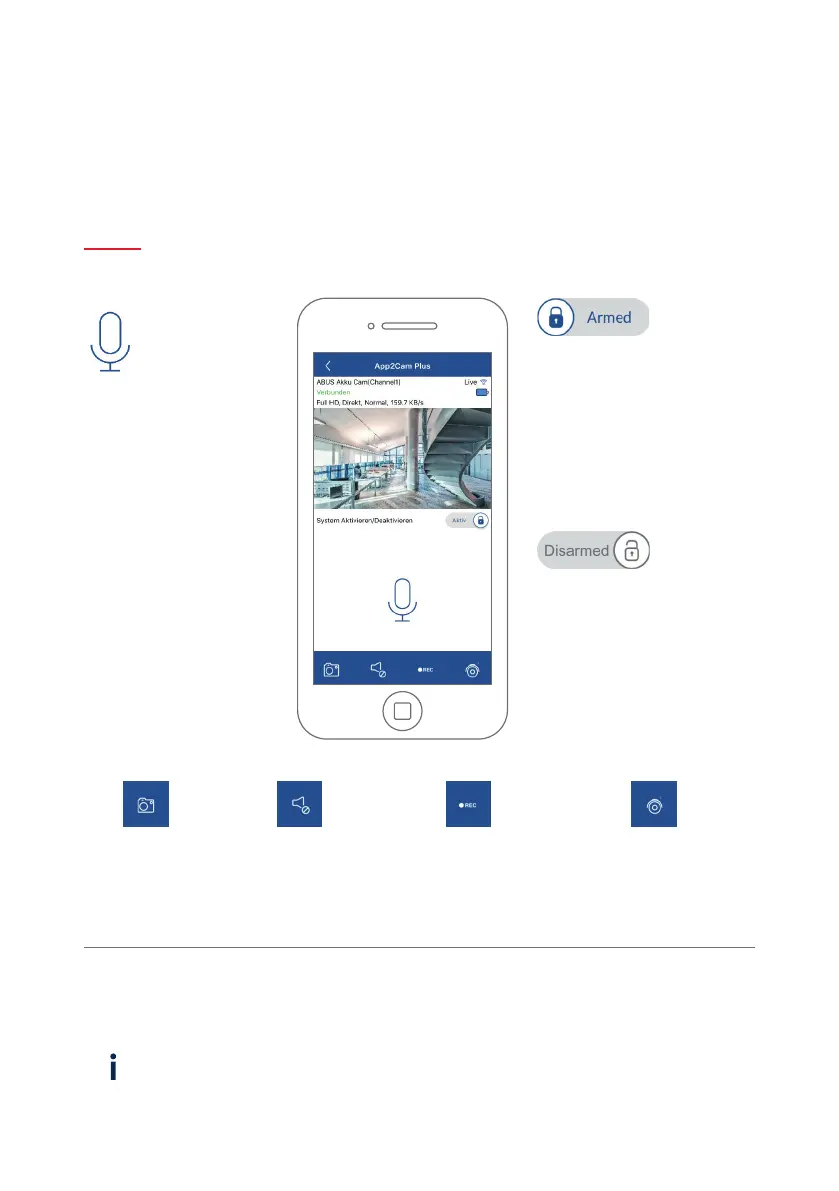
L’alarme est active
La caméra enregistre dès qu’un
mouvement est détecté et envoie
une noti cation (push ou e-mail).
Alarm is active
The camera records when motion
is detected and sends noti cations
(push or e-mail).
L’alarme est désactivée
La caméra a che une image
en direct, mais n’e ectue
aucune action lorsqu’un
mouvement est détecté.
Alarm is deactivated
The camera displays a live view
but does not carry out any other
actions when motion is detected.
Interphone
Vous pouvez utiliser le
microphone du terminal
mobile pour communiquer
avec la caméra. Maintenez
le symbole appuyé a n
d’activer l’interphone.
Latransmission est
désactivée dès que vous
relâchez le symbole.
Intercom function
You can use the microphone
of the mobile end device to
communicate through the
camera intercom. Press and
hold the symbol in order
to activate the intercom
function. The transmission
is deactivated as soon as
you release the symbol.
Créer une
capture d’écran
Create a
screenshot
Activer/ Désactiver
la sortie audio
Enable/disable
audio output
Démarrer
l’enregistrement manuel
Start manual recording
Commutation entre la
caméra 1 et la caméra 2
Switch between camera
1 and camera 2
Les fonctions de App2Cam Plus avec a ichage en direct
Functions of the App2Cam Plus live view
FONCTIONS APP2CAM PLUS
APP2CAM PLUS FUNCTIONS



 To Next Page