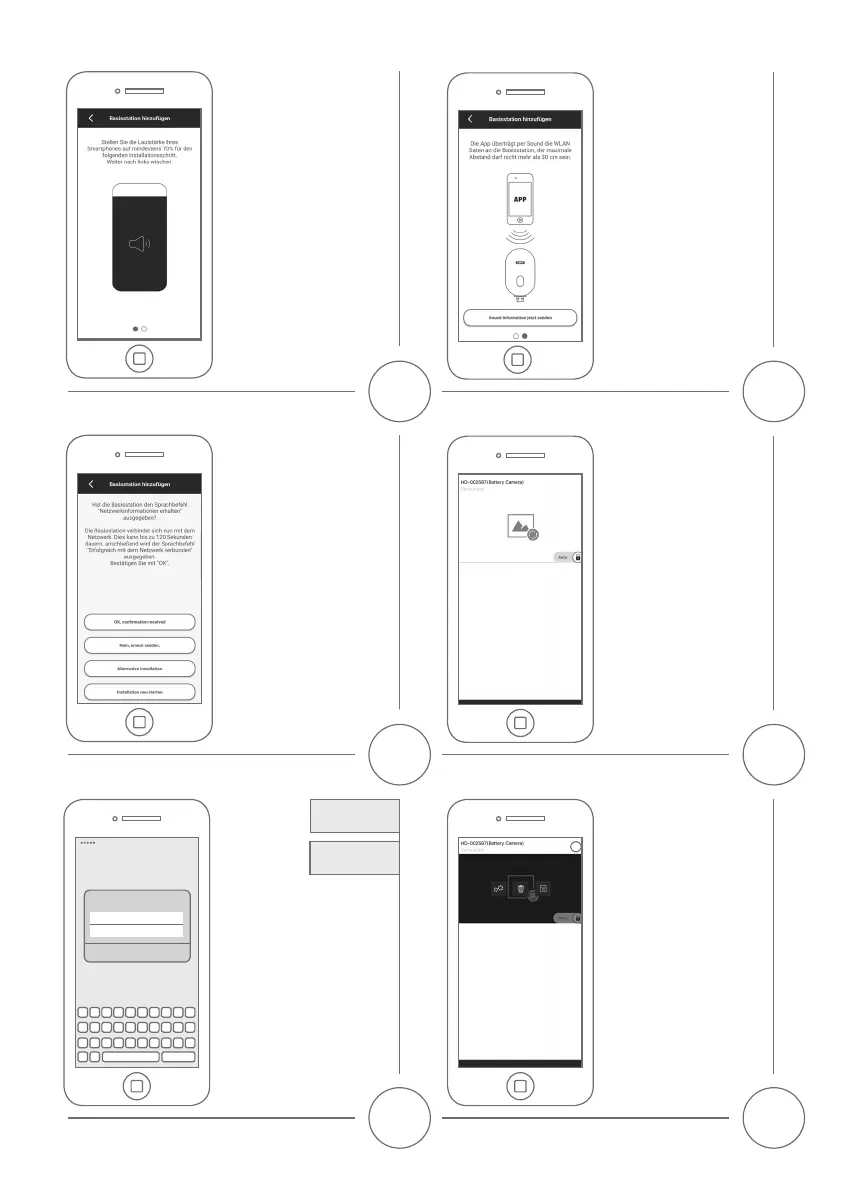
Die App überträgt per Sound die
WLAN Daten an die Basisstation,
der maximale Abstand darf
nicht mehr als 30 cm sein.
Drücken Sie auf „Jetzt Sound
Information senden“
The App transfers the WiFi data
via sound to the Base station,
the maximum distance should
not exceed 30 cm. Click on
„Send sound information now”
Die Basisstation gibt den Sprachbefehl
„Netzwerkinformationen erhalten“
aus. Um den Sound erneut zu über-
tragen, klicken sie auf „Erneut
senden“. Bei erfolgreicher Über-
tragung, ist die Basisstation eingelernt
und startet neu, dies kann bis zu
120 Sekunden dauern. Falls die
Sound-Übertragung nicht erfolgreich
war, können Sie auch die Alternative
Installation nutzen.
Thebasestationplaybacksthevoice
command „network information
received“. To send the sound again,
please press “No, re-send”. If the
conrmationisreceived,thebase
station is connected now and will
restart. This can take up to 120.
Please use the alternative Installation
if the sound transmission was not
successful.
Stellen Sie die Lautstärke ihres
Smartphones auf mindestens
70% für den folgenden Installa-
tionsschritt. Weiter nach links
wischen.
Pleaseturnonthesoundofyour
smartphone to at least 70%, for
the following Setup step. Swipe
letocontinue.
13
15
17
12
14
16
Klicken Sie nun auf das
Kamerabild in der Übersicht
um das Livebild zu starten.
Please press on the camera
picture to enter the live view.
Sicherheitscode
ändern
Change
SecurityCode
Bei der Erstinstallation muss der
Sicherheitscode geändert werden. Die
erneute Verwendung des Standard
Sicherheitscodes „123456“ ist nicht
möglich. Es wird empfohlen eine
Kombination aus Zahlen sowie Klein-
und Großbuchstaben zu verwenden.
Die Verwendung von Umlauten und
Sonderzeichen ist nicht möglich.
Intherstinstallationyouwill
needtochangethesecuritycode.
You will not be allowed to enter the
standardsecuritycode‚123456‘asyour
new code. We recommend using a
combination of numbers and letters
in lower and uppercase. The use of
special characters is not supported.
Conrm
Sicherheitscode ändern
•••••••
•••••••
Um weitere Einstellungen an
der Basisstation und der Kamera
vorzunehmen, klicken Sie auf
dasEinstellungssymbolunten
und im Anschluss auf das
Einstellungsicon im Kamerabild.
For further settings of the base
station and of the camera, please
pressthesettingssymbolinthe
bottom and the settings icon of
the camera picture.


 To Next Page
 Loading...