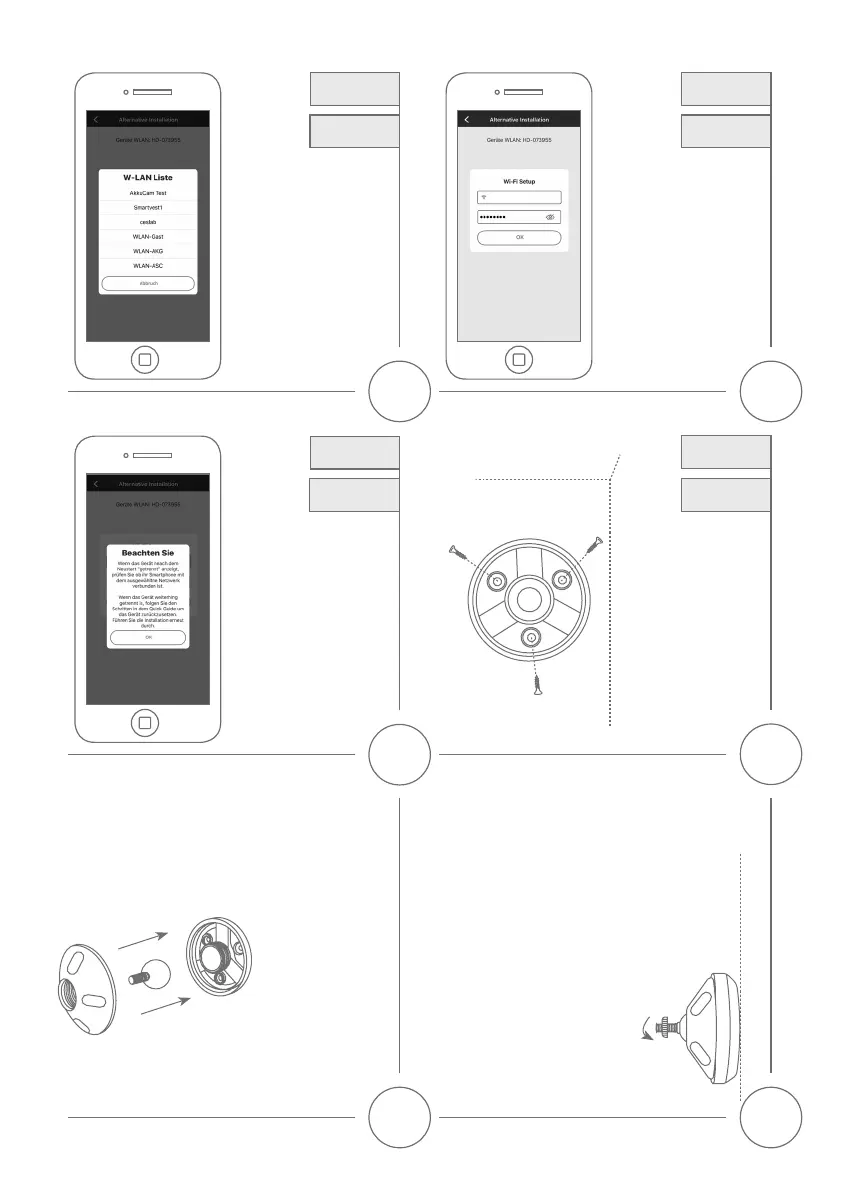
Schrauben Sie den Fixierring auf das Gewinde.
Pleasescrewthexingringontothethread.
29
Bohren Sie anhand der Bohr-
schablone die Löcher vor
und schrauben Sie mithilfe
des Montagematerials die
Bodenplatte fest.
Drill holes into the wall with
the drilling templates and
mont the base plate with
the mounting material to
the wall.
27
Camera
Mounting
Kamera
Montage
Setzen SIe das Kugel-
gelenk ein und schrauben
Sie die Abdeckung auf, bitte
ziehen Sie diese nicht
fest um im Anschluss die
Kamera auszurichten.
Pleaseputhteballjoint
inside and screw the top
coveron.Pleasedonotx
it , so that the camera can
be aligned.
28
24 25
26
Alternative
Installation
Alternative
Installation
Alternative
Installation
Alternative
Installation
Alternative
Installation
Alternative
Installation
Wählen Sie aus der Liste der
WLAN-Netzwerke das WLAN Ihres
Heim-Netzwerkes aus.
SelecttheWi-Fiofyourhome
network from the list of Wi-Fi
networks.
Geben Sie das Passwort des
WLAN Ihres Heim-Netzwerkes
ein. Drücken Sie „OK“, um die
Verbindung herzustellen. Die
Kamera verbindet sich nun mit
dem Netzwerk, dies kann bis zu
120 Sekunden dauern.
The base station will now connect
to the network. This can take up
to 120 seconds.
Falls das Gerät nach dem
Neustart „getrennt“ anzeigt,
prüfen Sie ob ihr Smartphone
mit dem Netzwerk verbunden
ist, falls das Gerät weiterhin
„getrennt“ anzeigt, setzen Sie die
Basisstation zurück und führen
Sie die Installation erneut durch.
Ifthedevicedisplays
„disconnected“aerthereboot,
checkifyourphoneisconnected
to the network, if the device still
displays„disconnected“,reset
the base station and start the
installation again.
Home


 To Next Page