The Acconeer XC112-XR112 Radar Sensor Evaluation Kit (EVK) is a comprehensive solution designed for exploring and evaluating radar sensor technology. This kit provides the necessary hardware and software components to set up, configure, and interact with Acconeer's radar sensors, enabling users to develop and test various applications. The kit is particularly useful for engineers, developers, and researchers interested in integrating radar sensing capabilities into their projects.
Function Description
The Acconeer XC112-XR112 EVK facilitates the evaluation of radar sensor performance and capabilities. It allows users to:
- Hardware Integration: Connect and assemble the radar sensor board (XR112) with a connector board (XC112) and a Raspberry Pi 3, forming a complete hardware setup.
- Software Installation: Install and configure the necessary operating system (Raspbian) and Acconeer's proprietary software (Acconeer SW) on the Raspberry Pi.
- Sensor Control and Data Acquisition: Interact with the radar sensor through the installed software to control its operation, acquire raw radar data, and process it for various applications.
- Application Development: Utilize the kit to develop and test custom applications that leverage radar sensing for tasks such as distance detection, presence sensing, motion tracking, and more.
- Remote Access: Configure the Raspberry Pi for remote access, allowing users to control and monitor the sensor setup from a PC without direct physical connection of a monitor, mouse, or keyboard.
- Data Visualization and Analysis: Employ the Acconeer Exploration Tool to visualize and analyze the data streamed from the radar sensor, aiding in understanding sensor behavior and application development.
Important Technical Specifications
The core components of the Acconeer XC112-XR112 EVK include:
- XC112 Connector Board: This board serves as an interface between the XR112 radar sensor and the Raspberry Pi. It provides the necessary electrical connections and potentially some signal conditioning.
- XR112 Radar Sensor Board: This is the actual radar sensor module responsible for emitting and receiving radar signals. Its specific technical parameters (e.g., frequency band, range, resolution) are inherent to the Acconeer XR112 sensor itself, which this kit evaluates.
- Raspberry Pi 3: A popular single-board computer that acts as the processing unit for the EVK. It runs the operating system and Acconeer's software, handling sensor control, data processing, and communication.
- Flex Cable: A crucial component for connecting the XR112 Radar Sensor Board to the XC112 Connector Board. The kit provides one flex cable per XR112.
- SD Card: Used to store the Raspbian operating system and Acconeer software for the Raspberry Pi.
- SD Card Holder: A physical adapter for the SD card.
- USB Keyboard and USB Mouse: Standard peripherals for initial setup and direct interaction with the Raspberry Pi. These can be disconnected once remote access is configured.
- Power Supply for Raspberry Pi: Essential for powering the Raspberry Pi. It is recommended to use the original Raspberry Pi power supply.
- Monitor with HDMI Cable: Used for initial setup and display output from the Raspberry Pi. Similar to the keyboard and mouse, it can be disconnected after remote access is established.
Usage Features
The Acconeer XC112-XR112 EVK offers several features that enhance its usability:
- Step-by-Step Installation Guide: The kit comes with a detailed guide covering both hardware assembly and software installation, making it accessible even for users new to radar evaluation kits.
- Comprehensive Software Suite: Includes Raspbian OS, Acconeer SW, Etcher for flashing SD cards, PuTTY for SSH connections, and WinSCP for file transfers, providing a complete environment for development.
- Remote Control Capabilities: After initial setup, the Raspberry Pi can be controlled remotely via SSH (using PuTTY) and files can be transferred using SCP (via WinSCP), eliminating the need for a dedicated monitor, keyboard, and mouse.
- Flexible Interface Options: The Raspbian configuration allows enabling various interfacing options like SSH, SPI, and I2C, providing flexibility for different communication and integration needs.
- Exploration Tool: A dedicated graphical user interface (GUI) tool developed by Acconeer for visualizing and interacting with the sensor data, simplifying the process of understanding sensor output and developing applications. This tool can be downloaded from GitHub and comes with its own installation guide and support.
- Example Applications: The Acconeer SW includes example applications, such as a distance detector and an envelope viewer, which demonstrate basic functionalities and serve as starting points for custom development.
- Community Support: The availability of the Exploration Tool on GitHub suggests potential for community contributions and support, which can be valuable for troubleshooting and sharing knowledge.
Maintenance Features
While the manual primarily focuses on installation and usage, some aspects touch upon maintenance:
- Software Updates: The guide emphasizes the importance of keeping the Raspberry Pi's operating system (Raspbian) and Acconeer software up to date by using
sudo apt-get update and sudo apt-get dist-upgrade commands. This ensures access to the latest features, bug fixes, and security patches.
- Network Connectivity: Maintaining a stable network connection (Wi-Fi or Ethernet) is crucial for software updates, remote access, and potentially for data streaming to a PC running the Exploration Tool.
- SD Card Management: Proper handling of the SD card, including correct formatting and flashing procedures using Etcher, is essential for the reliable operation of the Raspberry Pi. Users are advised to make sure the SD card is the selected destination during flashing.
- Configuration Management: The guide details steps for configuring Raspbian, such as setting localization options, time zone, and enabling interfacing options (SSH, SPI, I2C). These configurations should be maintained as per application requirements.
- Troubleshooting: The guide implicitly provides troubleshooting steps by detailing the correct installation process. For instance, if remote access fails, verifying network connectivity and SSH enablement would be initial steps. The warning prompt during PuTTY connection also guides users on how to handle security alerts.
- Hardware Care: Although not explicitly detailed, general best practices for electronic hardware apply, such as ensuring proper power supply, avoiding static discharge, and handling components carefully during assembly and disassembly. The instruction to disconnect mouse, keyboard, and monitor after remote setup also implies a cleaner, less cluttered setup, potentially reducing wear and tear on ports.
In summary, the Acconeer XC112-XR112 Radar Sensor Evaluation Kit is a robust and user-friendly platform designed to accelerate the development and evaluation of radar-based applications, offering a complete ecosystem from hardware assembly to software interaction and data visualization.

 Need help?
 General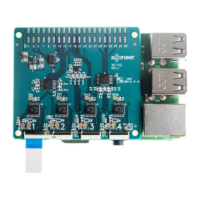

 To Next Page