•
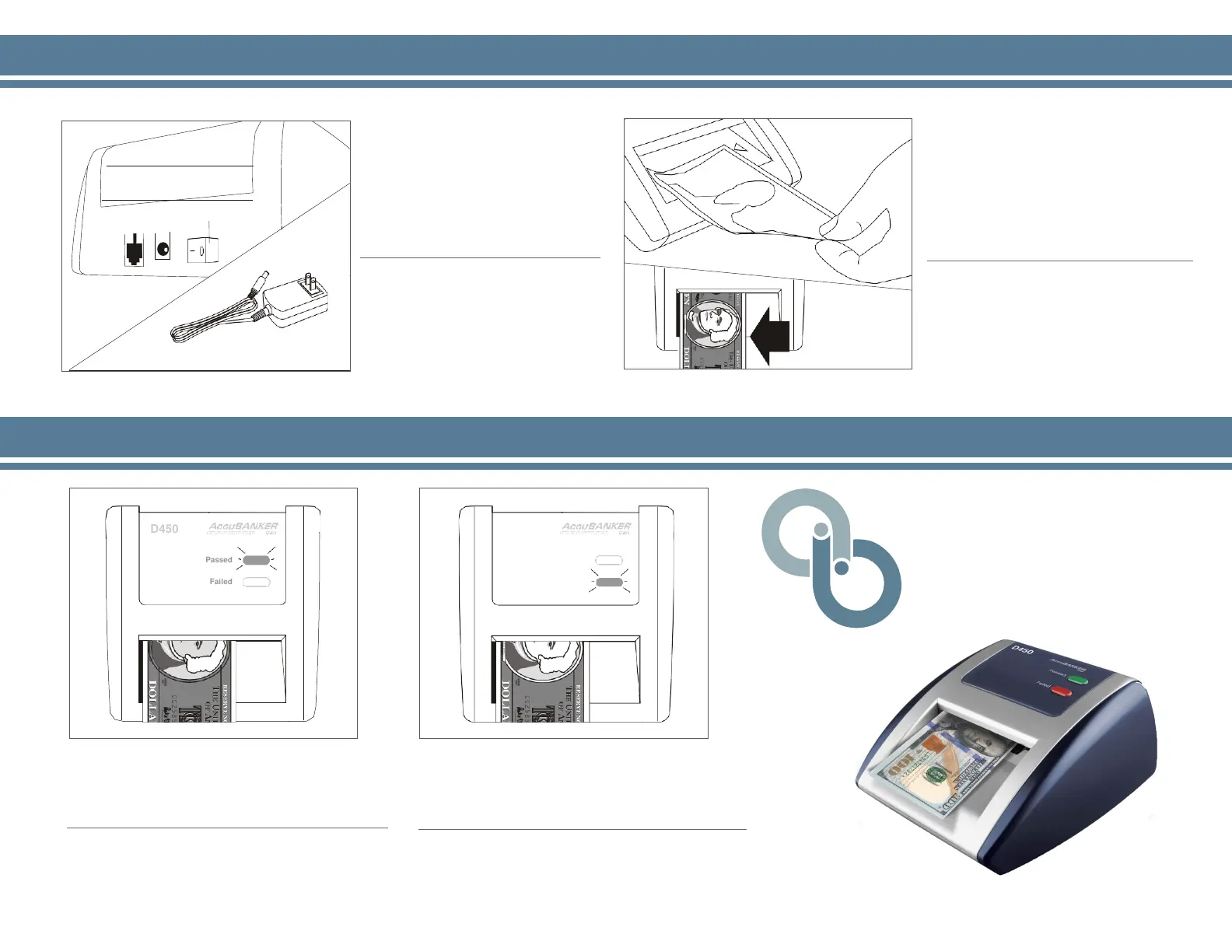
To power the detector, simply
plug in the included adaptor and
position the power switch to ON.
Conecte el adaptador de
corriente y proceda a encender
el detector.
•
To test a bill, insert it face up, and
well aligned towards the left. Once
the bill has been inserted, it will be
tested automatically.
Inserte el billete como se indica en la
figura (cara hacia arriba y alineado
hacia la izquierda). El billete será
verificado de forma automática.
D450
Bleached Bill Detector
•
A GREEN light and a single BEEP will
confirm that the bill PASSED the
detection test.
Los billetes ACEPTADOS por el detector
serán confirmados con el indicador VERDE
y un solo aviso audible.
•
A RED light and THREE BEEPS alert will
confirm that the bill FAILED the detection
test.
Los billetes RECHAZADOS por el detector
serán confirmados con el indicador ROJO y
TRES avisos audibles.
3. Reading the Results / Resultados
Power Jack
Power Switch
12V Adapter
D450
Passed
Failed
D450
Passed
Failed
1. Powering the Detector / Encendido 2. Testing a Bill / Modo de Empleo
®


 To Previous Page