4 Technical Specifications
1) Display Format: OLED Display;
SpO
2
Measuring Range: 0% - 100%;
Pulse Rate Measuring Range: 30 bpm - 250 bpm;
Pulse Wave Display: columniation display and the waveform display.
2) Power Requirements: 2 ×1.5V AAA alkaline batteries (or using the rechargeable battery instead),
adaptable range: 2.6V~3.6V.
3) Power Consumption: Lower than 30mA.
4) Resolution: 1% for SpO
2
and 1 bpm for Pulse Rate.
5) Measurement Accuracy: ±2% in stage of 70%-100% SpO
2
, and meaningless when stage being
smaller than 70%. ±2 bpm or±2% (select larger) for Pulse Rate.
6) Measurement Performance in Weak Filling Condition: SpO
2
and pulse rate can be shown
correctly when pulse-filling ratio is 0.4%. SpO
2
error is ±4%, pulse rate error is ±2 bpm or ±2% (select
larger).
7) Resistance to surrounding light: The deviation between the value measured in the condition of
man-made light or indoor natural light and that of darkroom is less than ±1%.
8) It is equipped with a function switch. The Oximeter can be powered off in case there is no finger in
the Oximeter for 5 seconds.
9) Optical Sensor
Red light (wavelength is 660nm, 6.65mW)
Infrared (wavelength is 880nm, 6.75mW)
5 Accessories
One hanging rope;
Two batteries (optional);
One User Manual.
6 Installation
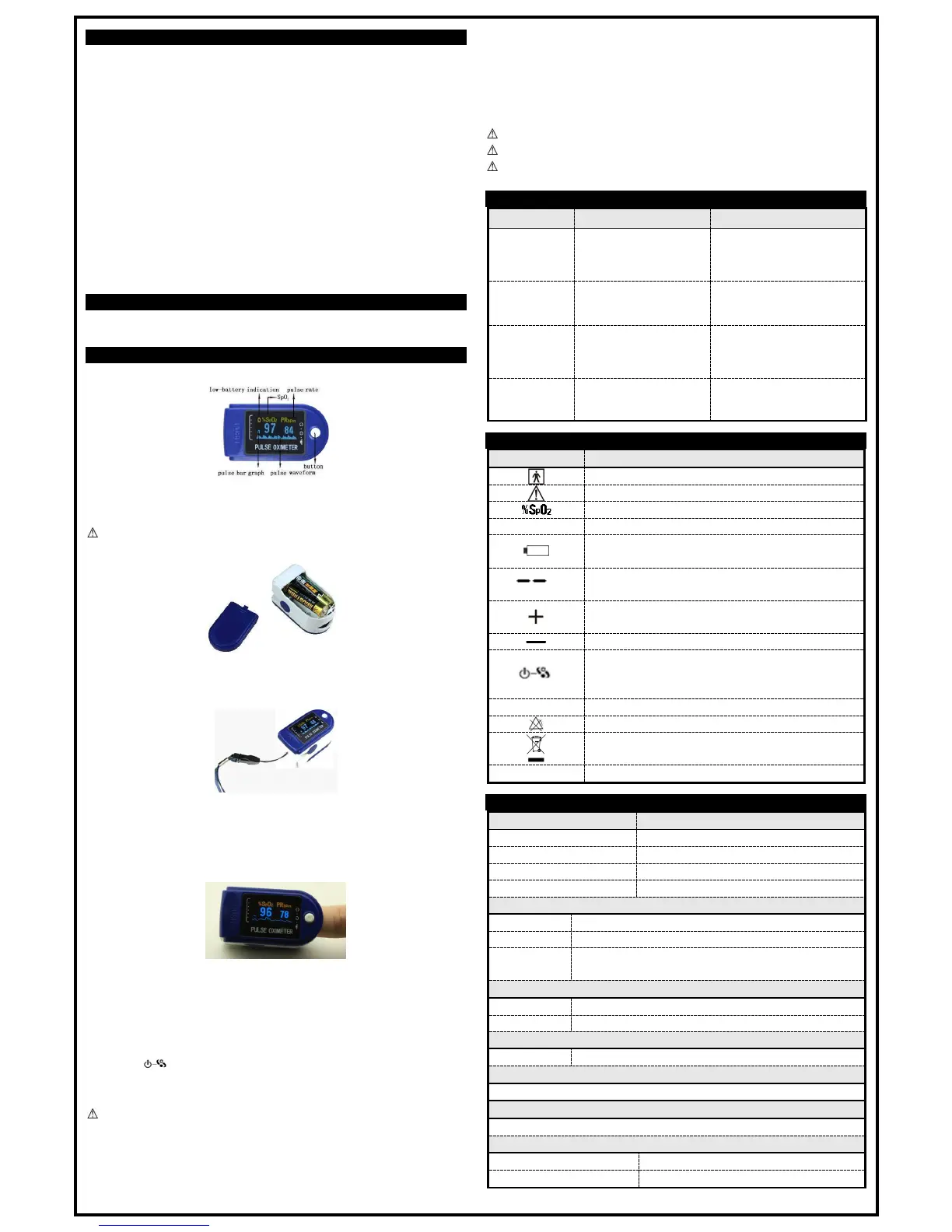
6.1 View of the Front Panel
Figure 2 Front view
6.2 Battery
Step 1. Refer to Figure 3 and insert the two AAA size batteries in the right direction.
Step 2. Replace the cover.
Please take care when you insert the batteries as improper insertion may damage the device.
Figure 3 Batteries installation
6.3 Mounting the Hanging Rope
Step 1. Put the end of the rope through the hole.
Step 2. Put another end of the rope through the first one and then tighten it.
Figure 4 Mounting the hanging rope
7 Operating Guide
1) Insert the two batteries in the correct direction, and then replace the cover.
2) Open the clip as shown in Figure 5.
Figure 5 Put finger in position
3) Put the patient’s finger into the rubber cushions of the clip (make sure the finger is in the right
position), and then clip the finger.
4) Press the button once on front panel.
5) Do not shake the finger and keep the patient at ease during the process. It is not recommended for
the patient to be moving.
6) Get the information directly from screen display.
7) The button has three functions. When the device is power off, pressing the button can turn it
on; when the device is powered on, pressing the button shortly can change direction of the screen;
when the device is powered on, long pressing the button can change brightness of the screen.
Fingernail and the screen should be on the same side.
8 Repairing and Maintenance
Please change the batteries when the low-voltage displayed on the screen.
Please clean the surface of the device before using. Wipe the device with medical alcohol first, and
then let it dry in air or clean it with dry clean fabric.
Use the medical alcohol to disinfect the product after use prevents cross infection the next time it is
used.
Please take out the batteries if the oximeter is not in use for a long period of time.
The best storage environment of the device is - 40ºC to 60ºC ambient temperature and no higher
than 95% relative humidity.
Users are advised to calibrate the device periodically (or according to the calibrating program of
hospital). It also can be performed by the state-appointed agent or just contact us for calibration.
High-pressure sterilization cannot be used on the device.
Do not immerse the device in liquid.
It is recommended that the device should be kept in a dry environment. Humidity may reduce
the life span of the device, or even damage it.
9 Troubleshooting


 To Previous Page
 Loading...