Figure 3 Batteries installation
4.3 Mounting the Hanging Rope
Figure 4 Mounting the hanging rope
1) Put the end of the rope through the hole.
2) Put another end of the rope through the first one and then tighten it.
4.4 Accessories
1) A hanging rope;
2) Two batteries (optional);
3) A User Manual.
5 Operating Guide
5.1 Operation Method
1) Insert the two batteries in the proper direction, and then replace the cover.
Please take care with the batteries as improper insertion may damage the device.
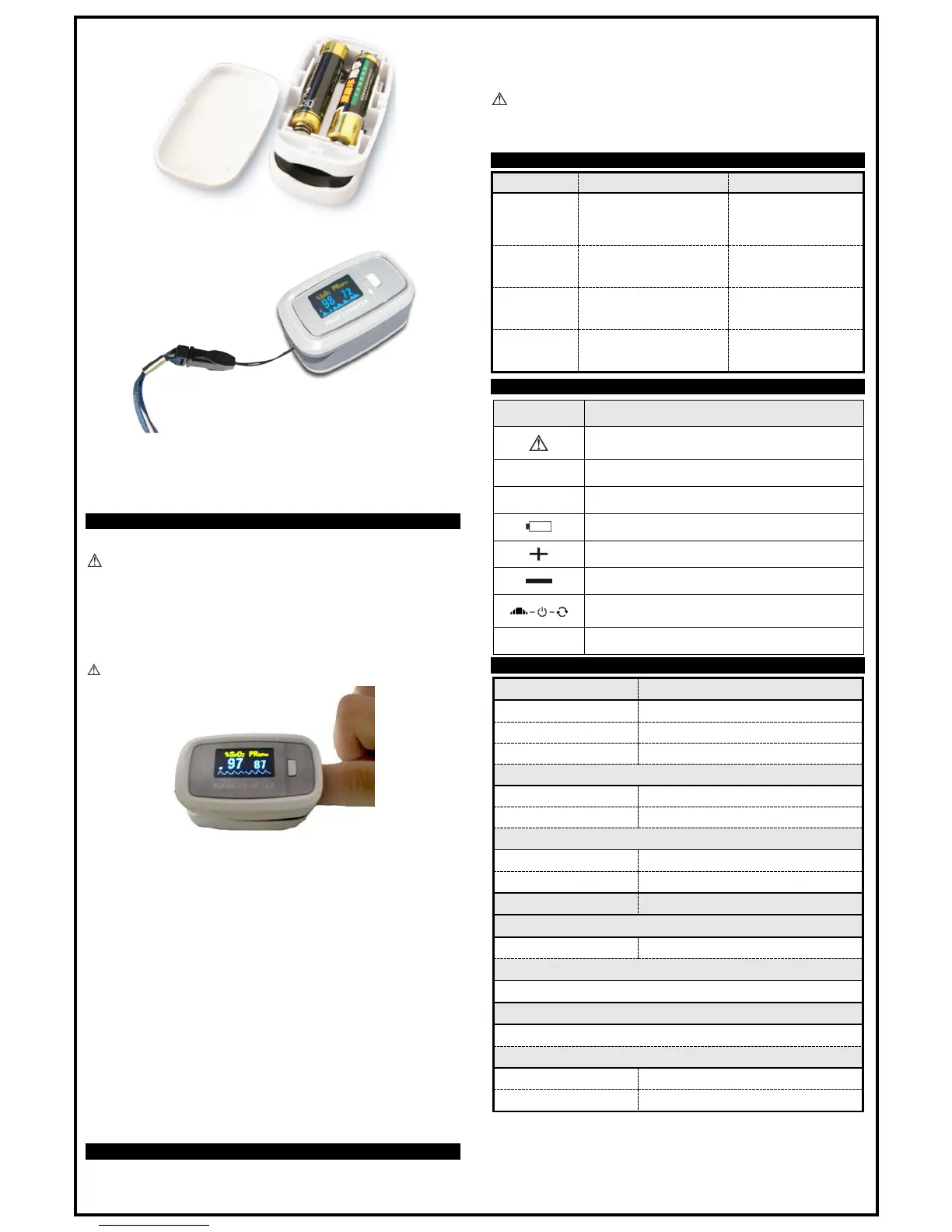
2) Open the clip as shown in Figure 6.
3) Let the patient’s finger put into the rubber cushions of the clip (make sure the finger is in the right
position), and then clip the finger.
a. Press the switch button once on front panel.
b. Do not shake the finger and keep the patient calm during the measuring process. It is
recommended that the patient be resting and no moving.
4) Get the information directly from screen display.
5) In operational state, lightly press this button to change the direction of the screen.
6) In operational state, long press this button can change brightness of the screen.
Fingernails and the screen should be on the same side.
Figure 6 Put the finger in position
5.2 Caution
1) Before use, please fully check the device to make sure that it can work correctly.
2) The finger should be placed properly (see the attached illustration in this manual Figure 6), or else it
may cause inaccurate measurement.
3) The SpO
2
sensor and photoelectric receiving tube should be arranged in a way with the subject’s
arteriole in a position there between.
4) The SpO
2
sensor should not be used on a limb tied with arterial canal, blood pressure cuff, or
receiving intravenous injection.
5) Make sure the optical path is free from any optical obstacles like rubberized fabric or else it may
cause inaccurate SpO
2
and pulse rate.
6) Excessive ambient light may affect the measuring result. This includes fluorescent lamps, dual ruby
lights, infrared heaters, direct sunlight, etc.
7) Strenuous action of the testee or extreme electrosurgical interference may also affect the accuracy.
8) Testee cannot use enamel or other makeup.
9) After use, please refer to respective chapters about cleaning and disinfection for details.
5.3 Clinical Restrictions
1) As the measurement is taken on the basis of arteriole pulse, substantial pulsating blood flow in the
subject is required. For a subject with weak pulse due to shock, low ambient/body temperature,
major bleeding, or use of vascular contracting drug, the SpO
2
waveform (PLETH) will decrease. In
this case, the measurement will be more sensitive to interference.
2) For those with a substantial amount of staining dilution drug (such as methylene blue, indigo green,
and acid indigo blue), or carbon monoxide hemoglobin (COHb), or methionine (Me+Hb) or
thiosalicylic hemoglobin, and some with icterus problem, the SpO
2
determination by this monitor may
be inaccurate.
3) The drugs like dopamine, procaine, prilocaine, lidocaine, and butacaine may also be a major factor
blamed for serious error of SpO
2
measure.
4) As the SpO
2
value serves as a reference value for the judgement of anemic anoxia and toxic anoxia,
some patients with serious anemia may also report good SpO
2
measurement.
6 Maintenance ,Transportation and Storage
6.1 Cleaning and Disinfecting
After cleaning the device, wipe the surface of device with ethanol and self-air dry (or clean with a
clean, dry cloth).
6.2 Maintenance
Before using, please refer to respective chapters about cleaning and disinfection for details.
Please change the batteries when the low-voltage is displayed on the screen.
Please take out the batteries if the oximeter is not in use for a long time.
Users are advised to calibrate the device periodically (or according to the calibrating program of
hospital). It also can be performed at the state-appointed agent or just contact us for calibration.
High-pressure sterilization cannot be used on the device.
6.3 Transportation and Storage
The device cannot be transported mixed with toxic, harmful, or corrosive material.
The best storage environment of the device is -40ºC to 60ºC ambient temperature and no higher
than 95% relative humidity and in a room with no corrosive material and good ventilation.
7 Troubleshooting


 To Previous Page
 Loading...