Home
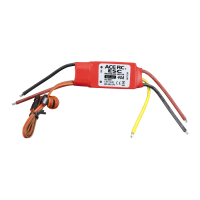
ACE RC
Controller
VELOCI PRO-R
ACE RC VELOCI PRO-R - User Manual
2 pages
Manual
Specs
Ask a question
Save Page as PDF
To Next Page
To Next Page
Loading...
Scale
Boat
|
|
susmarine
VELOCI
PRO-R/PRO/RS/RS-M
ELECTRONIC
SPEED
CONTROLLER
Product
no.
#8020
/
8021
#8023
/
8050
/
8051
Introduction
Congratulations
on
choosing
one
of
the
best
electronic
speed
controllers.
We
have
phased
in
the
latest
digital
technology
in
your
Veloci
speed
controller
for
you
to
get
an
excellent
perfor-
mance.
Please
see
the
set-up
procedure
carefully
for
your
installation.
-
Using
the
latest
MOS
FETs
-
Adjustable
to
Racing
Mode,
reverse
switch
off
Over
load
protection
and
safety
of
full
warranty
-
Compact
size
for
fits
anywhere
-
Plug
in
and
drive
-
With
Real-Time-Braking
Specifications
Product
Name
Veloci
Pro-R
Veloci
Pro
Veloci
Pro-R
Veloci
RS
Veloci
RS-M
Product
No.
8020
8021
8023
8050
8051
Voltage
range
4.8-8.4V
4.8-8.4V
4.8-8.4V
4.8-8.4V
4.8-8.4V
Internal
resistance
0.01752
0.01752
0.01752
0.0042
0.0040
Momentary
Load
(1
sec)
120A
120A
120A
400A
400A
Brief
Load
(30
sec)
70A
70A
70A
230A
230A
Continuous
Load
(5
min)
50A
50A
50A
170A
170A
BEC
Voltage
5V
5V
5V
5V
5V
BEC
Current
1A
1A
1A
1.5A
1.5A
Frequency
2
KHz
2
KHZ
2
KHz
2
KHz
2
KHz
Reverse
MES
NO
YES
YES
VES
Reverse
limit
YES(8")
NO
NO
YES(8”)
NO
Motor
limit
23+turns
17+turns
Over
Load
Protection
YES
ies
YES
YES
YES
Setup
Procedure
Digital
/
Push
button
Toae
miton
YES
NO
w
a
e
(reverse/brake)
Weight
31g
31g
31g
71g
71g
Dimension
26x25.6x15.6mm
49x36x28mm
Rec.
Vehicle
car
Boat
car
*Boat
*Note:
Veloci
RS-M
is
especially
designed
for
thunder
tiger
electric
powered
submarine
Precaution
-
Before
starting
your
installation
of
the
electronic
speed
controller,
read
the
instruction
manual
carefully.
-Make
sure
that
the
suppressor
capacitors
have
been
soldered
to
the
motor.
‘Install
the
speed
control
in
a
position
that
allows
easy
to
access
all
connectors
and
the
set-up
button.
‘
Find
a
secure
location
for
the
speed
control
since
the
speed
control
is
not
water
resistant.
-Do
not
arrange
the
speed
controller,
power
cables,
receiver
or
receiver
aerial
too
close
together.
It
may
cause
some
interference
between
the
power
system
components
and
receiver
aerial.
-If
the
aerial
is
too
long,
cut
it
down
to
a
suitable
length
Suitable.
-
Please
also
refer
the
instructions
that
is
supplied
with
your
radio
control
system.
Warning
/\
a
-Always
unplug
the
batterry
after
use.
Do
not
leave
your
vehicle
unattended
with
the
battery
pluggedin.
-Always
make
sure
the
switch
is
off
unless
under
adjust-
ment.
-Never
touch
to
water
without
any
protection.
Anti-water
protection
is
strongly
recommended.
-Never
run
the
motor
by
connecting
a
separate
battery
when
the
motor
is
already
connected
to
the
speed
control-
ler.
-Never
cut
off
the
original
plug,
as
this
invalidates
the
warrantee.
‘Avoid
incorrect
connections
and
reverse
polarity
or
it
will
cause
damage
to
the
unit.
-Do
not
let
the
FETs
touch
any
metal
objects
or
any
bare
wires.
-Make
sure
there
is
ample
supply
of
air
to
allow
for
cooling.
Set-up
Procedure
1.
Leave
the
throttle
in
neutral.
2.
Connect
the
speed
control
to
the
battery.
3.
Power
the
speed
control
on
.
4.
Press
the
set-up
button
at
least
3
seconds
with
the
plastic
screwdriver
supplied.
5.
The
set-up
LED
now
flashes
red/green
to
confirm
that
the
unit
is
in
set-up
mode.
6.
Leave
the
throttle
in
neutral
and
press
the
set-up
button
again.
7.
The
neutral
setting
is
now
stored,
and
the
set-up
LED
lights
green.
8.
Move
the
throttle
to
full-throttle
and
press
the
set-up
button
again.
9.
The
full-throttle
setting
is
now
stored,
and
the
set-up
LED
lights
red.
10.
Move
the
transmitter
stick
to
full-brake/reverse
and
press
the
set-up
button
again.
11.
The
full
brake/reverse
setting
is
now
stored,
and
the
set-up
red/green
LED
lights
simultaneously
3
times.
12.
Then
the
red/green
LED
stays
on.
Now,
your
Veloci
speed
controller
is
set-up
completely
and
is
ready
to
run.
2
Need help?
Do you have a question about the ACE RC VELOCI PRO-R and is the answer not in the manual?
Ask a question
ACE RC VELOCI PRO-R Specifications
General
Brand
ACE RC
Model
VELOCI PRO-R
Category
Controller
Language
English
Related product manuals
ACE RC BLC-40
1 page


 To Next PageTo Next Page
 Need help?
 General