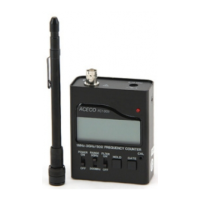
Controls
1. Power Switch - This slide switch turns the counter on and initiates a 2 second
test of all the LCD segments.
2. Range Switch - This should be switched to the 300 MHz position for frequencies
between 1 MHz and 300 MHz and switched to the 3 GHz position for frequencies
between 10 MHz and 3 GHz.
3. Filter Switch - This slide switch turns the filter on and off.
4. Hold Button - This holds the current display and stops the counter from
counting.
5. Gate Button - This selects the gate or measurement time. A longer gate time
allows counting for longer period and results in higher accuracy.
6. Calibration - The calibration adjustment opening is located on the front
panel of the counter. This allows access to the trimmer capacitor that
provides about a 10 PPM adjustment range of the time base oscillator. This
is not usually necessary but to do so read a signal of an known frequency
before adjusting the trimmer for correct frequency display. If you calibrate
at 4.1943 MHz or above then the counter will be more accurate.
Warranty
Welfare Electronic Component Ltd. guarantees the counter and accessories for one
year against defects in manufacture. This warranty does not cover items that have
been modified, subject to unauthorized repairs, misuse or abuse. This warranty does
not cover damage caused b y excessive power levels applied to the signal input. Never
make any kind of connection between the counter and a transmitter.


 To Next Page
 Loading...