EasyManua.ls Logo

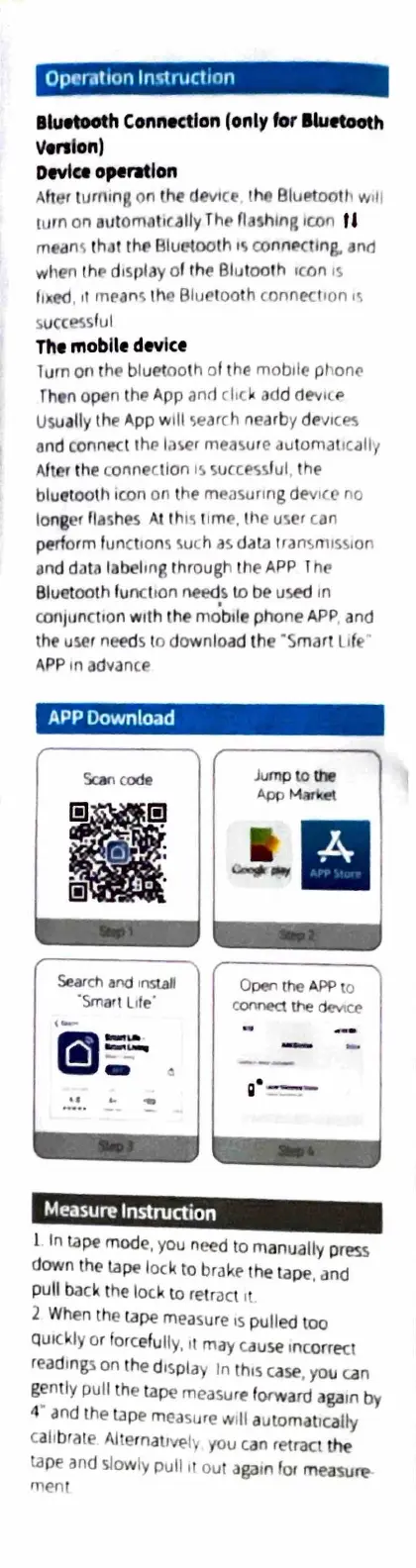
Acegmet DP20 - Bluetooth Connectivity and App Usage; Bluetooth Device Operation; App Download and Setup; Basic Measurement Instructions

Default Icon
10 pages
Print Icon
To Next Page IconTo Next Page
To Previous Page IconTo Previous Page
Loading...
Op
era
ti
on
ln'1ruct,on
lluetooth
Connection
(only
fo
r
lwftOOlh
1/
tra
l
on)
Device
o,-mlon
After
turning
on
the
devi
ce
tho
Blu~tooth w
,II
turn
on
automot,cally
Th
t>
nashlnR
icon
f
I
mean
r,
th
.:it
the
Bluetooth
Ir,
connPctlng.
and
when
th
P
d1spldy
of
th
e Blutoo
th
,con
1s
luced
,
,,
meanr,
thC'
Bluetooth
connec
tion
1\
s
ucc
ess
f
ul
Th•
mobile
device
lurn
on
t
he
bluetooth of
the
mobile p
hon€.'
Then
open
the
App
an<I
clac
k
add
dev
Ic.
i>
Usually
the
App
will
5eMch
nearby
d.-v1
ces
and
connec
t
the
la\er
measure
automat
1c
all1
After
the
c.onnectlon
1~
succ~~ul.
the
bluetoolh
Ic.on
on
the
measuring dev
1C
('
no
lo
ng
er
fl
ashes
At
th
1'i
11me.
the
user
can
perform functions
suc.h
as
dat.a
trans
mis
si
on
on
d
data
labeling through
the
APP
I
he
Bluetooth
fu
nc
ti
on
needs
to
be
used
In
con1unct,on
with
the
m~
b,l
e phone
APP
,
and
the
user
nee
ds to download
th
e
·s
mart
Life
·
APP
in
advance
APP
Download
Scan
code
Iii
I
.
.
Search
and
,r,suJI
·Smart
L,
te·
Measure
Instruction
Jump
to
the
AppMarl(rt
Open
the
APP
to
connect
tlle
device
-
-
11·
=--:-
l
In
tape
mode,
you
need
to
manually p
ress
down
the
tape
lock
to
brake
the
ta
pe
,
and
pull
back
t
he
lock
to
re
t
ract
,t
2
When
th
e
tape
measure
,s
pulled too
quickly
or
forcefully, ii
may
cause
incorr
ect
readings
on
th
e display In
th,s
case
,
you
can
gently pull
th
e
tape
measure
forward
again
by
4
and
the
tape
m
easure
wi
ll
automatically
ca
li
brate Aller
natrve
lv
you
can
retract
the
tape
and
slowly pull
It
ou
t
again
for
measun?-
rnent