EasyManua.ls Logo

Acegmet DP20 - Pythagoras 2-Point Measurement; Pythagoras 3-Point Measurement

Default Icon
10 pages
Print Icon
To Next Page IconTo Next Page
To Previous Page IconTo Previous Page
Loading...
~
to
~.,(t
Ch
ID
-;otumc
m«1S:Un.-mert
l
lt:J
r:nftnM
10
th
<'
fl3
shtng
fine
prt!SS
)
to
ge
t
th<'
Ac,
n-ff
thl
press
)
a&,a1n
ro
get
Ui
e
r,rst
d
1swnc
e
,,..,
·er
,
econcl
d1sttlllC'O
(
Wid
th
),
pross 8
third
time
to
..,
1
t
he
third
distan
ce
(hc
1g'1t)
fhe
length,
widrh,
~d
hright data will
be
sho
wn
on
t
he
left
sldfl'
ol
""'"
and
t
he
volume measurement
resulL
\
the
SC•<-~•••
will
00
shown
on
the
bottom
ngh
t
,_,
. ·- l
::
:
91f.931f
~
,
..
-----..
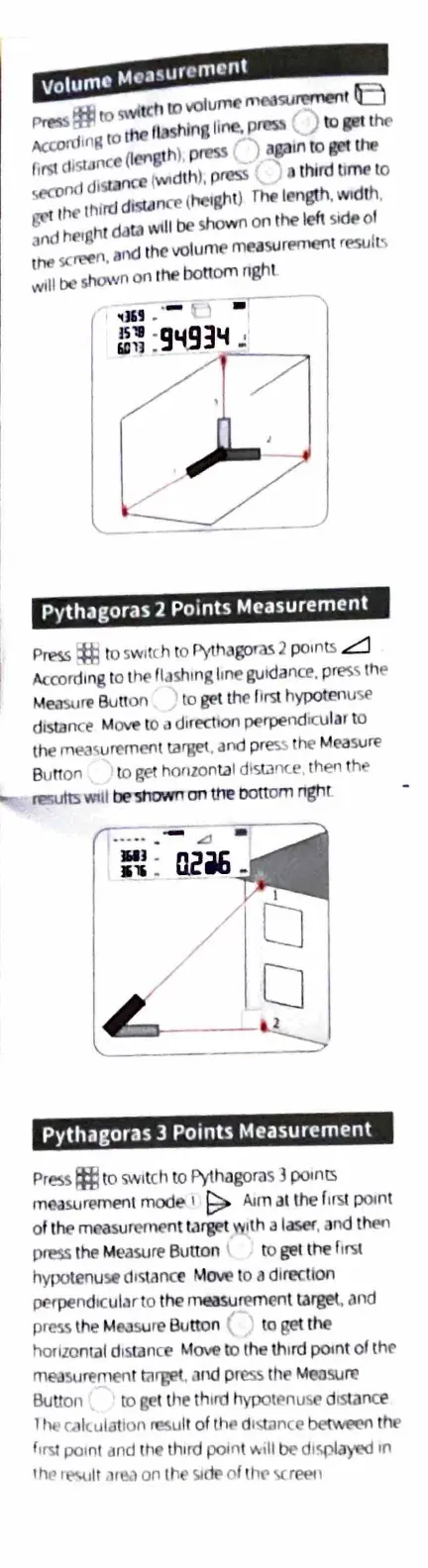
Pythagoras 2
Po
ints Measurement
P~
~
to sw
itc
h
10
Pythagoras
2 points
..::::::::::l
/\crord1ng
to the
flash
i
ng
hn
e
guidance.
pres
s
th
e
M
~re
Bu
tt
on
10
get
lhe
llrs
t
hypotenu
se
distan
ce
M
ove
to
cJ
direction perpendicul
ar
to
the
rne..i
<,
urcrnertt
target
.
and
pr
ess
the M
easure
Butt
on
to
~t
honzontal
d1starxe
,
then
the
-
~\J.ill
be
~on
the
bottom
ngnt
..•..
-- .a
UI
.
1n
_
Pythagoras 3 Points Measur~ment
Press
f:ffl
to
swi
t
ch
to
Pyt
hago
ras
3 po,nts
measuremen1
mode
1
~
Alm
at
the
f1'3l
poin
t
of the mea5urcment
tilrget
with a laser,
and
then
press
th
e M
easure
Button
to
ge
t
t
he
f
1rs
1
hypotenus.
drswnce
Move
to a
dln?Ctlon
perpend,cul.irto the measurement
target,
ilnd
press
the Mrusure Button "
to
ge
t t
he
horizontal
d1
s1ance M
ove
to
the
lh1rd
point of
the
mE?J
surement
rarget,
and
p
ress
che
Mrosuro
Buuon to
ge
t
tJ1t
th
ird hypott•nuse d
is
t
ance
1
ht
ri!ltulat
to
n
re5u
ll of
thr
cl"t
.ance
betwet-n
t
he
f
rl";!
paint
and
ct1e
lhrrd
polnl
~
1II
be
dl
r,pla~'Cd
1n
t
hp ,
t"-UII
am
,l
on
I
he
!.!
dt>
of
th
C'
'>C
r
l"(>l
1