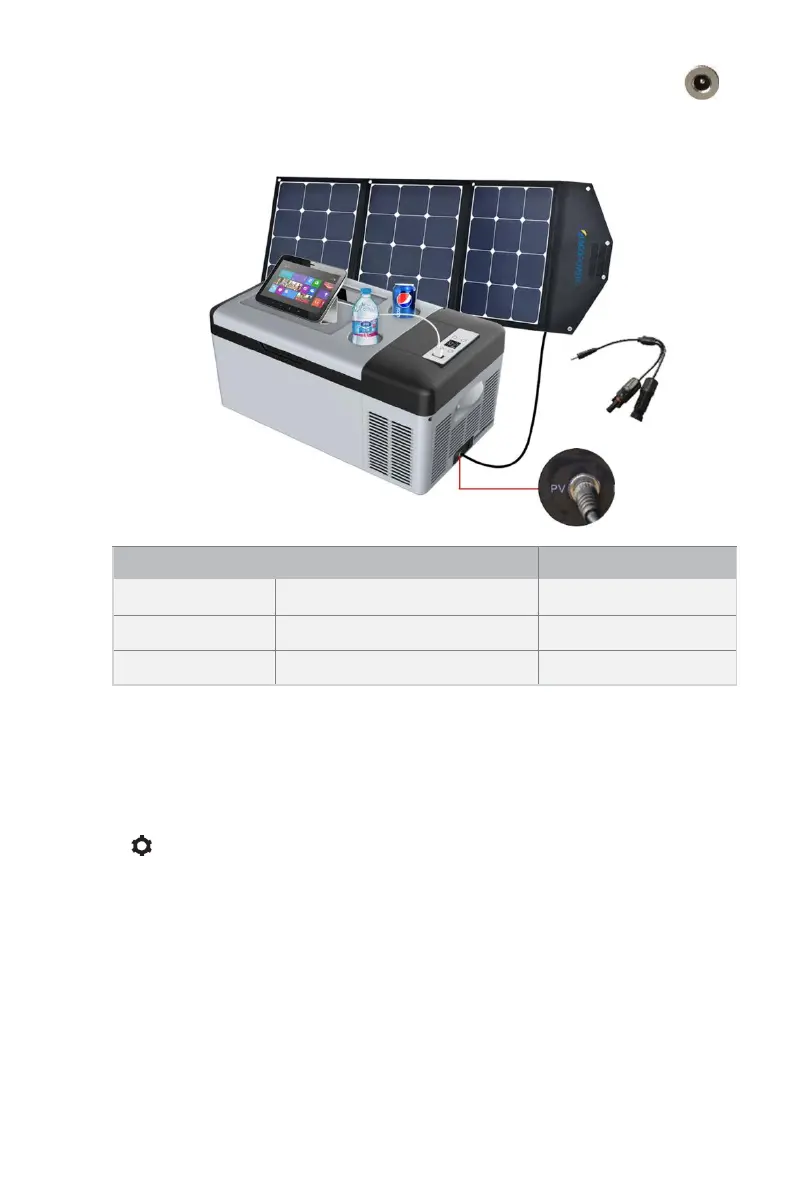
o Solar panel (PV) charge connection:
Insert the solar charge cable into the refrigerator’s “PV” terminal
Max Solar input Voltage:50V
Max Solar input Current:10A
o Checking Charge Ctatus: When the refrigerator is powered ON and
DC/AC power is connected, the battery icon on display screen will flash to
show charging. To charge the fridge/freezer battery without running
the compressor simply connect the adapters without powering ‘ON’
the unit. To view charging status please press and hold SET button
“ ” for 3 seconds. The unit’s battery status and voltage will be
displayed. When the voltage reaches 12.6V and the battery icon
stops flashing, the unit has been fully charged and wiring should be
disconnected to prevent internal component damage.
o Warning!!: Do not charge fridge/freezer with DC12V and Solar
Panel at the same time! The unit may be seriously damaged and
pose a potential hazard to you.
• AC Charging Management
o AC charging is always the first choice if AC power supply is available.
Check AC voltage range and use AC adapter to connect with AC power
outlet


 To Next Page