EasyManua.ls Logo

Acorto 2000s - Page 126

Acorto 2000s
237 pages
Print Icon
To Next Page IconTo Next Page
To Previous Page IconTo Previous Page
Loading...
2030-01 3A Seetion 13 Cleanino
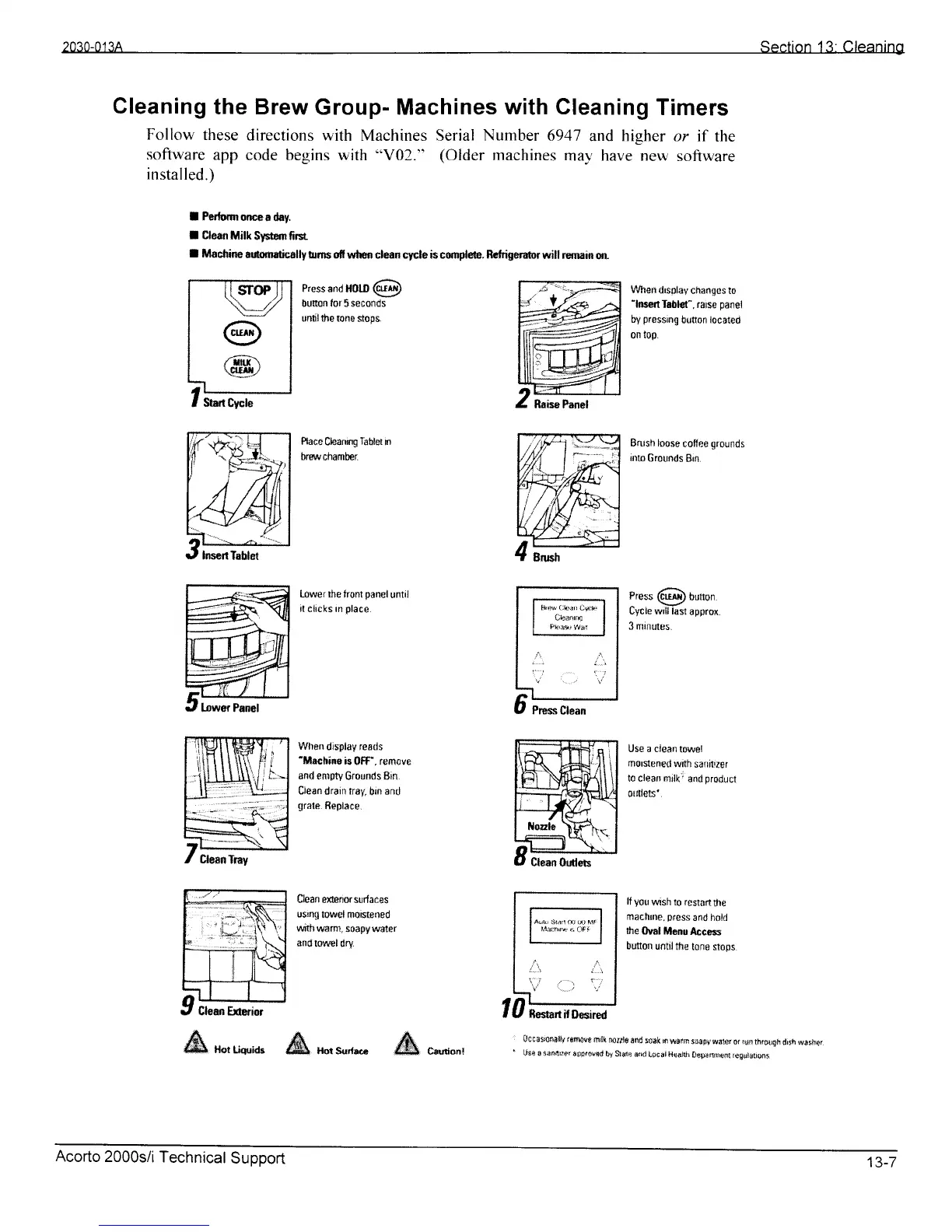
Cleaning
the Brew
Group- Machines
with Cleaning
Timers
Follow
these
directions
with Machines Serial
Number
6941
and higher
or if
the
software
app code
begins with
"V02."
(Older
machines
mav have new
software
installed.)
I Pedomonceadry.
I Cleao
l$ilk
Sysgr firsr
I Msdrin€
oufimtic*lly
trrns otr whan clan cycle is cun/ete. Ritrigerabr
will remain
or
rwl
I
@-l
lrfF\l
| \cullr-/ I
I
\-''
I
ltl
f
Stan
Cycle
Iffifl]
W
Press
and ll0to
6D
button lor 5 seconds
untl the tone
stops.
Race
Cbanng
labl€t
m
trrswchBmber
Lower the lront
panel
until
it clicks In
place.
Whon
display reads
'lllrchine
is
0ff"" remove
and
empty
G(ounds
8in
Clean
drain
tray,
bin
and
grale.
ftepl8ce.
Clean
e$crror surlaces
ustng
lowgl morsteoed
rilrttl
warm, soapy water
and
lowel dry.
Vwied
drsolay
changes to
'lnssfi
Tsblst". r6rse
panel
bv
preseng
but0n
l0cated
on
t0p.
Brush loose
coftee
grounds
inm
Grounds 8rn.
Press
@
bunon.
Cycle wrll iast
approx.
3 trrifiules.
&
xoruo,ue
&
n**r"o
fu
Use a clean
towel
morstened
wrth
sanitlz8f
to clean
mjlk'
and
producl
ordots*.
It
yot|
wtsh
to restan
he
machrle,
pross
and
hold
the
Ovol i/lonu
Accrs
bufiofl
until
the
tone slops
gC{tsst4n0lly
t6fr0sf,
mrlk tr{Iris
Efid
losk
m
w{rm
$${lrf sater
ot
r{tr thrltqh
d6h
srrhcr
licf o xinlrrsr
6ilBr*sd
trt St&B
€4d
L{cn,
n€sllh
[rffa{i)eni re0ilt!!pni
Prsss
Clsan
t0ffi*"
Acorto
2000s/i
Technical
Support