EasyManua.ls Logo

Acorto 2000s - Page 170

Acorto 2000s
237 pages
Print Icon
To Next Page IconTo Next Page
To Previous Page IconTo Previous Page
Loading...
2030-0184 Section
18
Troubleshooting
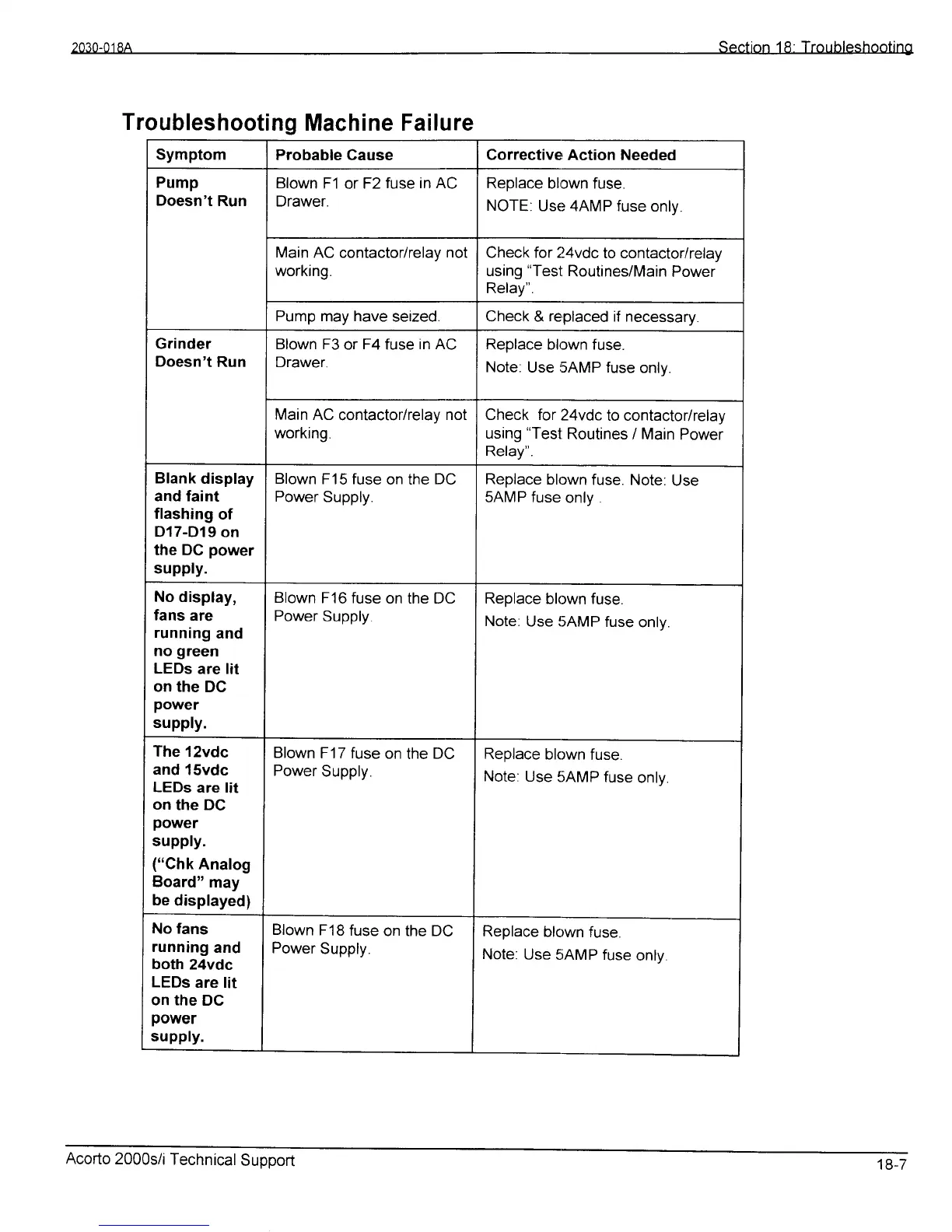
Troubleshooting
Machine Failure
Symptom
Probable Cause Corrective Action
Needed
Pump
Doesn't
Run
Blown
F1 or F2
fuse in AC
Drawer.
Replace
blown fuse.
NOTE:
Use 4AMP fuse
onlv.
Main
AC contactor/relav
not
workino.
Check for lL4vdc
to contactor/relay
using
"Test
Routines/Main
Power
Relay".
Pump
may
have
seized. Check &
rerplaced
if necessarv
Grinder
Doesn't
Run
Blown F3
or
F4
fuse
in AC
Drawer.
Replace
blrcwn fuse.
Note:
Use
I5AMP
fuse
onlv
Main
AC
contactor/relav
not
workino.
Check tor
24vdc
to contactor/relay
using
"Tesl
Routines
/ Main
Power
Relay".
Blank
display
and faint
flashing
of
D17-D19
on
the DG
power
supply.
Blown
F15 fuse
on the
DC
Power
Supply.
Replace
bk:wn
fuse. Note:
Use
5AMP fuse
only
No display,
fans
are
running
and
no
green
LEDs
are lit
on the
DC
power
supply.
Blown
F16 fuse
on the DC
Power
Supply
Replace
blown
fuse.
Note:
Use ITAMP
fuse
onlv.
The 12vdc
and
1Svdc
LEDs
are lit
on
the DC
power
supply.
("Chk
Analog
Board"
may
be
displayed)
Blown
F17 fuse
on
the
DC
Power
Supply.
Replace
blown
fuse.
Note:
Use
{iAMP fuse
onlv.
No fans
running
and
both
24vdc
LEDs
are lit
on the
DC
power
supply.
Blown
F18
fuse
on the DC
Power
Supply.
Replace
blown
fuse.
Note.
Use:tAMP
fuse
onlv
Acorto
2000s/i
Technical
Support
18-7