EasyManua.ls Logo

Acorto 2000s - Page 172

Acorto 2000s
237 pages
Print Icon
To Next Page IconTo Next Page
To Previous Page IconTo Previous Page
Loading...
2030-0184 Section 18: Troubleshooting
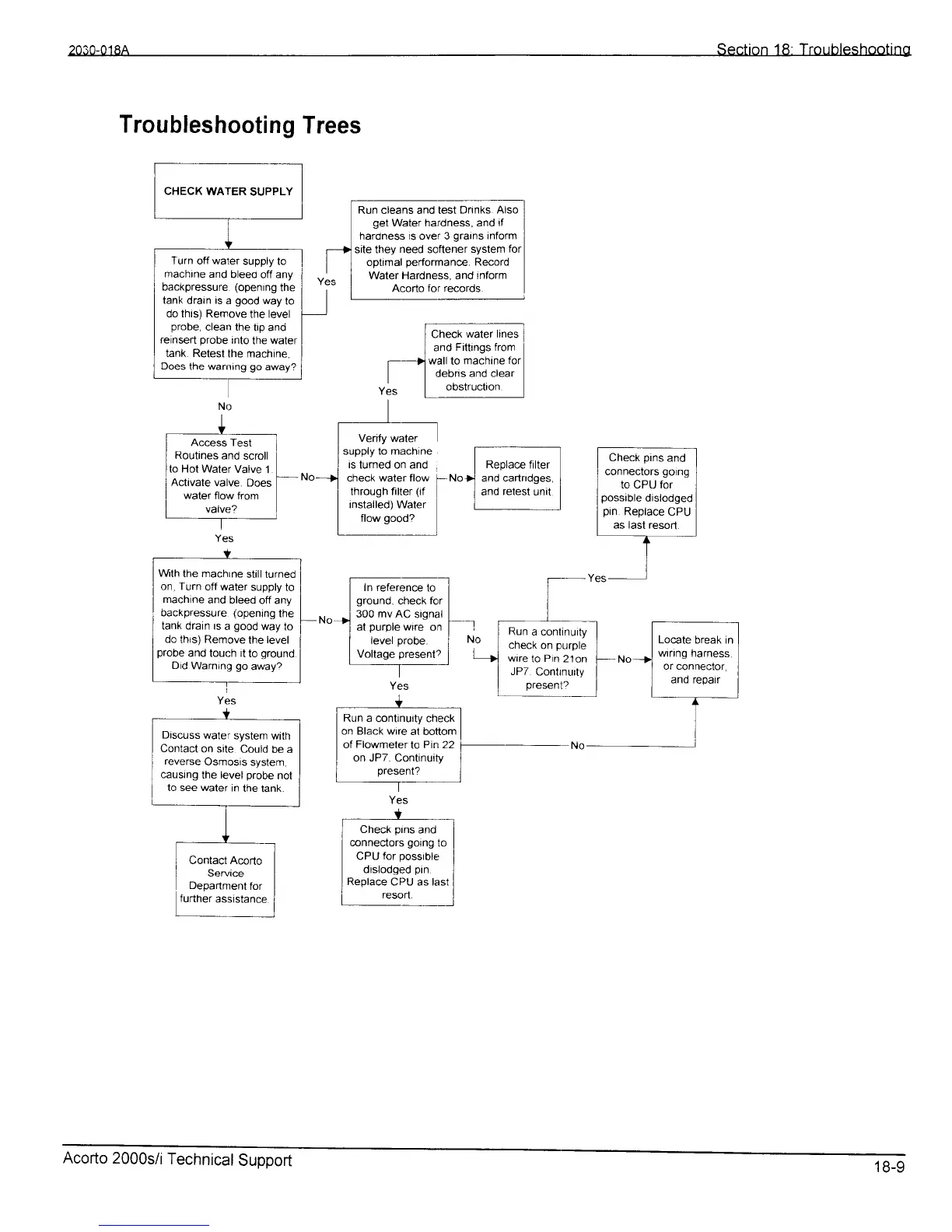
Troubleshooting
Trees
Run cleans and test
Drinks Also
get
Water hardness, and
if
hardness is
over
3
grains
inform
site they
need
softener
system
for
oDtimal
oerformance.
Record
Water Hardness. and
inform
Acorto
for records.
Wth
the machrne
stillturned
on, Turn
off water
supply
to
machine
and bleed
off any
backpressure
(opening
the
tank drain ts
a
good
way
to
do
thrs) Remove
the
level
probe
and touOh it
to
ground
Did
Warning
go
away2
CHECK
WATER
SUPPLY
reh*k
-"1-
h.,";l
I
and
Fittings from
I
1-)]
wall
to
machine
for
I
| |
debns
and clear
I
Yes
t
b"!':9t!L
]
Turn
off waler
Supply to
machrne
and bleeo
off
any
backpressure (openrng
the
tank
drain
is
a
good
way
to
do this) Remove
the
level
probe,
clean the
tip and
reinsert
probe
into
the water
tank. Retest
the machine,
Does
the warning
go
away?
Run
a conlinuity
check
on
p,urple
wrre
to
Pin
21on
JP7
Contlnu,ty
Present2
Discuss
water
system
with
Contact
on site
Could
be a
reverse
Osmosis
system,
causrng
the level
probe
not
to see water
in
the tank.
Cl*"k
p".
r'rd''l
connectors
going
to
I
nor r r^-
^^^^,rr-.
I
CPU
for
possrble
i
dislodged
pin
]
Replace
CPU as last
i
reson.
l
Acorto
2000s/i
Technical
Support
18-9