EasyManua.ls Logo

Acorto 2000s - Page 180

Acorto 2000s
237 pages
Print Icon
To Next Page IconTo Next Page
To Previous Page IconTo Previous Page
Loading...
2030-018A
Section 18:
Troubleshooting
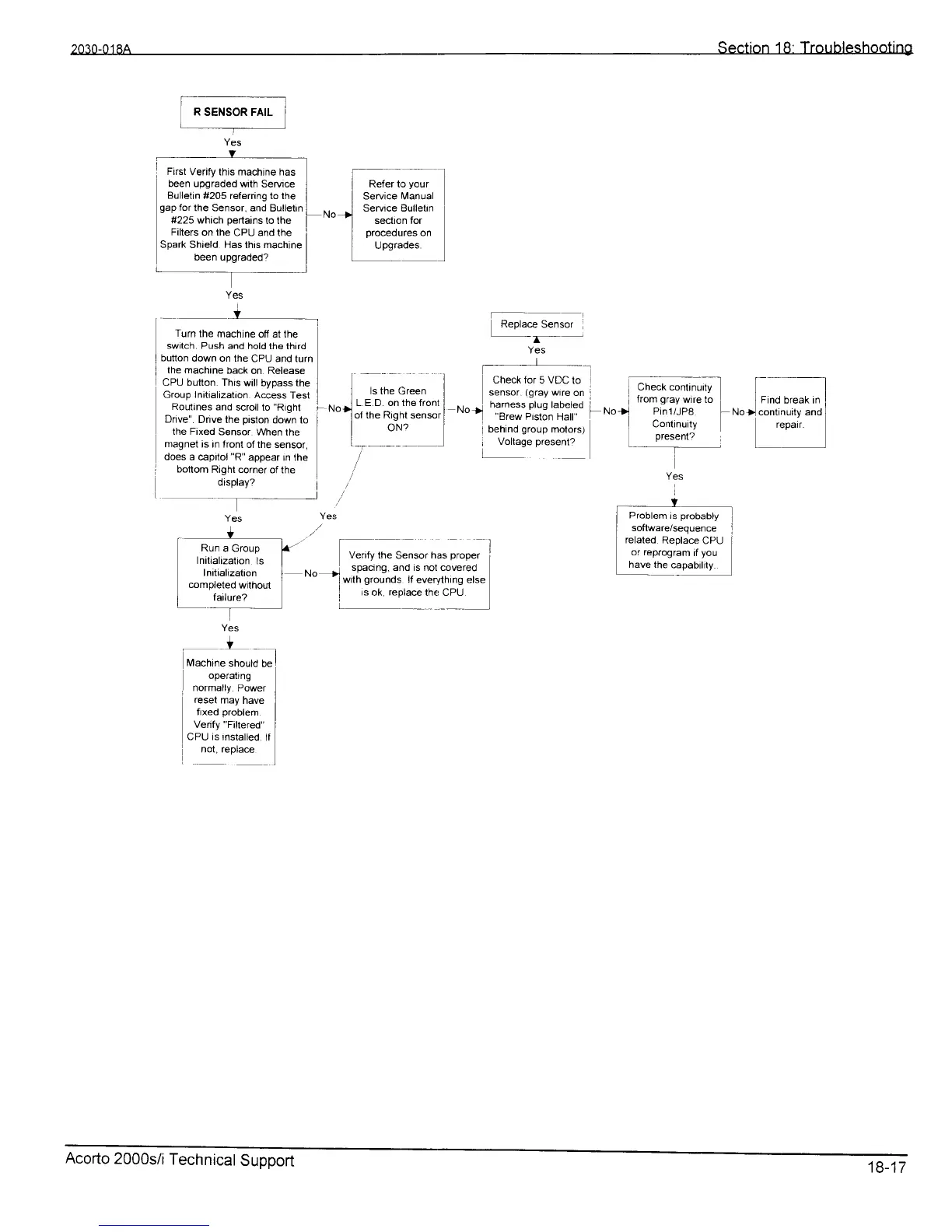
l-RsENsoR;;l
Yes
does
a capitol
"R"
appear rn the
bottom
Right corner
of the
display?
---t
Heler to
your
Service
lvlanual
Service BulletrnSeruce Bulletrn
secllon lor
proceoures
on
Upsrades
]
Venfy the
Sun*,
nr.
O.;"; I
Turn
lhe machine
off at the
switch. Push
and hold lhe third
button
down on the
CPU and turr'
the machine
back
on Release
CPU button. Thrs
will bypass
the
Group
Initiatization
Aciess
Test
i ]
-ls-the
9ree.n I
Rolrtinesand
scrollto"Rrghl
I
ruotl
L.--E D^on,thefront
I
Dnve".
Dnve the
prston
down to
i I
ol lne Hlgnt sensor
I
the Fixed
Sensor
When the I I
ON?
I
magnet
is In front
of the sensor,
-ll
Yes
.,Y
Fr"*.;;;l
operarng
I
normally
Power
reset
may
have
fixed
problem
Verify
"Filtered"
cPU is
insralled.
tf
nol, rePlace
Yes
_+
I
erobtem
is
probabty
]
I
software/sequence
l
I
related
Replac
CPU
I
or reprogram
tt
you
have the
capability.
I
First
Verify this machine has
been upgraded
wilh SeNice
Bulletin
#205 referring to lhe
gap
for
the Sensor,
and Bulletin
#225 which
pertains
to the
Filters
on the
CPU and the
Spark Shield Hasthrs machine
been upgraded?
Replace
Sensor
,
Yes
t-_l__
Check
for
5
VDC
to
l
sensor.
(gray
wre
on l
No>
h:In""3lYsl1?u]-:d
i No
brew Htston ts|atl
I
behind
group
motors)
i
Voltage
present?
t^^
KUn
a uroup
Initialization
ls
Initialization
mmpleted
withoul
i
failure?
Acorto
2000s/i
Technicat
Support
18-17