EasyManua.ls Logo

Acorto 2000s - Page 51

Acorto 2000s
237 pages
Print Icon
To Next Page IconTo Next Page
To Previous Page IconTo Previous Page
Loading...
2030-005A
lmproper
setting of the Jumper Plug Connections
can
lead to machine
malfunction, short
circuit, blown fuses, overheating
or damage
to circuit
boards,
Seffinrg; Jumper Plug
L Measure
Source
Voltage at
the wall outlet.
2. Remove
electrical
enclosure
cover to access
DC Power Supply Board.
3. CAIJTION:
ESD
protection
required
4.
Remove the DC
Power Supply Board
using
the white ejector
lever.
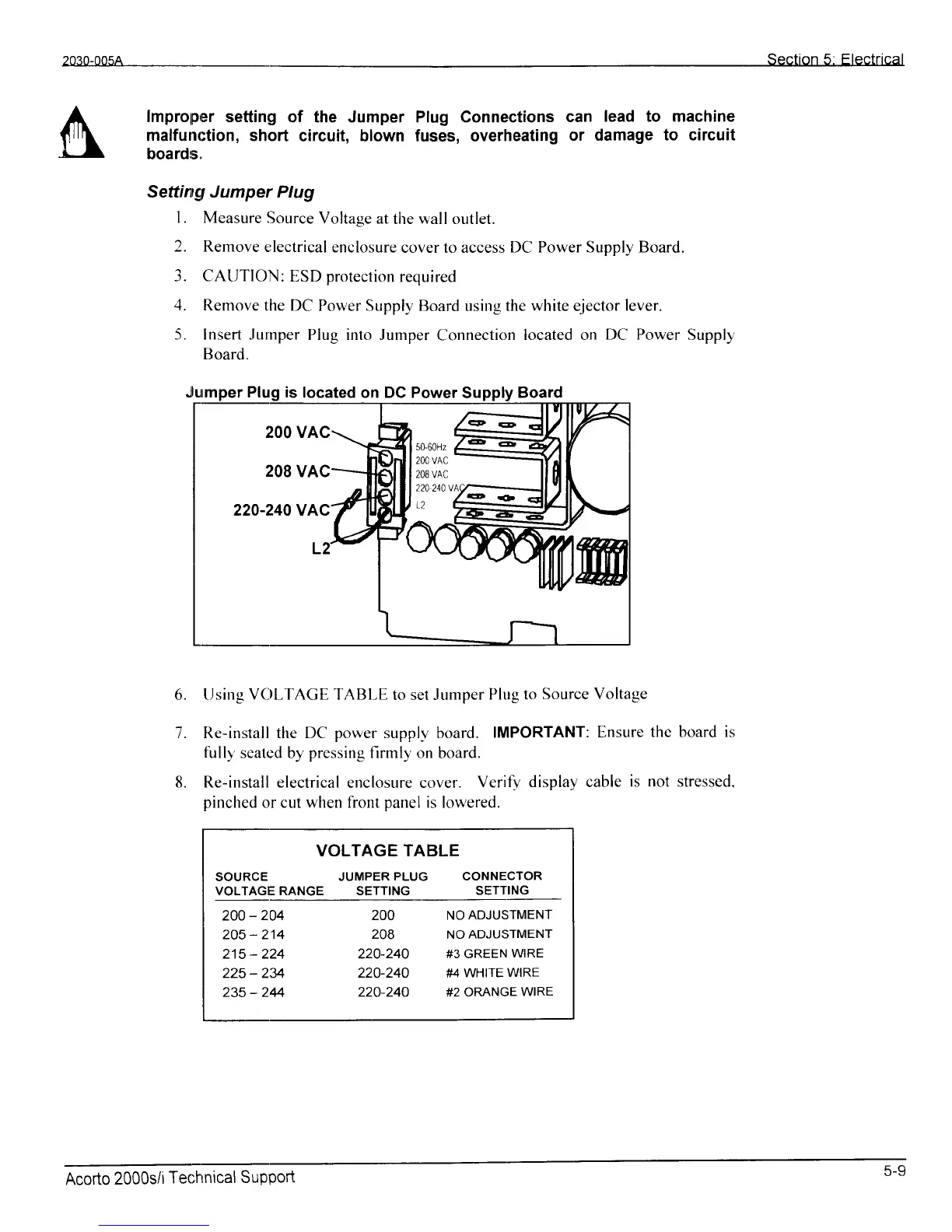
5. Insert Jurnper
Plug into Jumper
Connection
located on
DC Power
Supply
Board.
6.
[Jsing VCILTAGE TABI-E
to set Jumper
Plug to
Source Voltage
7. Re-install the DC
power
suppl-v-- board.
IMPORTANT:
Ensure
thc board is
fully'
seated by
pressing
firmly on
board.
Re-install electrical
enclosure cover.
Verifl'
display cable
is
not
stressed.
pinched
or cut when front
panel
is lowered.
VOLTAGE TABLE
SOURCE
JUMPER
PLUG CONNECTOR
VOLTAGE RANGE SETTING
SETTING
2OO_204
2OO
NOADJUSTMENT
205-214
2OB NOADJUSTMENT
215
-
224 220-240
#3 GREEN
wlRE
225
-
234
220-240 #4
WHIrE
WIRE
235
-
244
220-240 #2 oRANGE
wlRE
8.
is
located on DC Power
Acorto
2000s/i
Tecl'rnical
Support
5-9