6-14
USER MANUAL 750000992/16
Using the OTS module MTS
e
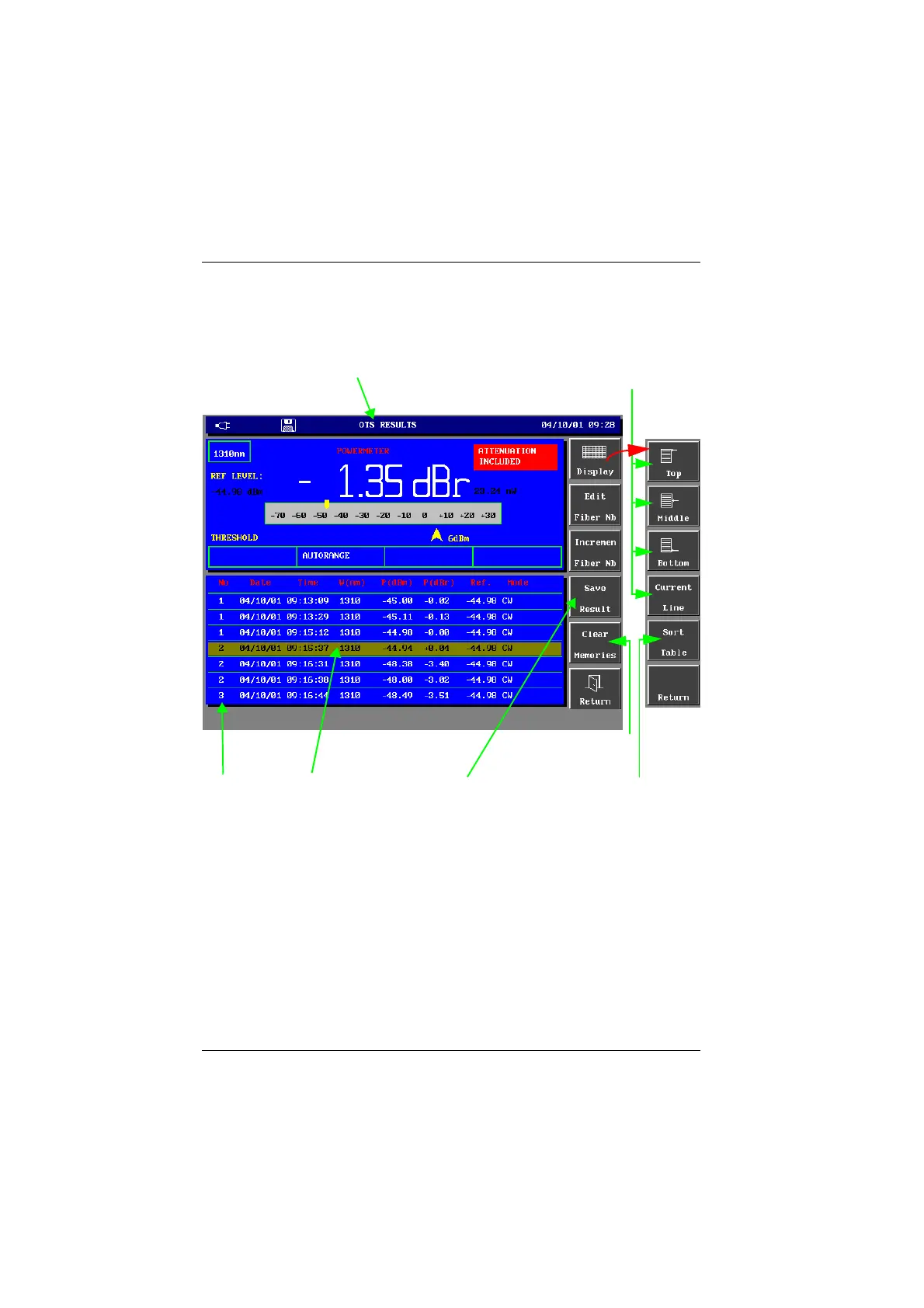
• To access the memory functions press the <Memories> key. The following
memory functions are displayed.
Display of the Memories
Sorting the results in the memory
After pressing the <Display> key, the <Sort Table> gives access to the different
memory sorting options in the displayed table:
- by fiber number (then by wavelength)
- by date
- by wavelength (then by fiber number)
Moving about in the memory
After pressing the <Display> key, the following functions are available:
Go to :
- the top,
- the middle
- the bottom of table
- the last result saved
Sort results in the table
by fiber number, time or
lambda
Selected
result in
memory
Number of
the fiber
Name of the displayed memory:
- OTS RESULTS for the active memory
- FILENAME for the currently displayed loaded table
- CURRENT for the results saved during an Autostore operation
Save current measured result to selected
memory location (1 to 300). If the TwinTest
mode is detected, save the 2 results.
Clear the 300 lines
of the memory
Artisan Technology Group - Quality Instrumentation ... Guaranteed | (888) 88-SOURCE | www.artisantg.com


 To Next Page
 Loading...

