USER MANUAL 750000992/16
5-23
MTS
e
Addition of manual measurements
Making Slope measurements
To make a manual slope measurement:
• Press the
RESULTS button to call the trace.
• Position the A cursor at the start of the section of the trace where you wish to
measure the slope.
• Position the B cursor at the end of the section.
• Successively press the
<Expert>, then <Manual>, then <Slope> keys.
The specified fiber section’s slope is measured.
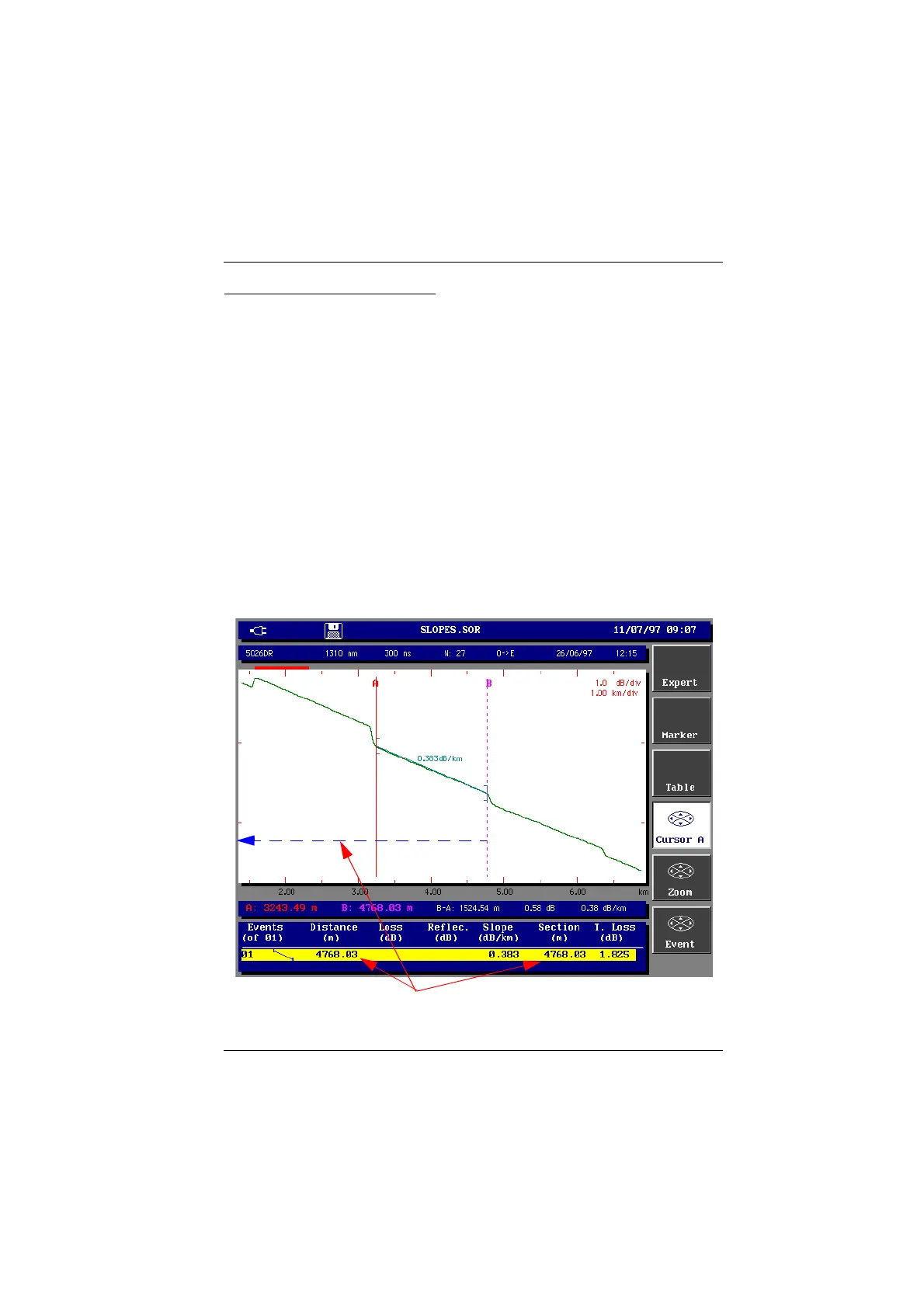
Slope measurement results
The result is displayed on the screen between the slope identifiers [ ].
The measurement results are also available in the event result table and can be
displayed by pressing the <Table> key, if it is not already displayed (after
pressing the <Exit> key to leave the Expert functions) :
• under distance is given the distance between the beginning of the trace and
the end of the slope;
• under section is given the distance between the previous marker (if no
marker : between the beginning of the link) and the end of the slope. This
section is not the distance between the two slope identifiers [ ].
Slope measurement
In this case Distance = Section (distance between the beginning of the link and the end of the slope)
Artisan Technology Group - Quality Instrumentation ... Guaranteed | (888) 88-SOURCE | www.artisantg.com



 To Next Page