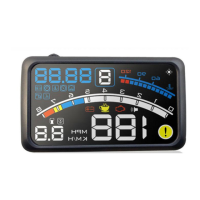
HUD Display User Manual
2540101
7
6. Digital +unit—use the function key ’B’ to display voltage, water temperature and the
throttle position.
7. Voltage—When this icon lights up, Digital +unit icon displays the voltage.
8. Water temperature icon—When this icon lights up, Digital +unit icon displays the water
temperature.
9. Throttle position—When this icon lights up, Digital +unit icon displays the throttle
position. This value reflects the throttle size
10. Distance icon—this icon displays the distance ahead during GPS navigation.
11. Direction icon—this icon displays the driving directing during GPS navigation.
12. Recalculating the route icon—Recalculating the route during GPS navigation.
13. When this icon lights up, it reminds you the traffic lights ahead during GPS navigation.
14. When this icon lights up, it means you reach your destination during GPS navigation.
15. When this icon lights up, it reminds you the speed limit during GPS navigation.
16. When this icon lights up, it reminds you the camera ahead during GPS navigation.
17. When this icon lights up, it reminds you the gas station ahead during GPS navigation.
18. GPS icon--When this icon lights up, it means there is GPS signal , otherwise no GPS
signal during GPS navigation.
19. U-turn icon—When this icon lights up, it reminds you to making a U-turn during GPS
navigation.
20. Fuel consumption icon—this figure shows the instantaneous fuel consumption per
100Km.
21. Data input interface—it’s used to upgrade and update HUD for HUD manufacturer.
22. Engine speed alarm icon—The alarm value can be set and No alarm when the car
speed exceeds 60km/h.
23. GPS input interface—connecting your headphone port to this GPS input interface to
Transmit the phone GPS navigation data.
24. Engine speed icon—this icon shows the value of the engine speed. The display value
multiplied by 1000RPM is the real engine speed of the car.
25. Function key B—push up this function key B to switch and dispaly voltage / water
temperature / throttle / speed / engine speed / mile; push down this function key B to
switch off the alarm microphone. The number ‘0’ means that the alarm microphone is
off, The number 1’ means that the alarm microphone is on. In the setting mode, push
up or down this function key B to increase or decrease the value.
26. Car speed alarm icon—When this icon lights up, it means the present car speed
exceeds the set car speed alarm.
27. Power and data line- Connect the OBD interface to power.
Detailed Installation And Use Of The GPS Navigation
1. installation for a smart phone with OVI Maps(ASH-4-GPS only supports NOKIA
smart phones OVI map):


 To Next Page
 Loading...