Page 4
Replacing Batteries
1. General Information Remote Control
The following cases are indications of a low or
dead batteries, if encountered please replace old
batteries with new ones.
• Beep sound is not emitted when a signal is transmitted.
• LCD Indicator fades away.
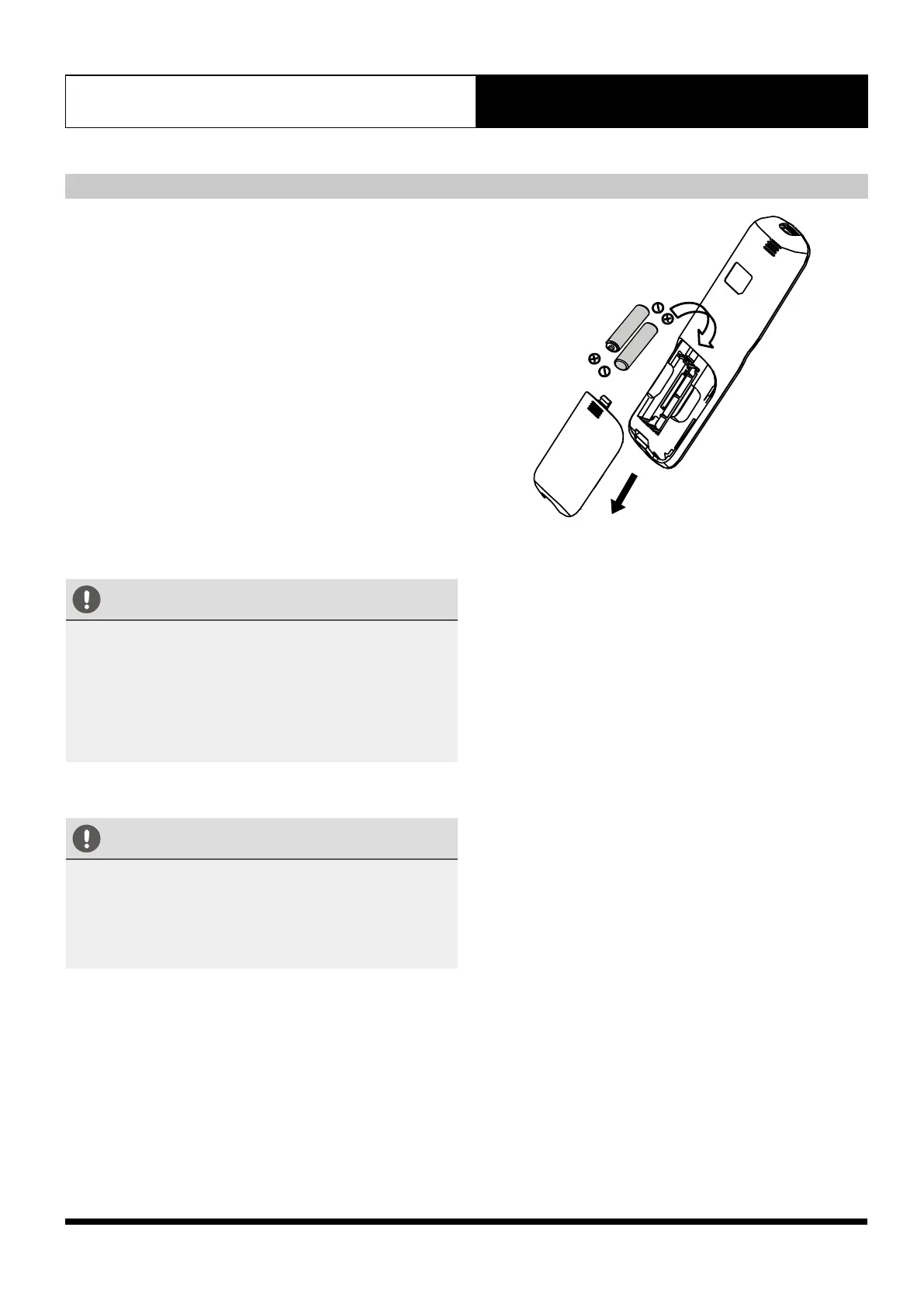
The remote controller is powered by two 1.5V AAA
batteries housed in the back of the remote controller and
protected by a cover.
(1) Remove the cover in the rear part of the remote
controller.
(2) Remove the old batteries and insert the new batteries,
placing the (+) and (-) ends correctly.
(3) Install the cover back on.
CAUTIONS
• Do not mix old and new batteries or batteries of
different types
• Do not leave the batteries in the remote controller if
• Do not use rechargeable batteries.
CAUTIONS
When the batteries are removed, the remote controller
erased all settings. After inserting new batteries, remote
controller and the A/C unit may have a different settings.
To sync their settings, press any button or adjust the
settings from remote controller. The A/C unit will follow
the new remote controller settings.


 To Next Page