nLight® Digital Time Clock (DTC)
Quick Start Guide
Initial Configuration
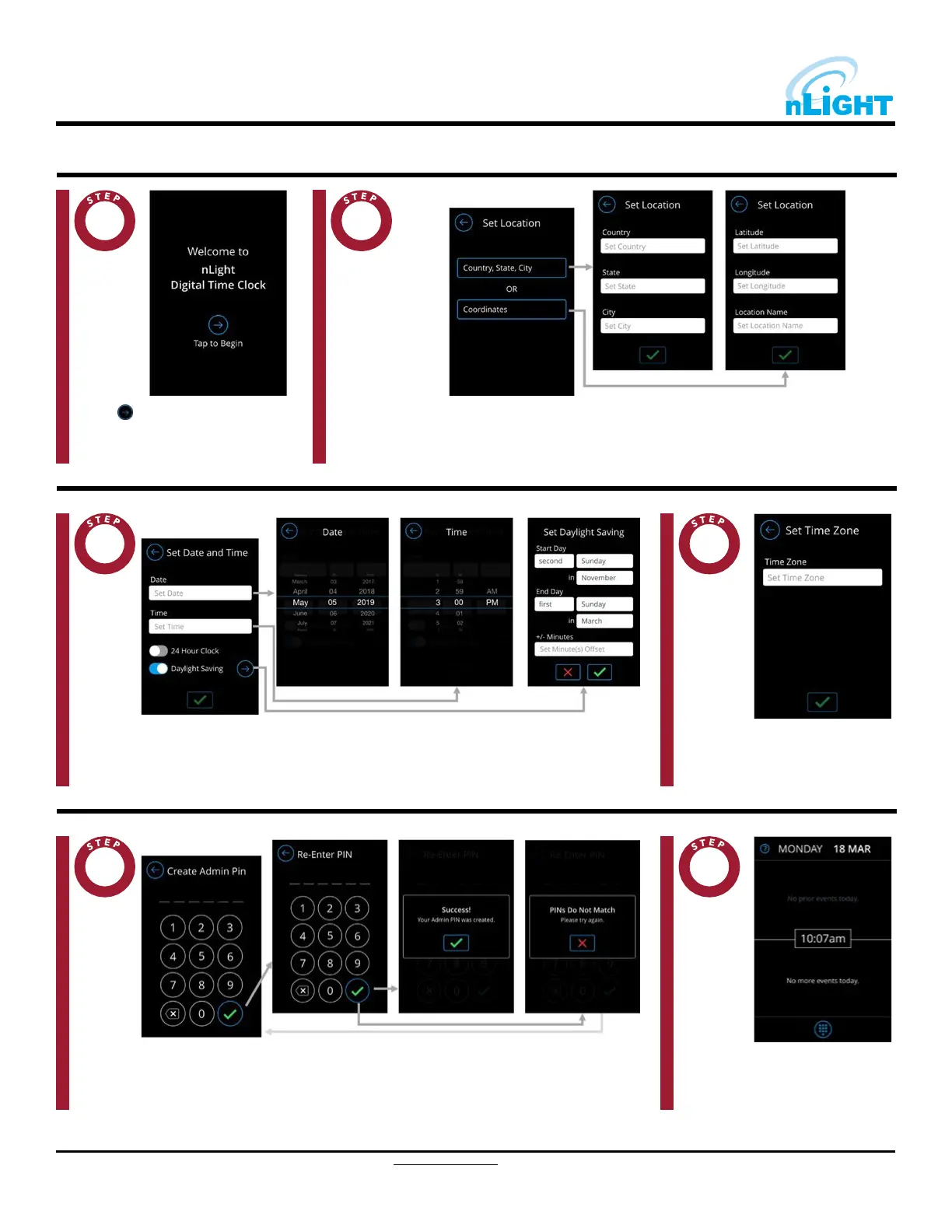
Set the current location by either entering a country/state/city, or providing geographical coordinates.
2
Tap the button to begin thedevice
setup operation.
1
Set the date and time. If using Daylight Saving, enter the required information in the Set DaylightSaving
fields.
3
Set the device’s designated timezone.
4
Create the administrator PIN, which must be six (6) digits in length. The nDTC does not have adefault
PIN.
5
When device configuration is complete.
the main DTC dashboard will be
displayed.
6
2 of 4
Acuity Brands | One Lithonia Way Conyers, GA 30012 Phone: 800.535.2465
www.acuitybrands.com © 2019 Acuity Brands Lighting, Inc. All rights reserved. Rev. 5/23/2020



 To Next Page