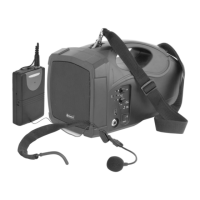
The Adastra H25B is a portable PA system designed for convenient and reliable public address applications. This all-in-one unit includes a handheld PA speaker, a VHF bodypack transmitter, a neckband microphone, and a shoulder strap, making it suitable for a wide range of uses.
Function Description:
The H25B system provides amplification for speech and audio playback. It features a built-in VHF wireless microphone system, allowing for hands-free operation with the included neckband microphone and bodypack transmitter. In addition to wireless microphone capabilities, the unit includes a media player with USB MP3 playback, an FM tuner, and Bluetooth connectivity for streaming audio from smart devices. A 6.3mm microphone input is also available for connecting a wired microphone or an additional wireless receiver. A 3.5mm audio output allows for connection to external audio devices.
Important Technical Specifications:
- Power Supply (Main Unit): Mains or internal rechargeable battery.
- Power Supply (VHF Bodypack): 3Vdc (2 x AA battery).
- Output Power (Max): 25W.
- RF Carrier Frequency: 174.1MHz.
- RF Power: 10mW.
- Frequency Response: 100Hz - 12kHz.
- S/N Ratio: >60dB.
- VHF Operating Distance: 35.0m.
- VHF Tuning Stability: 0.005% quartz crystal locked.
- FM Radio Tuning Range: 88 - 108MHz.
- Dimensions (VHF Bodypack): 100 x 65 x 35mm.
- Weight (VHF Bodypack): 68.2g (no battery).
- Dimensions (Main Unit): 155 x 183 x 285mm.
- Weight (Main Unit): 2.74kg.
Usage Features:
- Powering the Main Unit: The H25B can operate from its internal rechargeable battery or directly from mains power using the integral lead stored in the rear compartment. When connected to mains and switched off, the internal battery charges, taking approximately 4.5 hours for a full charge. When switched on, it operates from mains power. A fully charged internal battery provides up to 8 hours of operation, depending on usage and volume. Power (10) and charging (11) indicators are present on the control panel.
- Wireless Microphone Operation: The bodypack transmitter (16) requires two alkaline or NiMH AA batteries. The neckband microphone plugs into the 3.5mm threaded jack (15) on the bodypack. The transmitter is activated via a slide switch (14). The H25B's built-in VHF receiver is controlled by a VOLUME knob (8). Turning this knob up activates the receiver and increases the level. The RF indicator (7) illuminates when a signal from the bodypack transmitter is detected. A TONE control (9) adjusts the treble content for the wireless microphone, helping to prevent feedback or enhance speech clarity.
- Media Player: The media player supports USB MP3 playback, FM radio, and Bluetooth streaming. The MODE button (2) cycles through these modes.
- USB Playback: Insert a USB drive into the USB type A socket (5). Track navigation is controlled by Next Track (1), Play/Pause (3), and Previous Track (4) buttons.
- FM Tuner: In FM mode, if no stations are tuned, press and hold the Play/Pause button (3) for 3 seconds to initiate auto-tuning. Briefly pressing Play/Pause stops the auto-tuning. Next Track (1) and Previous Track (4) buttons navigate through tuned stations.
- Bluetooth: In Bluetooth mode, search for "LS101" on your smart device to pair. An audible notification confirms connection. Track navigation is controlled by the same buttons as USB.
- Volume Control for Media Player: In any media player mode (Bluetooth, USB, FM), pressing and holding the Next Track (1) and Previous Track (4) buttons will increase or decrease the media player's output level.
- Wired Audio Input: A 3.5mm AUDIO OUTPUT jack (12) accepts line-level audio sources (e.g., MP3 or CD players). This input is always active and is not affected by the main VOLUME control (8).
- Feedback Prevention: Users should avoid "line-of-sight" positioning of the H25B speaker and microphones, and keep the H25B away from the microphone(s) to prevent feedback (howling or squealing).
- Battery Conservation: When the wireless microphone is not in use, turn down the OFF/ON/VOLUME control (8) fully to power down the VHF receiver, and switch off the bodypack transmitter. Remove batteries from the bodypack if not used for long periods.
Maintenance Features:
- Cleaning: Use a soft cloth with a neutral detergent to clean the exterior of the components. Lightly damp sterile wipes can be used on the microphone head for hygiene. Avoid using solvents.
- Battery Replacement: The bodypack transmitter's battery compartment (16) is accessible by squeezing the sides inward and levering the flap forward. Ensure correct polarity when inserting 2 x AA alkaline or NiMH batteries.
- Servicing: No user-serviceable parts are inside the transmitter or receiver, except for battery/charging access. Refer servicing to qualified personnel.
- Storage: Keep all components out of direct sunlight and away from heat sources. Avoid impact, crushing, damp, and dusty environments.


 To Next Page
 General