Placefingeronfingerprintwindowtoadd
Generalfingerprint
Twolongbeepsandmotorlockingsoundafter
fingerprintissuccessfullyadded
Howtounlockusingfingerprintadded:
Press“0”toactivatelock,placefingeronfingerprintwindowtounlock.Greenindicatorlightturnson,
beeps,andyoucanhearmotorunlockingsound.Itlocksagainautomaticallyafter5seconds.
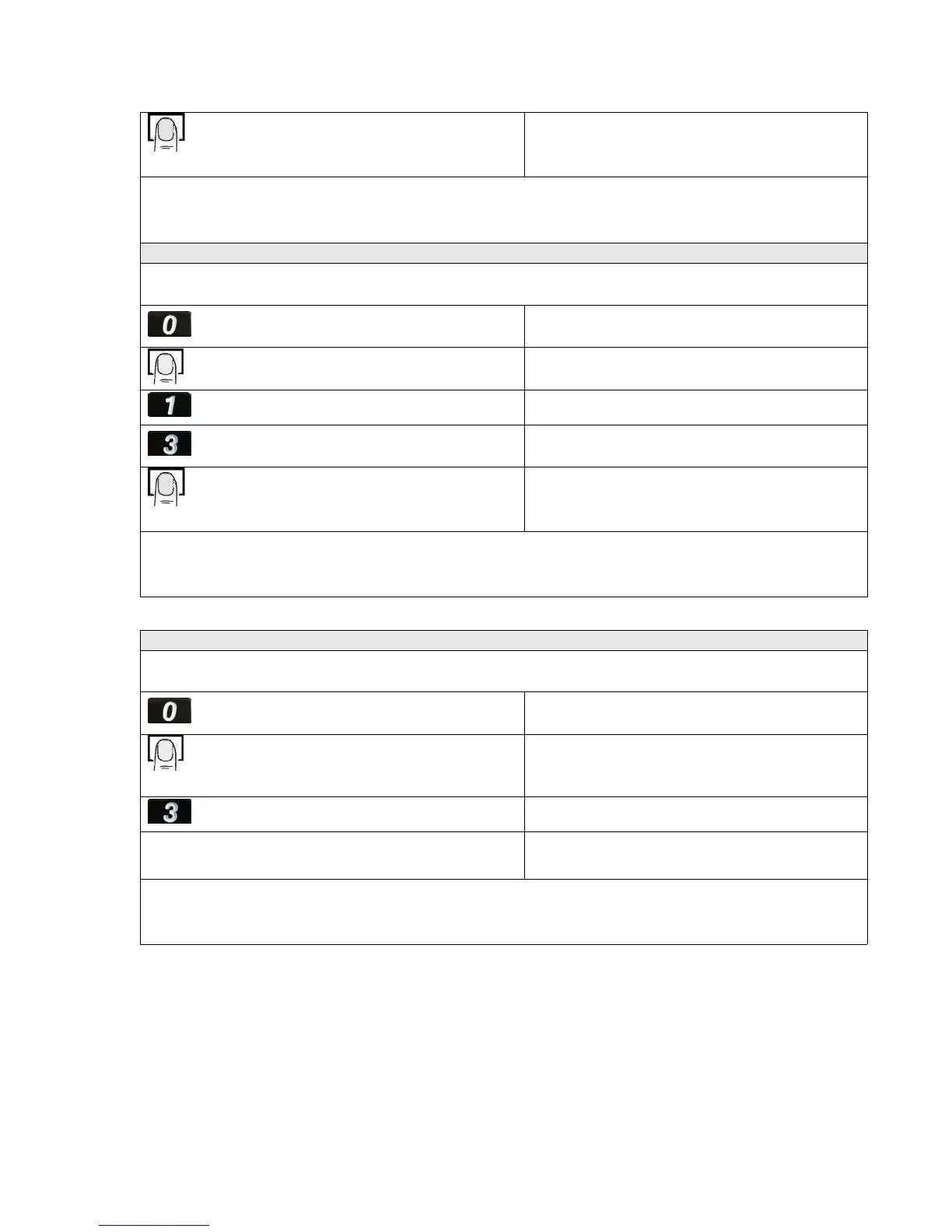
Adding a Temporary Fingerprint User
Youcanaddupto20Temporaryfingerprintsinthedoorlock.Whenaddingfingerprint,placefinger
flatandcenteredonthefingerprintwindow.
Pressthe“0”buttontoactivatethelock
Greenindicatorlightison,beepsandsensor
windowisred
Placefingeronfingerprintwindowtounlock
Greenlightturnson,beeps,andyoucanhear
motorunlockingsound
Pressthe“1”buttontostartsetup
Greenlightturnson,andbeeps
Press“3”forTemporaryfingerprintgroup
Greenindicatorlightison,beepsandsensor
windowisred
Placefingeronfingerprintwindowtoadd
Temporaryfingerprint
Twolongbeepsandmotorlockingsoundafter
fingerprintissuccessfullyadded
Howtounlockusingfingerprintadded:
Press“0”toactivatelock,placefingeronfingerprintwindowtounlock.Greenindicatorlightturnson,
beeps,andyoucanhearmotorunlockingsound.Itlocksagainautomaticallyafter5seconds.
Adding a PIN User
Only1PINcanbeaddedtothelock.ThePINmustbe11digitslongandPINcannotstartwith“0”
Pressthe“0”buttontoactivatethelock
Greenindicatorlightison,beepsandsensor
windowisred
Placeanymasterfingerprintonfingerprint
windowtounlock
Greenlightturnson,beeps,andyoucanhear
motorunlockingsound
Press“3”tostartthePINsetup
Redindicatorlightison,beeps
Enteryour11digitPIN.ThePINcannotstartwith“0”
___________
Twobeepsandfingerprintissuccessfully
added
HowtounlockusingPINadded:
Enterthe11digitPINtounlock.Greenindicatorlightturnson,beeps,andyoucanhearmotor
unlockingsound.Itlocksagainautomaticallyafter5seconds.
Lowbattery ‐ Whenopening,ifalarmbeepsandindicatorlightflashesred,thebatteryislow.
Youshouldreplacebatteries.Ifthereisnopoweratall,youcanusea9Vbatteryasemergency
power.Placea9Vbatteryonthetwocontacts/terminalsonbottomofdoorlocktotemporarily
2


 To Next Page
 Loading...