a v g - I
5
A-8
a v g - u
5
A-7
c T S E C
% 0 0 0
A-6
c T P R I
5 ) 0
A-5
p T s e c
5 0 ) 0
A-4
p T p r i
5 0 ) 0
A-3
U u n i t
v
A-2
w i r e s
3 p 4 W 3
A-1
g r o u p
INPUT
GROUP
i n p u t
ENT
!
Pass word
e n t e r
P c o d e
Pa sswor d co rr ec t
NO
YES
ENT
P
2 2 ) 0
1 0 ) 0
) 0
W
ENT
P
Engineer level
■Operating Steps
Measurement
Display
g r o u p
INPUT
GROUP
i n p u t
ENT
!
INPUT
GROUP
Display
Range : /v k v
※Please note that this setting is the choice of the
corresponding primary voltage units. For example, if
Vunit kv, while this pTpri set to 45) 0, then the set
primary voltage for 450.0KV.。
g r o u p
RELAY
GROUP
r e l a y
ENT
!
g r o u p
RS485
GROUP
r s 4 8 5
ENT
!
g r o u p
ANALOGUE
OUTPUT
a o
ENT
!
ENT
!
g r o u p
PULSE
GROUP
p u l s e
P 1s Back
P 1s Back
P 1s Back
!"#$%
P 1s Back
P 1s Back
RELAY / PULSE output of the outputs can only
choose a functional output
EX: Select PULSE output and then RELAY
function no output and vice versa
1 /5 24
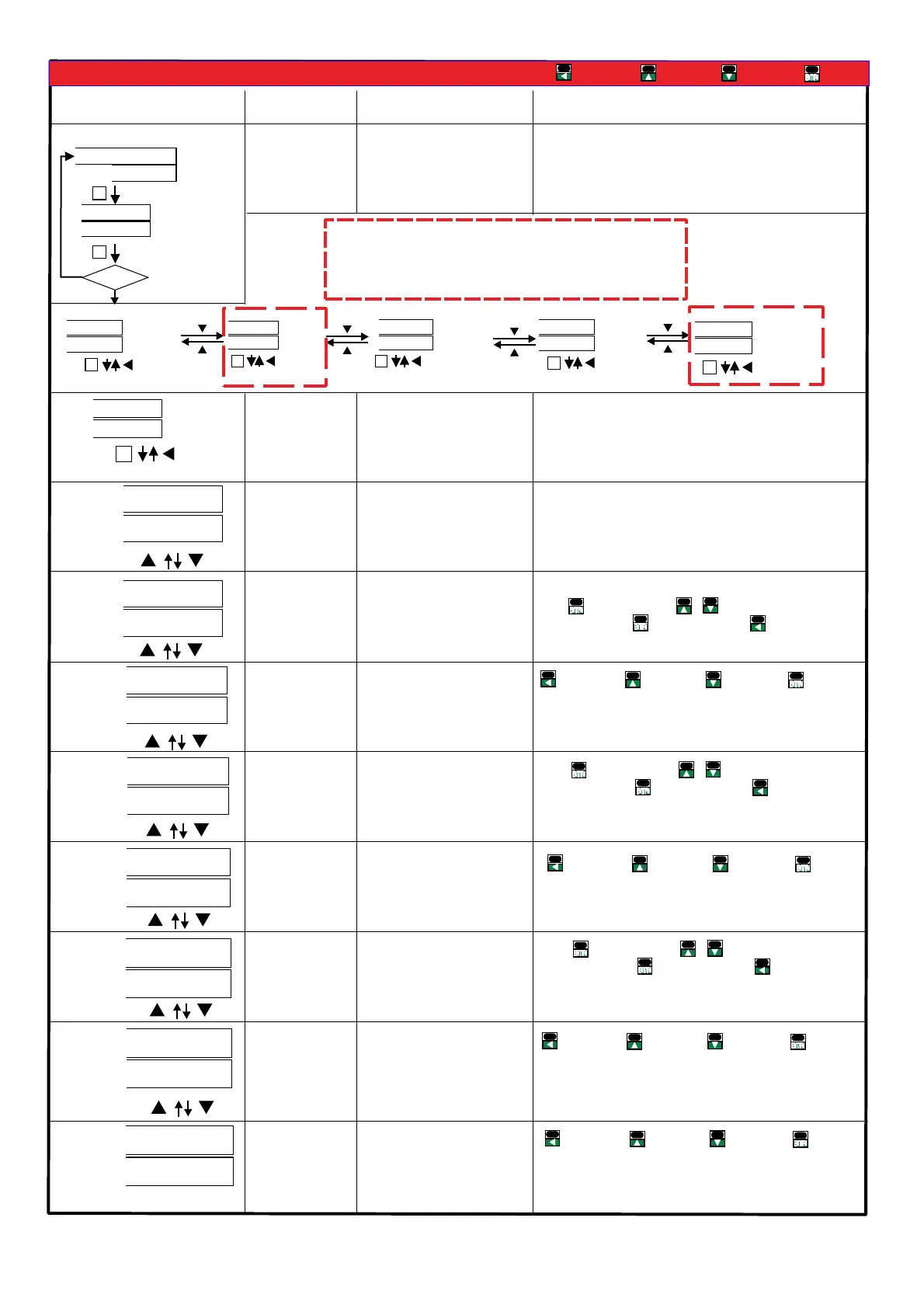
Parameters Display Setting Operation
AV
Default 1000:
Input system
selection WIRES:
Range:
1P2W 1P3W 3P3W.1// /
3P3W.2/3P3W.3/
3P4W.1/3P4W.3
1P2W:1Phase 2 Wire
1P3W:1Phase 3 Wire
3P3W.1:3Phase 3 Wire 1CT(balanced)、
3P3W.2:3Phase 3 Wire 2CT、
3P3W.3:3Phase 3 Wire 3CT、
3P4W.1:3Phase 4 Wire 1CT(balanced)、
3P4W.3:3Phase 4 Wire 3CT。
Enter
DecreaseIncrease
Shift
Primary PT
voltage
unit V.Unit:
Press values blink press change value or selection, , &
when done press secto next setting or hold 1 .
to previous selection list
V KV/
Primary voltage
setting range
Setting range 0V~ KV:50. 100
Secondary voltage
setting range
Setting range 0V~ V:50. 500
Primary CT
setting range
(VIEW ONLY)
Secondary CT
setting range
Setting range 0A 2 A:1. 999.9~
Average voltage
setting:
Setting range:2 99~
Average current
setting:
Setting range:2 99~
※System may have interference or signal unstable
sometimes, causing display unstable: This function help
to decrease rapid change on the display. Increasing
average value make display more stable,
Press values blink press change value or selection, , &
when done press secto next setting or hold 1 .
to previous selection list
※System may have interference or signal unstable
sometimes, causing display unstable: This function help
to decrease rapid change on the display. Increasing
average value make display more stable,
Enter
DecreaseIncrease
Shift
Enter
DecreaseIncrease
Shift
Enter
DecreaseIncrease
Shift
Enter
DecreaseIncrease
Shift
Press values blink press change value or selection, , &
when done press secto next setting or hold 1 .
to previous selection list
En d te rm in al o hm
ADEFGHI -1,:JKL)*MNO.PQNOMRS.<)
*3 4RSTUVWP4W.3
)*1 2 4,1-10~1-27XYZRSP W
)*1 4,1-14/1-1 ~ XYZRSP3W 6 27
)*3 4,1-1 1-1 /1-1 1- /P3W.1 3~ 5 7/1-18/ 20 1-21/1-23/1-24/1-
26/1-27XYZRS
)*3 4,1-1 1- /1- XYZRSP3W.2 7/ 20 23/1-26
)*3 4,1-1 1- /1- XYZRSP3W.3 7/ 20 23/1-26
)*3 4,1-1 1- /1-P4W.1 4~15/ 17~18 20~21/1-23~24/1-26~27
XYZRS
)*+,:1 p 2 w 1 p 3 w 3 p 3 w .1 3 p 3w .2 3p 3w .3/ / / / /
3 p 4 w .1 3 p 4 w .3/
"#$%&':
v a v g. ()*+,-.:
i a v g. ()*/,-.:
f r e q :
2345.
p . t l :()673.
q . t l :()6873.
s . t l :()69:73.
p f . a vg :(),-73;
%45.
v a : )*+.45A
vb :B)*+.45
vc :C)*+.45
ia :A)*/.45
ib :B)*/.45
ic :C)*/.45
p f - a :A)7345.
pf-b :B)7345.
pf-c :C)7345.
p - a :A)7345.
p-b :B)7345.
p-c :C)7345.
q - a :A)87345.
q-b :B)87345.
q-c :C)87345.
s - a :A)9:7345
s - b :B)9:7345
s - c :C)9:7345
RELAY / PULSE output of the outputs can
only choose a functional output
EX: Select PULSE output and then RELAY
function no output and vice versa
Clamp CT
Optional of Clamp CT, make sure
(1)CT of the SN number with the
CPM-10 SN number, as shown
( )2 On the label
A A Phase B B: - ; : -
Phase C C Phase; : - ;
According to the phase matching
Relay Pulse output
CL
BK
AK
AL
BL
CK
, ,0123CT4 56789:; <=>?@A


 To Next Page
 Loading...