2
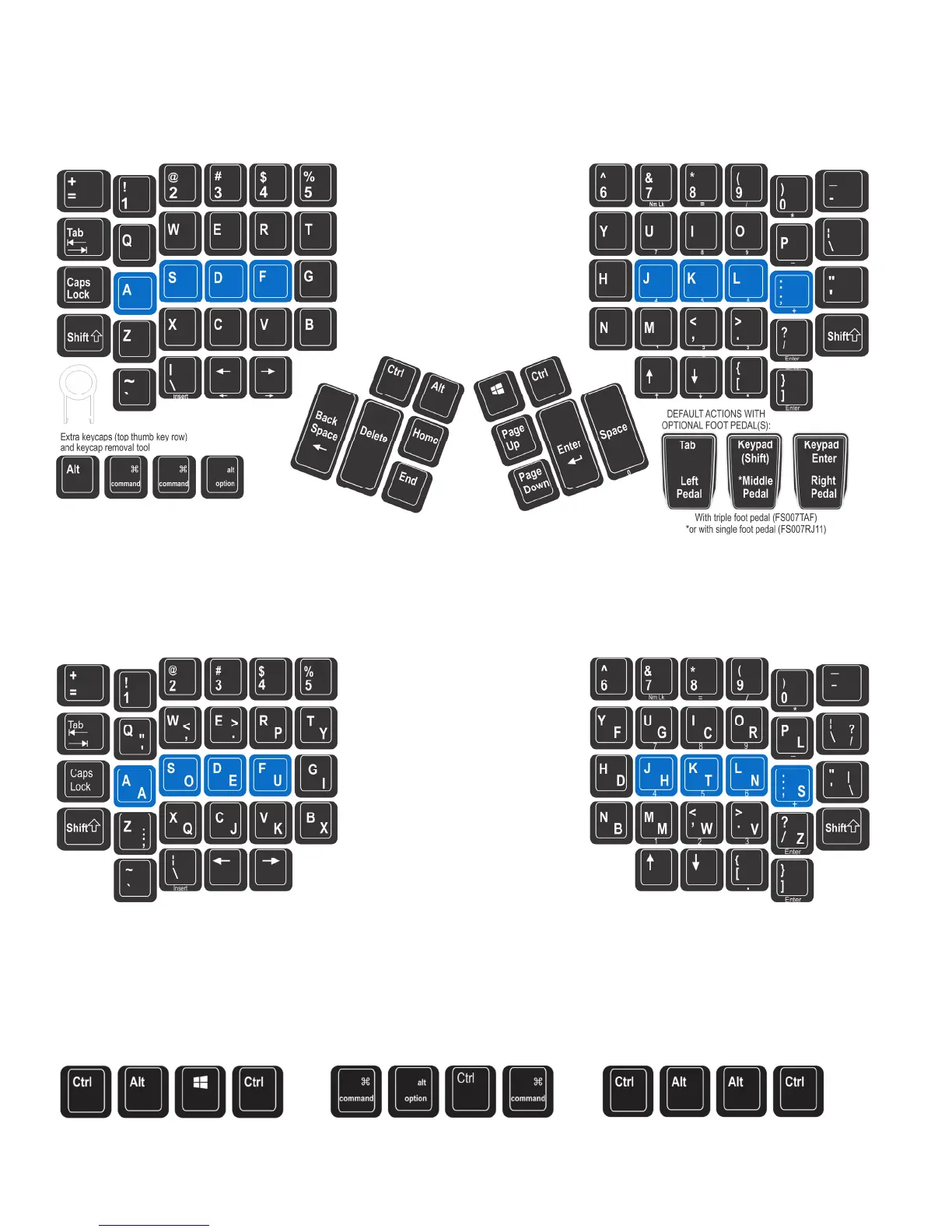
Default Layout: QWERTY (U.S.)
All Advantage2 keyboards come precongured from the factory with the familiar QWERTY layout, but customizing is easy with the simple on-board
programming features (see page 3).
Alternate Layout: Dvorak
The Advantage2 also comes preloaded with an onboard Dvorak layout. Dual-legended QWERTY-Dvorak keycaps are standard on the KB600QD, but
they can also be purchased separately and installed on any Advantage2 keyboard.
Thumb Key Modes: Windows, Mac, or PC
Users may also congure the modier keys in the thumb-operated clusters in one of three modes. These modes are optimized for Windows users,
Mac users, and PC users who don’t need a Windows key. Thumb Key Mode is set independently from layout (QWERTY or Dvorak). Thumb Key
Mode defaults to the Windows conguration in the US (PC mode is pre-set for non-US models to allow the right Alt to serve as Alt Gr). Extra
keycaps and a keycap tool are included.
Fig 1. QWERTY Layout: Default (Program+F3)
Fig 2. Dual legended Qwerty/Dvorak keycap layout. Use with on-board Dvorak feature (Program+F4)
Fig 4. Mac Mode: Progm+F5 Fig 5. PC Mode: Progm+F6
Fig 3. Windows Mode: Progm+F7


 To Next Page
 Loading...