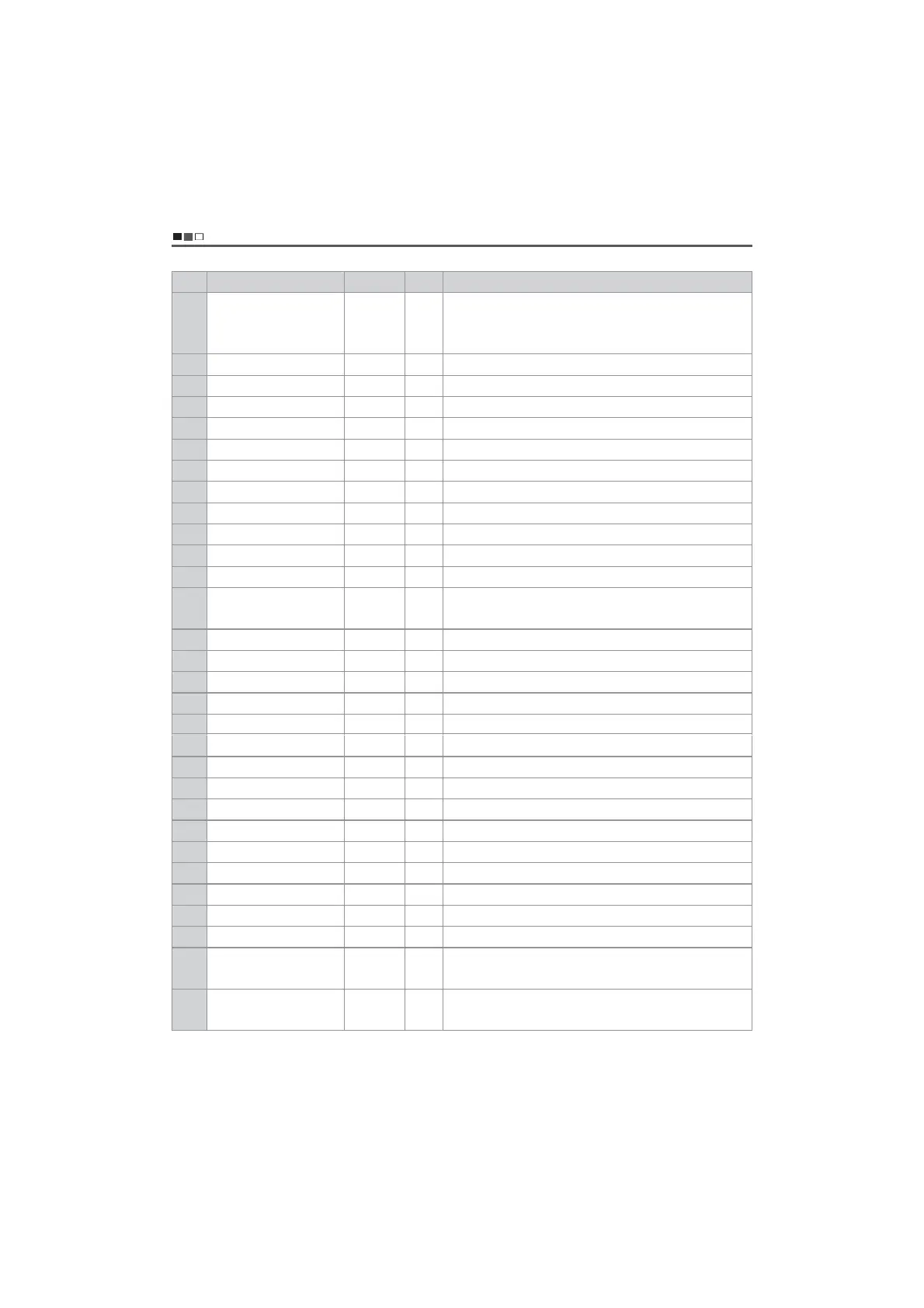
No. Category Type Qty. Brief description
Altitude hold/
positioning flight
switching switch
Three-
speed
toggle type
1
High speed:head free mode Medium
speed: Fixed point mode
Low speed: Altitude hold mode
Left joystick
Universal
joystick
1
Control the throttle and the heading
One button take-off/landing
Push-button
1
One button take-off/landing
One button route
Push-button
1
After setting the route, one button controls the drone to fly according to the route.
One button return
Push-button
1
When the drone has a normal flight, one button controls it to make
autonomous return.
Route suspended/resumed
Push-button
1
Press the button to suspend the route, and then press it again to resume the route
Switch camera 1/2 / mapping
Toggle type
1
Right joystick
Universal
joystick
1
Control the flight forward & backward and to left & right
Camera button
Push-button
1
Short press to start airborne photo taking
Video button
Push-button
1
Short press to start/stop airborne video
Custom button
Push-button
1
Reserve custom button
Custom button
Push-button
1
Navigation light button
Power button
Push-button
1
Short press once, long press for 3S to turn on/off the power, and a prompt
sound will be given when the power is started successfully
Button response indicator
LED light
8
It indicates whether the corresponding button works
System indicator
LED light
1
If the system works properly, the LED light will flash.
Communication failure light
LED light
1
If the communication between the remote control and the drone is interrupted,
the light will be red.
Battery alarm light
LED light
1
When the battery is low, the light will be red.
Charging indicator
LED light
1
The light will be red during battery charging while the light will be blue when the
battery is fully charged
Power button response
indicator
LED light
1
It indicates whether the corresponding button works
Zoom control button
Push-button
2
Mark "+" for zooming in images, mark "-" for zooming out images
Digital video transmission
antenna interface
/1
Digital HD video antenna
Net port
/1
Network cable interface
SD insertion port
/1
SD card slot
HDMI
/1
HD image transmission interface
USB
/2
Software upgrade interface and external device
D C IN
/1
Charger interface
Radio antenna interface
/1
Radio antenna
Pitching control of the gimbal Push-button
2
Control the gimbal pitching, up means nose-up and down means nose-down
Tripod folding &
unfolding button
L1/R1 2
Up: tripod folding & unfolding function Down:
reservation function
Reservation
function button
L2/R2 2
Up: reservation function Down:
reservation function
AEE Unmanned Aircraft System
Professional Leading


 To Next Page