- 5 -
Steps Illustration Description
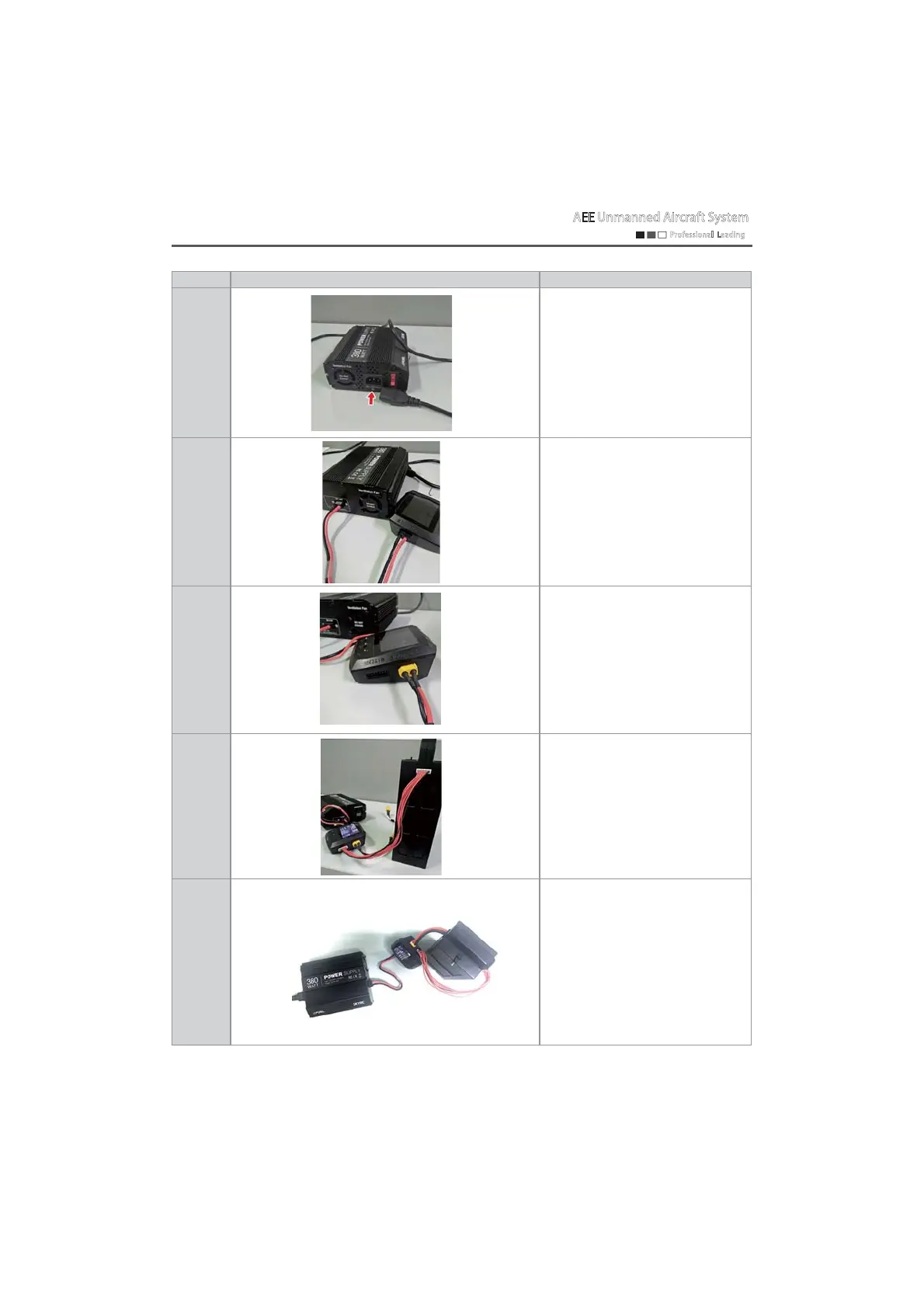
Step 1
Connect the power cord of "380W
power";
Step 2
Insert the power adapter cable into
the "DC-24v" interface of the 380w
power, and the other end into the
"DCINPUT" interface
corresponding to the charger;
Step 3
Insert the battery charging cable
into the "OUTPUT" interface of the
charger, the 6pin flexible flat cable
into the "123456" interface of the
charger, and the battery charging
cable and 6pin flexible flat cable
into the battery interface.
Step 4
Insert the power cord of "380W
power" into 220V AC power to
supply power to the charger, then
turn on the red power switch, and
the charger will start to work.
Step 5
The overall charging connection
diagram is as shown on the left;
Connect one end of the standard
power cord to the charger power
interface and the other end to 220V
AC power to supply power to the
charger; then turn on the red power
switch, and the charger will start to
work.
AEE Unmanned Aircraft System
Professional Leading


 To Next Page