To access the source code of these free and
open source software components whose
license conditions require publishing, and to
see their full copyright information and
applicable license terms, visit: http://
aeg.opensoftwarerepository.com (folder
NIUS).
5.5 Initial preheating
Preheat the empty oven before the first use.
Step 1 Remove all accessories and removable shelf supports from the oven.
Step 2
Set the maximum temperature for the function: .
Let the oven operate for 1 h.
Step 3
Set the maximum temperature for the function: .
Let the oven operate for 15 min.
The oven can emit an odour and smoke during preheating. Make sure that the room is ventilated.
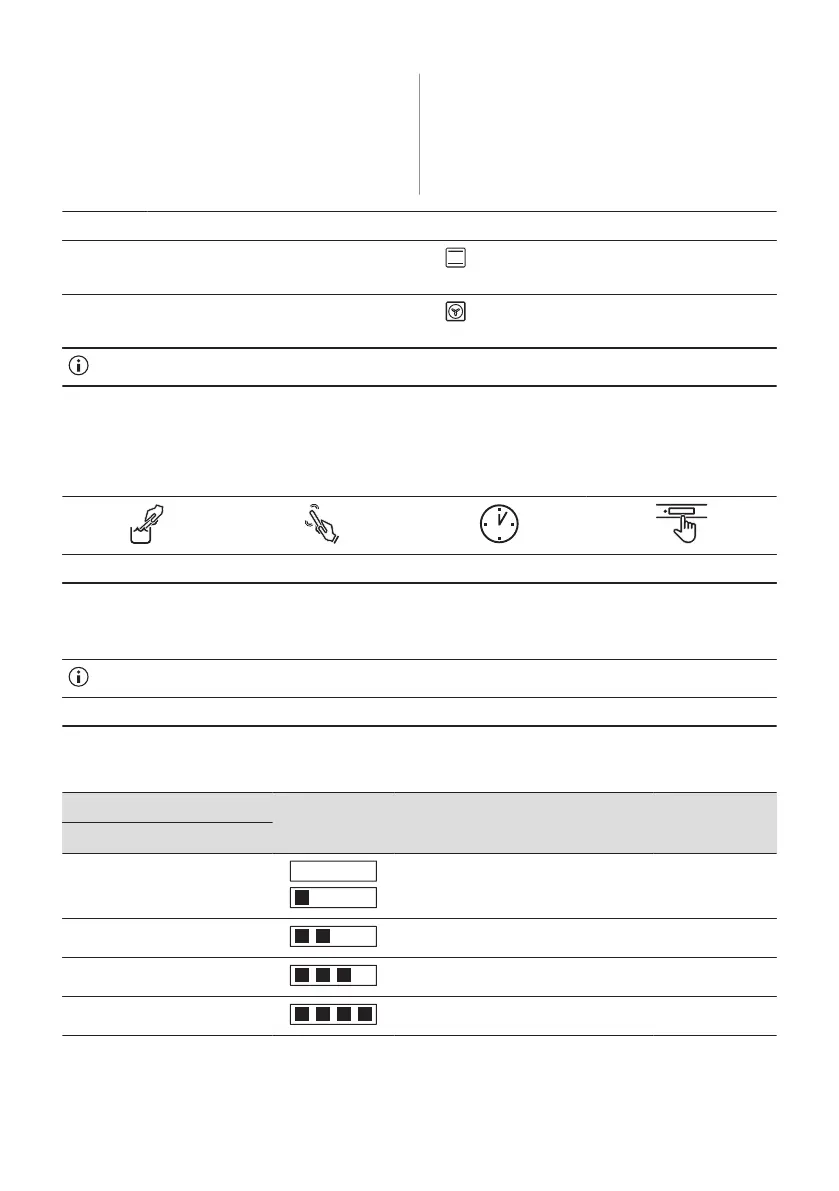
5.6 How to set: Water hardness
When you connect the oven to the mains you have to set the water hardness level.
Use the test paper or contact your water supplier to check the water hardness level.
Step 1 Step 2 Step 3 Step 4
Put the test paper into
water for about 1 sec. Do
not put the test paper un‐
der running water.
Shake the test paper to re‐
move the excess of water.
After 1 min, check water
hardness with the table
below.
Set the water hardness lev‐
el: Menu / Settings / Setup /
Water hardness.
The colours of the test paper continue to change. Do not check water hardness later than 1 min after test.
You can change the water hardness level in the menu: Settings / Setup / Water hardness.
The table shows water hardness range (dH) with the corresponding level of Calcium deposit
and the water classification. Adjust the water hardness level according to the table.
Water hardness Test paper Calcium depos‐
it (mmol/l)
Calcium de‐
posit (mg/l)
Water classifi‐
cation
Level dH
1 0 - 7 0 - 1.3 0 - 50 soft
2 8 - 14 1.4 - 2.5 51 - 100 moderately hard
3 15 - 21 2.6 - 3.8 101 - 150 hard
4 ≥22 ≥ 3.9 ≥151 very hard
When the tap water hardness level is 4, fill the water drawer with still bottled water.
ENGLISH 13


 To Next Page