Sensor
field
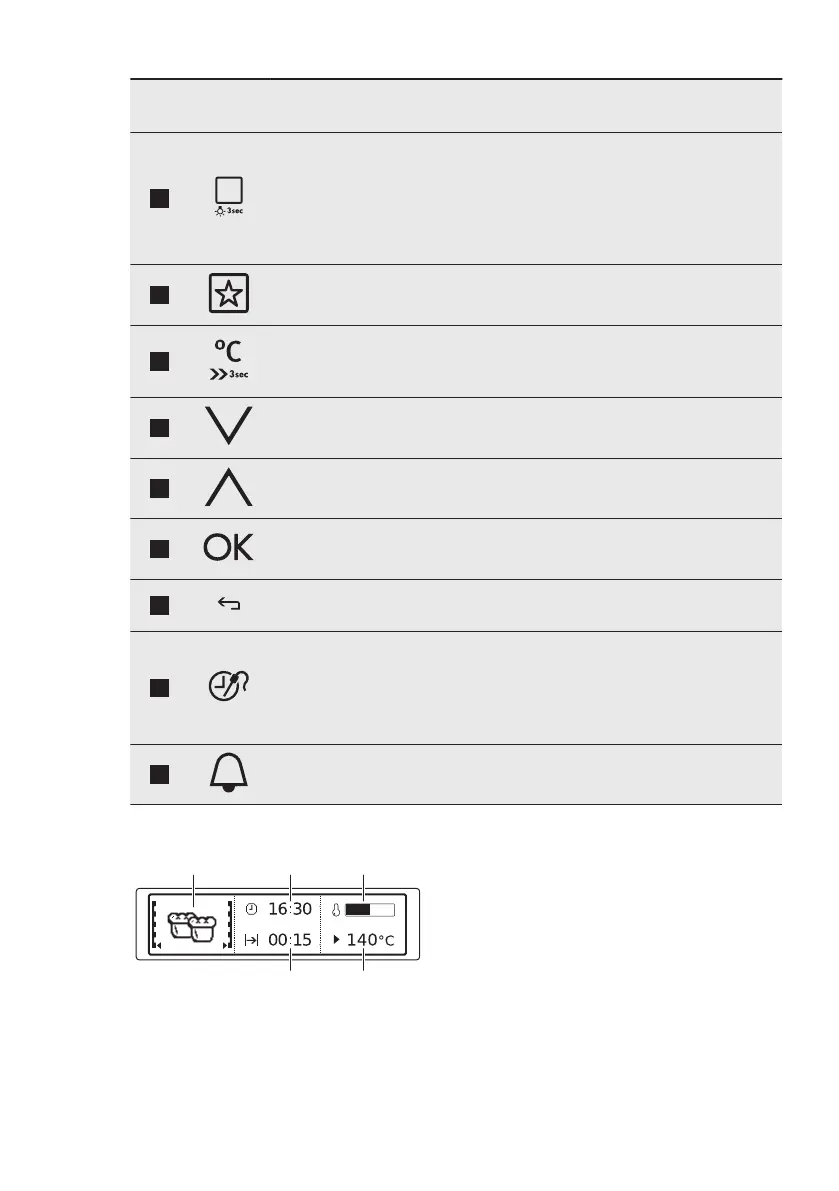
Function Comment
3
Heating Functions
or Assisted Cook-
ing
Press the sensor field once to choose a heating
function or the menu: Assisted Cooking. Press the
sensor field again to switch between the menus:
Heating Functions, Assisted Cooking. To turn on
or turn off the light, press the field for 3 seconds.
You can turn on the light also when the oven is off.
4
Favourites To save and access your favourite programmes.
5
Temperature se-
lection
To set the temperature or show the current tem-
perature in the oven. Press the field for 3 seconds
to turn on or turn off the function: Fast Heat Up.
6
Down key To move down in the menu.
7
Up key To move up in the menu.
8
OK To confirm the selection or setting.
9
Back key To go back one level in the menu. To show the
main menu, press the field for 3 seconds.
10
Time and addi-
tional functions
To set different functions. When a heating func-
tion works, press the sensor field to set the timer
or the functions: Function Lock, Favourites, Heat +
Hold, Set + Go. You can also change the settings
of the core temperature sensor.
11
Minute Minder To set the function: Minute Minder.
4.2 Display
A. Heating function
B. Time of day
C. Heat-up indicator
D. Temperature
E. Duration time or end time of a
function
ENGLISH 9


 To Next Page