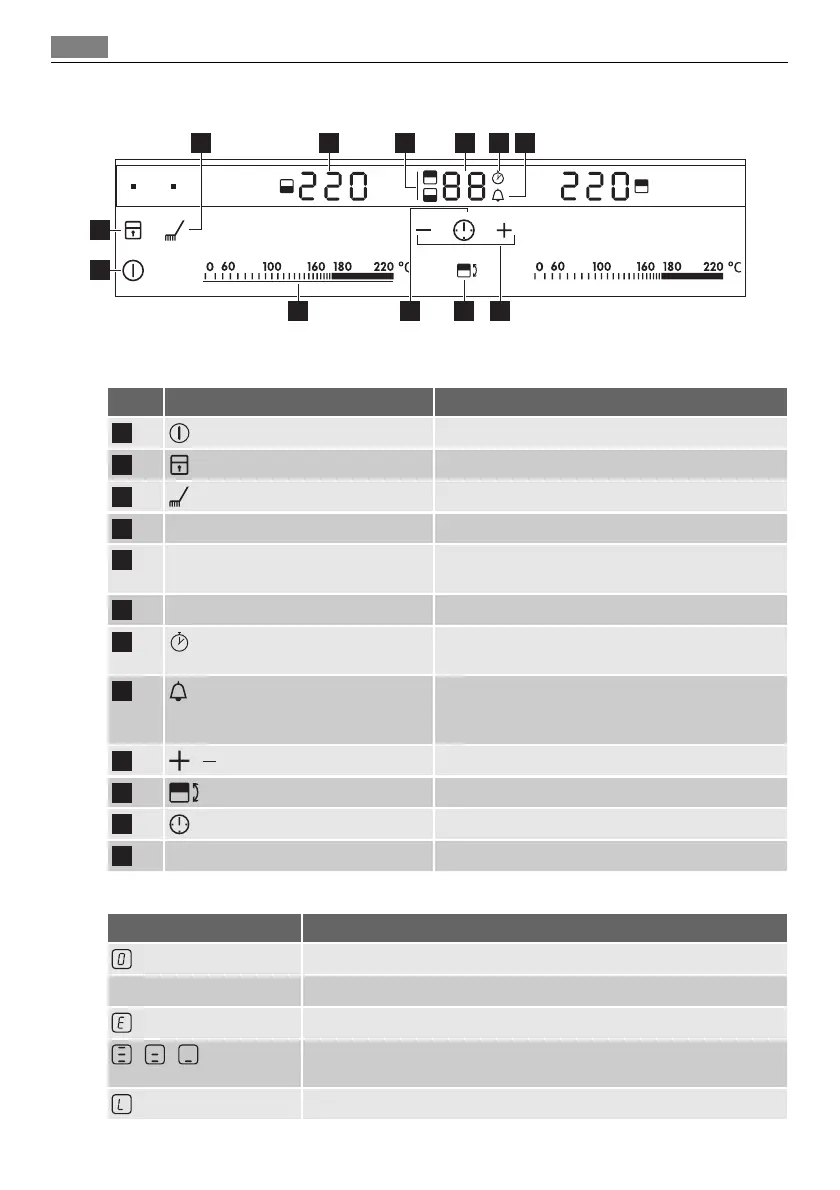
Control panel layout
6 75 843
91012 11
2
1
Use the sensor fields to operate the appliance. The displays, indicators and sounds tell which
functions operate.
sensor field function
1
It activates and deactivates the appliance.
2
It locks/unlocks the control panel.
3
It activates and deactivates the cleaning function.
4
Temperature display It shows the temperature.
5
Cooking zones' indicators of timer It shows for which of the roasting zones you set
the time
6
Timer display It shows the time in minutes.
7
It shows that the Count Up operates (1 to 59 mi-
nutes).
8
It shows that the Count Down Timer operates (1
to 99 minutes) or shows that Minute Minder oper-
ates.
9
/
It increases or decreases the time.
10
It sets the roasting zone. .
11
It sets the Timer functions.
12
Control bar To set the heat temperature.
Displays
Display Description
The roasting zone is deactivated.
60
-
220
The roasting zone operates.
+ digit
There is a malfunction.
/ /
3 step Residual heat indicator: continue cook / stay warm / residual
heat.
Lock / The Child Safety functions operates.
30 Product description


 To Next Page