4.13 Door open alarm
If the fridge door is left open for
approximately 5 minutes or if the freezer door
is left open for approximately 80 seconds, the
sound is on and the door open alarm
indicator turns on. The internal fridge light
may also start flashing.
The alarm stops after closing the door. Press
any button to switch off the sound.
If you do not press any button, the sound
switches off automatically after around
one hour to avoid disturbing.
4.14 Air filter change indicator
When the air filter has expired and requires
replacement, the Air filter change indicator
and the Filter Reset alarm indicator turn on.
Refer to "Installing and replacing the CleanAir
+ filter" section in "Care and cleaning"
chapter for the replacement instructions.
After the filter replacement, press the Filter
Reset alarm button to turn off the alarm.
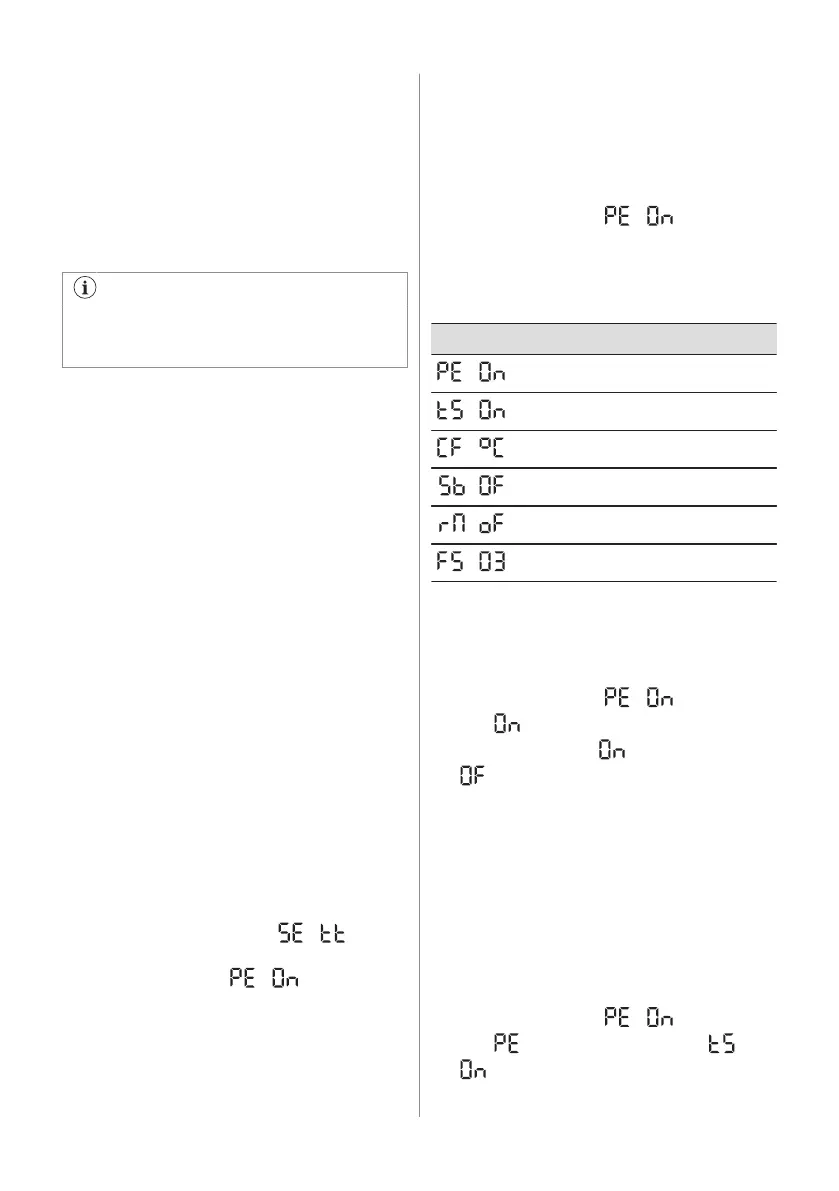
4.15 Setting mode
The Setting mode allows you to:
• Enable or disable the ECOMETER
indicator
• Enable or disable the button sounds
• Change the temperature units from °C to
°F
• Enable or disable the Rest mode
• Enable or disable the Sabbath mode
• Reset the appliance to factory settings
Activating the Setting mode
To activate the Setting mode:
1. Press and hold the ECO button for
approximately 3 seconds. When the
Setting mode is being activated, the
display shows a blinking .
2. Once the Setting mode is switched on,
the display shows .
To deactivate the Setting mode, press and
hold the ECO button for approximately 3
seconds.
The Setting mode deactivates automatically if
you do not interact with the control panel for
60 seconds.
Navigating the Setting mode
1. Activate the Setting mode (refer to
"Activating the Setting mode").
The display shows .
2. Tap the fridge temperature button (on the
left) to change the parameter. Tap the
freezer temperature button (on the right)
to change the parameter value.
Display Default parameters
ECOMETER indicator
Button sounds
Temperature units
Sabbath mode
Rest mode
Factory settings
ECOMETER indicator
In order to switch the ECOMETER on or off:
1. Activate the Setting mode (refer to
"Activating the Setting mode").
The display shows .
2. Tap repeatedly. The indicator will
show respectively for the enabled or
for the disabled ECOMETER
indicator.
3. Press and hold the ECO button for
approximately 3 seconds to exit the
Setting mode.
Button sounds
You can enable or disable the button sounds
in the Setting mode. To enable or disable the
sounds:
1. Activate the Setting mode (refer to
"Activating the Setting mode").
The display shows .
2. Tap repeatedly until you see . Tap
to switch the sounds either on or off.
12 ENGLISH



 To Next Page