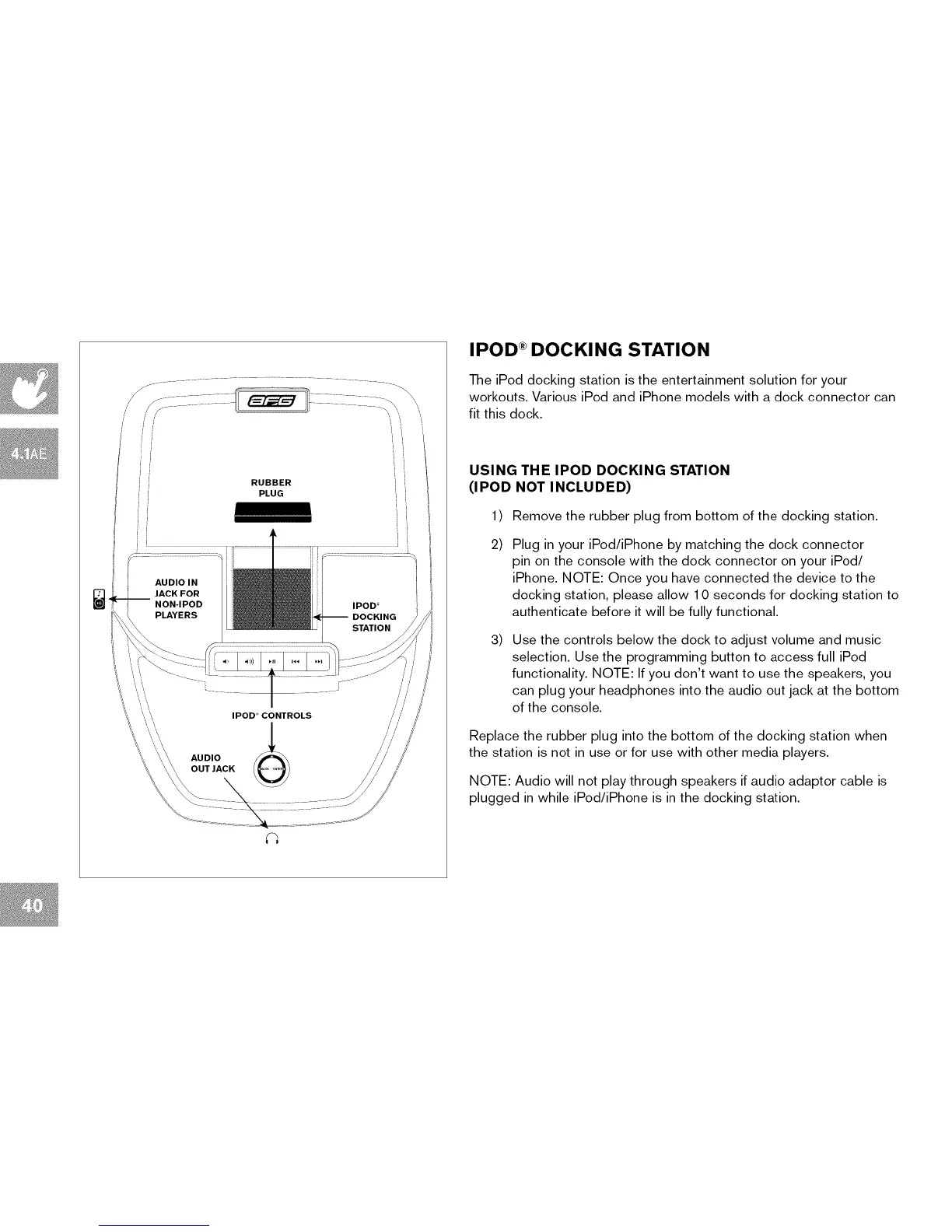
RUBBER
PLUG
IPOD _ CONTROLS
AUDIO
OUT JACK
IPOD ®DOCKING STATION
The iPod docking station is the entertainment solution for your
workouts. Various iPod and iPhone models with a dock connector can
fit this dock.
USING THE IPOD DOCKING STATION
(IPOD NOT INCLUDED)
1)
2)
3)
Remove the rubber plug from bottom of the docking station.
Plug in your iPod/iPhone by matching the dock connector
pin on the console with the dock connector on your iPod/
iPhone. NOTE: Once you have connected the device to the
docking station, please allow 10 seconds for docking station to
authenticate before it will be fully functional.
Use the controls below the dock to adjust volume and music
selection. Use the programming button to access full iPod
functionality. NOTE: If you don't want to use the speakers, you
can plug your headphones into the audio out jack at the bottom
of the console.
Replace the rubber plug into the bottom of the docking station when
the station is not in use or for use with other media players.
NOTE: Audio will not play through speakers if audio adaptor cable is
plugged in while iPod/iPhone is in the docking station.


 To Next Page