Anion
TM
ACR
Quick Guide
3
Information Codes
Important information codes are listed on page 1. Consult the Anion™ AS100 Analyzer User Manual for
information codes not listed on page 1. Follow the actions listed in the User Manual to correct the error.
Verification of Test Results
Consult the Anion™ ACR Package Insert. See section “Test result reporting”.
Verification of Control Results
Compare the results with the values listed on the front of the Anion™ ACR Control Package Insert.
Technical Support?
Call 1-866-216-9505. This is a toll free number.
Available for use only in the United States of America.
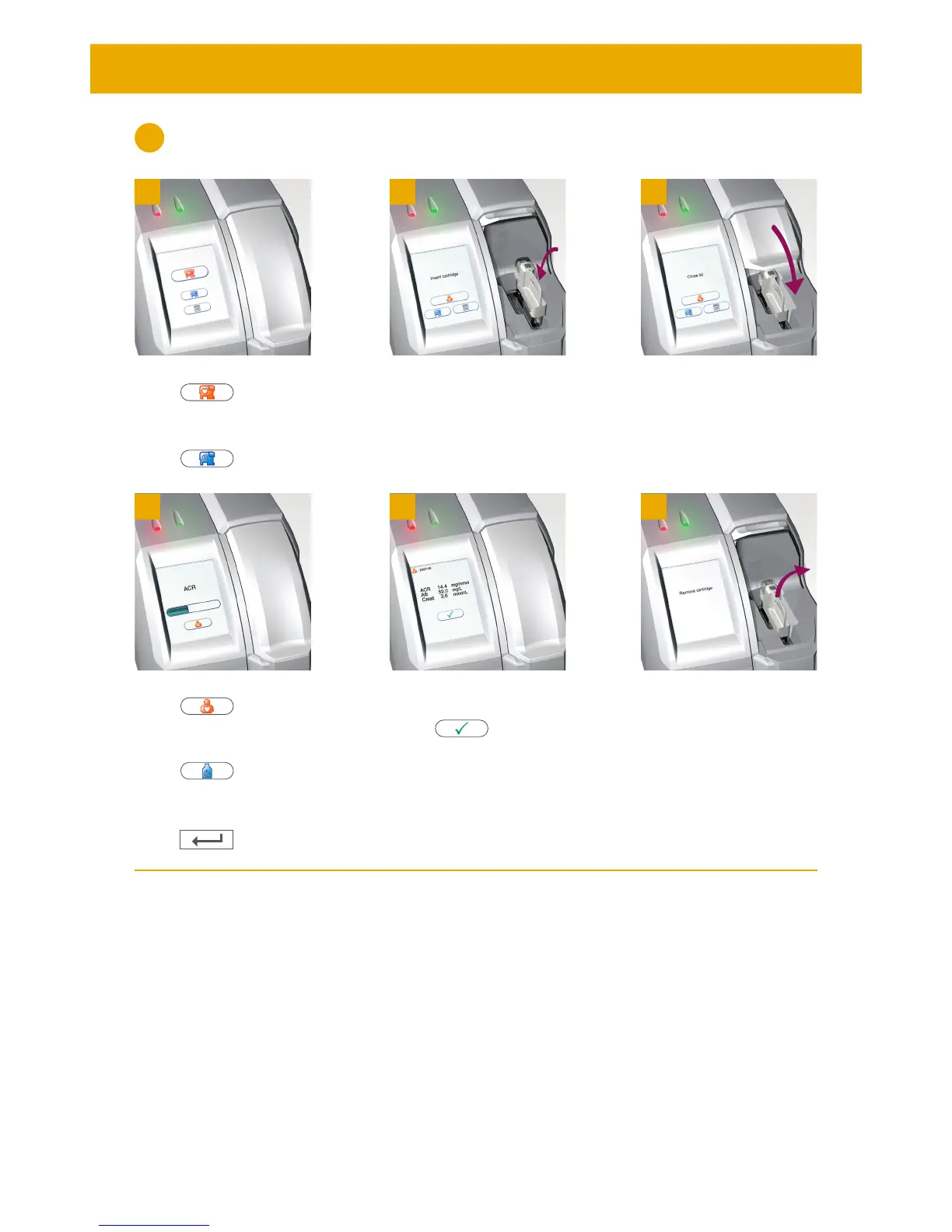
The lid opens automatically.
Insert the Test Cartridge.
The barcode should face left.
Close the lid manually.
The lid opens automatically.
Remove and discard the
Cartridge.
Close the lid manually.
1 32
4 5 6
Patient Sample:
Touch for patient
samples.
Control:
Touch for controls.
Patient Sample:
Touch and enter
patient ID.
Control:
Touch and enter
control ID.
Enter ID during processing.
Touch to conrm.
Record the result when it
appears on the screen.
Touch to accept.
Running Samples on the Analyzer
4


 To Next Page