Need help?
Do you have a question about the AG Neovo FMC-06 and is the answer not in the manual?
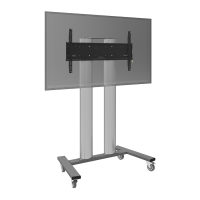
The FMC-06 is a robust and versatile floor mounting cart designed to provide a mobile and adjustable solution for interactive flat panels. This installation manual outlines the steps to correctly and safely assemble and use the stand, ensuring optimal performance and longevity. The cart is engineered to support a significant load, making it suitable for a wide range of display sizes and weights.
The primary function of the FMC-06 floor mounting cart is to securely hold and transport large interactive flat panels. It transforms a stationary display into a mobile workstation, allowing for flexible placement and collaborative use in various environments such as classrooms, conference rooms, and exhibition spaces. The cart's design emphasizes stability and ease of movement, ensuring that the valuable display remains safe during transit and use.
The core structure of the cart consists of two main legs, a wall bracket, and a tray. These components are meticulously designed to interlock and form a sturdy frame. The wall bracket serves as the primary mounting point for the interactive flat panel, offering multiple hole positions to accommodate different screen sizes and ensure proper balance. This adaptability is crucial for maintaining the display's integrity and providing an optimal viewing experience.
A key functional element of the FMC-06 is its mobility, facilitated by four castors. These wheels allow the cart to be effortlessly moved across various floor surfaces. Each castor is equipped with a brake mechanism, which is essential for securing the cart in a desired position and preventing accidental movement. The ability to lock the wheels ensures stability during presentations, interactive sessions, or when the cart is stored.
Another important feature is the integrated tray, which provides a convenient surface for placing accessories such as laptops, keyboards, mice, or remote controls. This tray is strategically positioned between the two main columns, making it easily accessible to users while maintaining a compact footprint. The inclusion of the tray enhances the cart's utility, transforming it into a comprehensive mobile workstation rather than just a display stand.
The design also incorporates a wall hanging strip, which is an integral part of securing the interactive flat panel to the main bracket. This strip works in conjunction with safety screws to ensure that the display is firmly attached, preventing any accidental dislodgement. The process of attaching the display is carefully outlined to guarantee a secure fit, highlighting the importance of proper alignment and tightening of all fasteners.
The FMC-06 is designed for straightforward and intuitive use, making it accessible to a wide range of users. The installation process is broken down into clear, sequential steps, starting from the assembly of the base and culminating in the mounting of the interactive flat panel.
Before any assembly begins, users are instructed to adjust the castors to their brake state. This initial step is critical for safety, as it ensures that the cart remains stationary during the assembly process, preventing any unintended movement that could lead to injury or damage. The castors are then screwed into the main legs, forming a stable foundation for the entire structure.
The attachment of the wall bracket to the end legs is a pivotal step, as it determines the height and stability of the display. The manual provides a helpful table suggesting specific hole positions on the wall bracket based on the monitor size. This guidance ensures that the display is mounted at an appropriate height for optimal viewing and interaction, whether for a 55-inch, 65-70-inch, or 75-86-inch panel. The "Positive" indicators on the components guide users to correctly orient the parts, simplifying the assembly.
Once the main frame is assembled, the tray is integrated between the two columns. The design allows for the tray to be inserted into positioning bolts first, then snapped into place, and finally secured by tightening all bolts. This multi-step attachment ensures that the tray is firmly fixed and can reliably support the weight of accessories.
Mounting the interactive flat panel is a critical stage that requires careful attention to detail. The wall hanging strip is first locked onto the interactive flat panel itself. This strip is then used to hang the assembled machine onto the wall bracket of the cart. A crucial safety warning emphasizes the need to ensure that the brakes are locked before attempting to hang the display. This step also explicitly states that it requires at least two professionals to complete, underscoring the weight and size of the displays the cart is designed to hold. This collaborative approach minimizes the risk of accidents and ensures the display is securely mounted.
In situations where the machine's wall mount bracket does not perfectly align with the stand's wall mount, the manual provides an adjusting process. This flexibility ensures compatibility with a broader range of interactive flat panels. The adjustment involves locking the wall hanging board to the wall bracket and then hanging the machine, followed by locking the safety bolts. The "Positive" indicators and instructions to ensure the locking hole side of the wall hanging board is front-facing further assist in correct alignment.
The overall user experience is enhanced by the provision of necessary tools and fasteners. The manual lists all required accessories, including various screws, spring pads, a Phillips screwdriver (self-provided), and an adjustable wrench (self-provided). This comprehensive list ensures that users are well-prepared for the assembly process.
While the manual primarily focuses on installation, several aspects imply ease of maintenance and long-term durability. The robust construction, indicated by the 100.0 kg (220.4 lb) load capacity, suggests that the cart is built to withstand regular use and movement. The use of durable materials and secure fastening mechanisms contributes to the cart's longevity, reducing the need for frequent repairs or replacements.
The design of the castors, with their integrated brake mechanism, not only enhances safety during use but also simplifies maintenance. Regular inspection of the castors and their brakes can ensure continued smooth movement and reliable locking. Should a castor become damaged, its modular design would likely allow for individual replacement, rather than requiring a complete overhaul of the base.
The clear and sequential instructions for assembly also indirectly contribute to maintenance. A correctly assembled cart is less likely to experience premature wear and tear or structural issues. By following the manual's guidelines, users can ensure that all components are properly aligned and secured, which is fundamental to the cart's stability and operational integrity over time.
The emphasis on tightening all bolts, as seen in Step 4 for the tray assembly, highlights the importance of secure connections. Periodically checking and re-tightening these fasteners can prevent loosening due to vibrations or movement, thereby maintaining the cart's structural soundness.
Furthermore, the "Remarks" section addressing potential mismatches between the machine's wall mount bracket and the stand's wall mount suggests a design that anticipates common user challenges. This adaptability reduces the likelihood of users forcing incompatible components, which could lead to damage. The provision of an adjustment process ensures that the cart can be maintained in an optimal configuration even with varying display types.
In summary, the FMC-06 floor mounting cart is a well-designed, user-friendly solution for mobile interactive flat panels. Its robust construction, clear assembly instructions, and thoughtful features like the adjustable mounting positions and integrated tray make it a practical and durable choice for dynamic display environments. The focus on safety, particularly during the display mounting process, ensures that users can operate the cart with confidence.
 General
| Swivel | 180° |
|---|---|
| Material | Steel |
| Color | Black |
| Mounting Type | Wall Mount |
| VESA Mounting Standard | 75 x 75 mm, 100 x 100 mm |
| Tilt | 15° |
| Pivot/Rotation | No |
| Compatible Screen Size | 17" ~ 27" |


 To Next Page