Home
AGPtek
Battery Charger
DW01
Page 4 (How It Works)
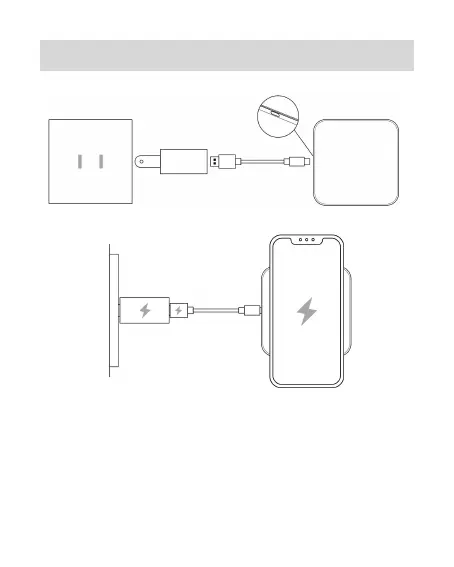
AGPtek DW01 - How It Works; Connection Steps; LED Indicator for Charging
33 pages
Manual
Save Page as PDF
To Next Page
To Next Page
To Previous Page
To Previous Page
Loading...
2
How
I
t
W
orks
1.
Connec
tion
Ins
truction
a.
Connectin
g
power
sourc
e.
b.
Put
devi
ce
on
wir
eless
charging
area.
c.
The
LED
indicator
is
in
blue
color
indicating
the
device
is
charging.
2.
Power
Indicat
or
In
structio
n
3
5


 To Next Page