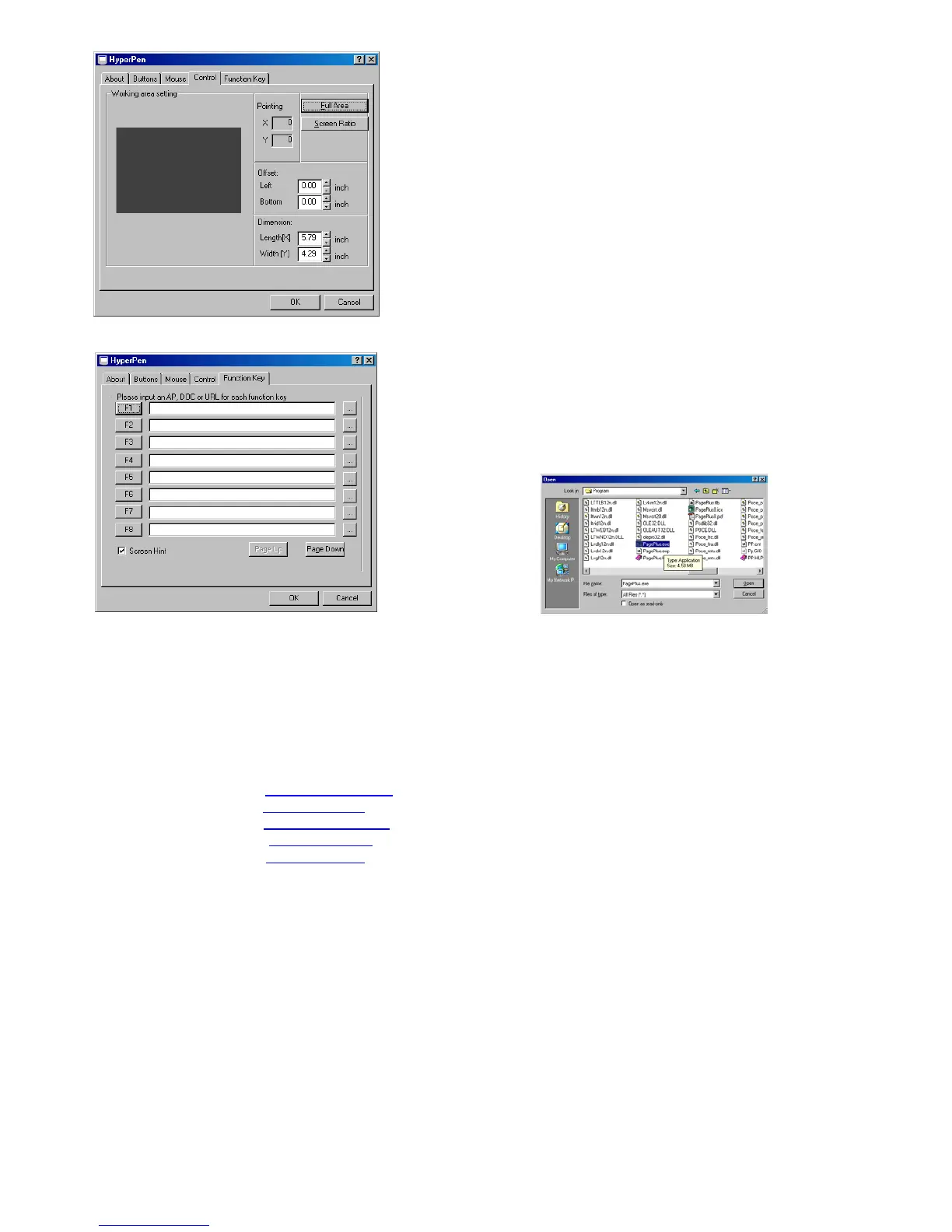
The Control Tab controls the Offset value and the dimensions of the
active work area. Only alter these settings if you feel that the position of
the pen on the tablet is not corresponding to the relative position on the
monitor screen. Obviously the settings will depend upon your system so
there are no set guide lines for altering these settings.
If you install the latest revision of the drivers from www.Aiptek.com.tw
you will also be able to specify function eyes. To association one of the
“F” keys on the tablet with a function you need to click the “...” icon. Then
browse to the application or document you want to associate with the
function and double click it. Alternatively type a web site URL e.g.. http://
www.serif.com/
Other Software that comes with the Package -
Serif are not able to offer technical assistance using the third party utilities provided with the HYPERPEN past
installation. That is, we can advise on problems you have getting the software on to the system, but cannot advise you
on how to use these utilities. Please contact the respective manufacturer’s or consult the program’s help menu if you
have problems with these extra applications that are provided free with the HYPERPEN. All these companies offer
online support, some also offer an over the phone service.
Pen Soft www.fineart.com.tw
Cadix www.cadix.com
Video Live Mail www.cyberlink.com
Foto Express / Explorer www.ulead.com
Corel / Paint www.corel.com
(Customer Service no. 0800 581 028)


 To Previous Page
 Loading...