Need help?
Do you have a question about the Air-Vac PCBRM15 and is the answer not in the manual?
Provides a welcome message and initial guidance for using the user's guide.
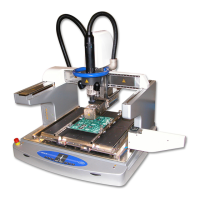
Briefly describes the capabilities of the PCBRM15 and PCBRM System 5.2 machines.
Lists contact information for Air-Vac for technical and operating questions.
Details the warranty terms and conditions for the equipment.
Provides a checklist of items shipped with PCBRM15 units.
Provides a checklist of items shipped with PCBRM System 5.2 units.
Instructions and cautions for safely unpacking the PCBRM15 machine.
Instructions and cautions for safely unpacking the PCBRM System 5.2.
Specifies physical, electrical, and air requirements for the PCBRM15.
Specifies physical, electrical, and air requirements for the PCBRM System 5.2.
Identifies and describes the main components of the PCBRM15 module.
Details the controls and indicators on the machine's control panel.
Explains the carrier system components and their functions for PCBRM15.
Provides an overview of the main components of the PCBRM System 5.2.
Details the PCB carrier system components for the PCBRM System 5.2.
Instructions for correctly leveling the machine module for proper operation.
Step-by-step guide for installing the carrier arms on the PCBRM15.
Step-by-step guide for installing the carrier arms on the PCBRM System 5.2.
Details on setting up and using the X-axis stops for the PCBRM System 5.2.
Details on setting up and using the Z-axis stop for the PCBRM System 5.2.
Instructions for installing the preheater safety stop to prevent damage.
Guide for installing the optional fume extraction manifold assembly.
Procedure for safely adding solder to the solder pot.
Instructions for setting up the flow well for soldering operations.
Guide for setting up the optional cleaning hood.
Information on setting and adjusting the solder pot temperature.
Details the procedure for cleaning PCB holes after component removal.
Procedure for soldering a replacement component onto the PCB.
Discusses specific applications for selective soldering in production.
Explains the operation and set points of the Watlow temperature controller.
Explains the operation and parameter setting of the CAL 9900 temperature controller.
Provides safety instructions and general procedures for machine operators.
Detailed step-by-step guide for setting up and processing a PCB.
Procedure for soldering using the automatic mode on the PCBRM System 5.2.
Procedure for soldering using the manual mode on the PCBRM System 5.2.
Instructions for removing components from the PCB.
Guidance on replacing components, referencing soldering procedures.
Outlines daily and weekly maintenance tasks to ensure optimal operation.
Procedure for safely removing solder from the system.
Detailed steps for cleaning the pump assembly.
Comprehensive guide for disassembling and cleaning the pump.
Instructions for correctly leveling the pump assembly.
Lists specific parts for the PCBRM System 5.2.
Diagram and parts list for the mechanical breakdown of the PCBRM15.
Details the components within the electrical compartment of the PCBRM15.
Identifies the fuse types and locations for the PCBRM15.
Discusses specialized tooling for various soldering and desoldering applications.
Contact information for Air-Vac technical support.
Lists common issues and their potential solutions for the machine.
Instructions for installing and setting parameters for the CAL 9900 controller.
 General
| Brand | Air-Vac |
|---|---|
| Model | PCBRM15 |
| Category | Industrial Equipment |
| Language | English |

 To Next Page