4
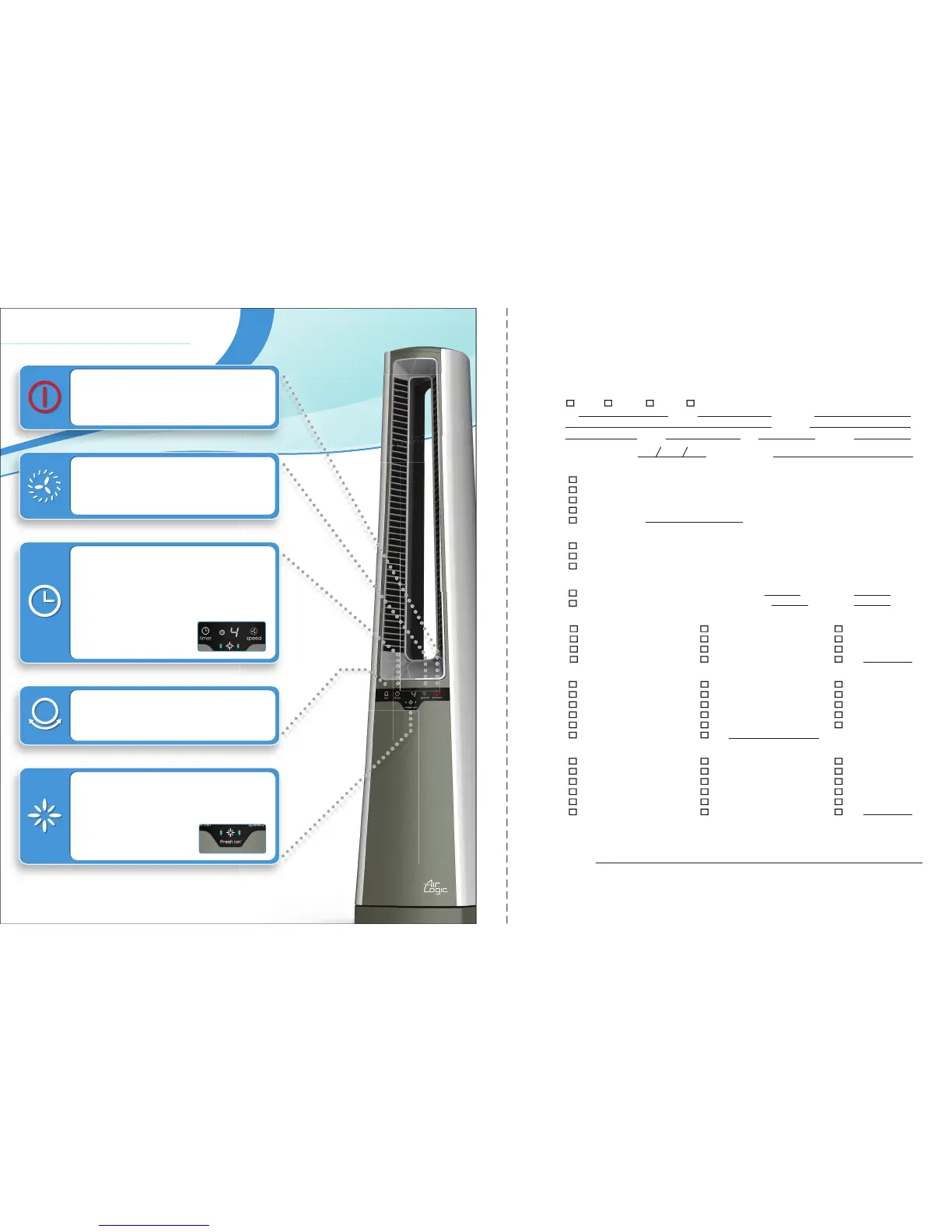
Press the Oscillation Mode button to
begin Oscillation. Press the button again
to stop Oscillation.
Timer Mode allows you to set the length of
time the Fan will run before turning itself off.
Pressing the Timer button will increase the
length of time from 1 to 8 hours, in 1 hour
increments. Pressing the button again will
turn off Timer Mode. After a few seconds,
the unit will display the
current Speed, as well as
the Timer symbol.
The Speed button controls all fan
speeds from 1-4. Speed 1 is Low and 4 is
High. Press the Speed button to cycle
between speeds.
EZtouch
™
Controls
Press the fresh ion
™
button to activate the
release of positive and negative Ions. The
fresh ion
™
setting works in any speed mode.
The fan must be on for the fresh ion
™
mode
to operate. Press the fresh
ion
™
button again to turn
off fresh ion
™
mode.
13
7. Which of the following had a major influence on your decision to purchase this product? (Select up to 3)
Fan Performance Design Price
Carton/Packaging Previous Experience with Brand Trusted Retailer
Consumer Reviews Salesperson’s Recommendation Size
Brand Reputation Family/Friend Recommendation Color
Energy Savings Statements Safety Features Features/Function
Durability Other
8. What other brand(s) did you strongly consider before purchasing this Air Logic
®
product?
Holmes O2 Cool Honeywell
Sunbeam Feature Comforts Bionaire
Aloha Hunter GE
Galaxy
®
Coolmaster Vornado
Delonghi Dyson Black and Decker
Lasko
®
None, I only consider Air Logic
®
Other
5. Do you own any other Lasko
®
or Air Logic
®
Products?
Yes If Yes, How Many? Fans Air Purifiers
No Heaters Humidifiers
4. Which statement below best describes you?
I always like buying a new technology as soon as it is available
I usually wait a short time before buying a new technology to make sure it gets good reviews
I never buy a new technology until I am sure it works well and the price is lower
3. This Fan is:
a replacement for another fan made by another company
a replacement for another Lasko
®
fan
the first fan you have ever owned
in addition to another fan(s) you are still using
Other (please specify)
6. Where do you plan on using your fan? (Please select all that apply)
Living Room/Den Kitchen Basement
Dining Room Home Office Adult Bedroom
Children’s Bedroom Porch/Sunroom Garage
RV/Camper Work/Away from Home Other
(Please fold and tape before mailing.)
REMEMBER! You can register online at https://www.research.net/s/AirLogicCool
2. Date of Purchase/Receipt Where Purchased?
Month Day Year
1. Mr. Mrs. Ms. Miss.
First Name Initial Last Name
Street Apt. No.
City State Zip Birth Year:
9. We do not sell any customer information to 3rd parties. We do contact our customers, from time to time, to ask for new
product ideas, or satisfaction with current products you own. Please provide an email address if you agree to receive future
communications from Lasko
®
and Air Logic
®
.
Email Address:
Thank you for purchasing this Air Logic
®
Bladeless Fan, Model AC600. Air Logic
®
is a part of Lasko Products, Inc.
Our ingenuity combined with a desire for innovative design, functionality and craftsmanship, allows us
to see a vast potential in the air products you use in your home.
Please take a few minutes to fill out the information below or register online at
https://www.research.net/s/AirLogicCool
Registering your product will help improve our future designs. It will also assist you if you should need service at a later date.
REGISTRATION REPLY CARD
Air Logic
®
Cool Home Fan



 To Next Page
 Loading...